
Auto Rename
Automatically normalize file names by variables, metadata, numbering and text rules.
Function Overview
In business scenarios involving multi-party collaboration and multi-frequency data collection, due to differences in operator habits, file naming often lacks unified standards, which brings great trouble to subsequent retrieval, archiving and auditing. The "Auto Rename" function allows the system to automatically rename files uploaded to a specified folder according to highly customized preset rules. This mechanism effectively eliminates naming confusion caused by human factors and ensures that enterprise data assets meet the standards as soon as they are stored in the database.
Scope of application and permission control
Permission-driven: The enabling of this function strictly relies on the user's operation permissions. As long as the user has "upload" and "rename" permissions on the target folder (covering various folders such as personal, department, project or material library), the automatic renaming task can be configured for it.
Traceability processing: The rules not only apply to newly uploaded files, users can also choose to apply traceability to historical files that already exist in the target directory and all its subfolders. To ensure system performance and execution stability, the upper limit for batch source traceability renaming is 5,000 files at a time.
Core rule engine and configuration dimensions
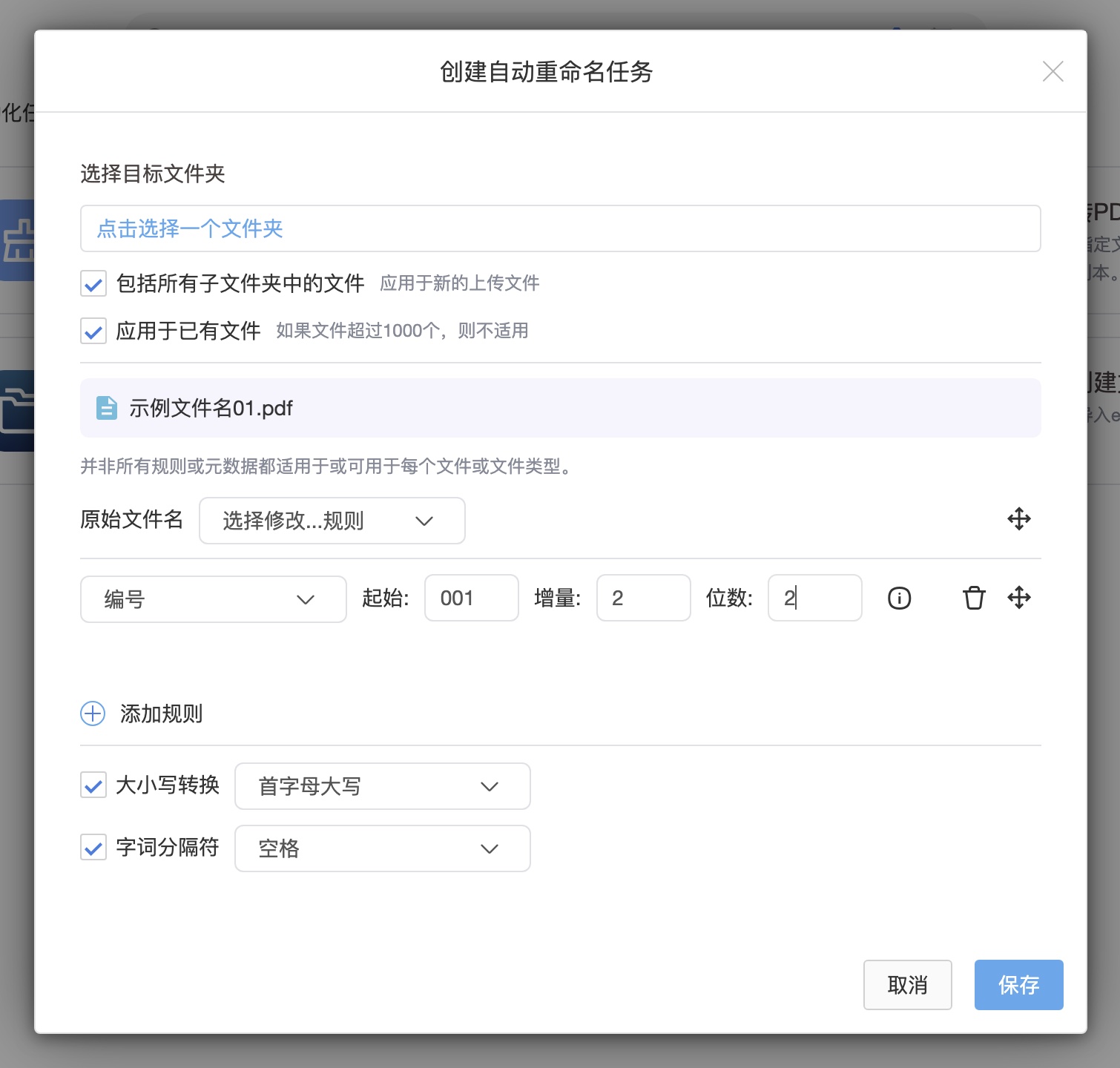
Babel provides a highly flexible visual rule splicing engine. Users can add multiple naming rules and sort the rules freely by dragging and dropping. The configuration interface provides real-time changing "sample file names" throughout the entire process to help users visually preview the overlay results of renaming rules.
The rules engine supports the following multi-dimensional named elements:
Standard attribute variables: Supports extraction and insertion of system-level variables, including file uploader, file person in charge, parent folder name, and upload time.
Multimedia metadata (Metadata): For files in specific formats such as images, the system can deeply analyze and extract their underlying metadata as the basis for naming, such as shooting date, camera manufacturer/model, lens model, size, and DPI/DPCM and other parameters.
Custom text and continuous numbering: Users can freely insert custom text content. In terms of numbering mechanism, unlike traditional single batch renaming, automatic renaming has state memory (continuity). The system will automatically read the last number in the target list that meets the rules to ensure that files uploaded across batches and time periods can achieve seamless continuation of serial numbers. Users can accurately set the starting value, incremental value and specific digits of the number.
Refined pruning and anti-conflict mechanism of original names
In addition to adding new prefixes/suffixes, the system also supports deep structural cleaning of the original names of files:
Name pruning and replacement: You can perform "replace specific content" and "delete specified content" operations on the original file name. In addition, it also provides a one-click "Delete Characters" function to accurately remove redundant spaces, numbers, quotation marks, dashes and underlines in file names.
Mandatory anti-collision protection: If the user chooses to completely delete the "original file name" in the rule (that is, the original name is not retained when uploading), in order to avoid the risk of files with the same name overwriting each other, the system will force and automatically add a "numbering" rule to the rule chain.
Date logical mutual exclusion: When calling date class variables, the user can check "Replace the date detected in the file name". To prevent logical conflicts, in a single rename task, the replacement instruction is only allowed to be checked once by a certain time variable (such as "upload time" or "shooting time").
Global formatted output control
After completing the splicing of rule variables, the system supports unified formatting specifications on the output end:
Case standardization: Supports one-click conversion of assembled file names into uppercase, lowercase, all uppercase or all lowercase to meet the visual specifications of different companies.
Uniform word separation: Supports the uniform insertion of standardized separators (such as spaces, underscores or dashes) between each naming rule module to further improve the machine-readable and human-readable experience of file names.