
Sensitive Content Recognition
Sensitive content recognition helps identify files that may contain sensitive content and, depending on configuration, mark them, restrict viewing, restrict sharing or assist administrators in manual handling. The capability is included in the v9.4.2.2606171439 version scope, and the public changelog also records the addition of sensitive content recognition under enterprise console management tools.
Positioning
Common high-risk files in an enterprise drive include contracts, certificates, personal data, customer materials, finance data, quotations, R&D documents, source code, confidential project materials and regulated industry content. Sensitive content recognition does not replace human judgement; it helps surface risky files first so administrators do not rely only on manual inspection.
Admin Entry
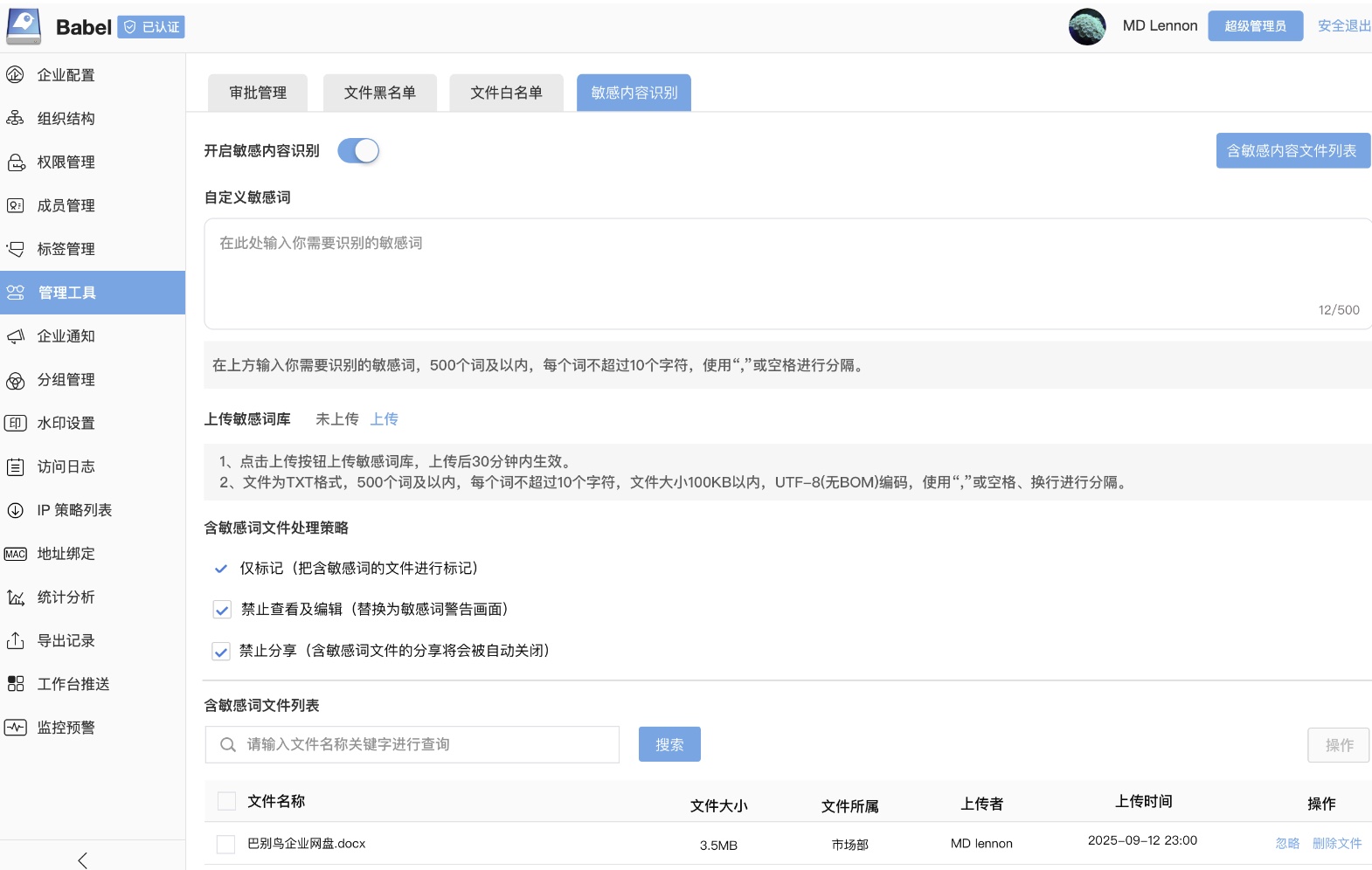
Public materials show that “File Settings” in the enterprise console was renamed to “Management Tools”, with a “Sensitive Content Recognition” tab added. Administrators can enable or disable the feature, maintain custom sensitive keywords and query detected files.
Common settings include:
- Enable or disable sensitive content recognition.
- Maintain custom sensitive keywords, separated by delimiters.
- Upload a sensitive keyword file for batch maintenance.
- Configure handling behavior for detected files.
- Query and locate the sensitive content file list.
Detection And Handling
| Capability | Description |
|---|---|
| File marking | Detected files can be marked for administrator review and tracing |
| Prohibit viewing | Detected files can be restricted from viewing to reduce exposure |
| Prohibit sharing | Detected files can be restricted from sharing to prevent outbound leakage |
| Detection list | Administrators can view and locate files containing sensitive content |
| Custom keywords | Enterprises can maintain keyword lists by industry, department, project or policy |
Actual handling behavior depends on the deployed version, licensed modules and administrator configuration. False positives, business exceptions and compliance decisions should be reviewed by administrators, security officers or business owners.
Scenarios
- Contracts, quotations, bidding and negotiation materials.
- Personal data such as ID numbers, phone numbers, emails, addresses and bank card information.
- Finance reports, salary data, invoices and payment information.
- Customer lists, channel data, sales leads and cooperation agreements.
- R&D documents, drawings, code, internal policies and unreleased content.
- Repositories subject to compliance, audit or confidentiality rules.
Relationship With Permissions
Sensitive content recognition discovers risk; the permission system controls access. Recommended combinations:
- Use department roles and project permissions for baseline access.
- Use file access control for extra authorization on high-risk files.
- Use watermarks and logs for traceability.
- Use sharing approval, external sharing restrictions or download restrictions for outbound control.
- Use encrypted folders or classification policies for highly sensitive materials.
Version Note
The latest v9.4.2.2606171439 scope includes “sensitive content recognition”. Enterprises on earlier deployments may only see the console entry, internal testing behavior or no enabled module. Actual availability depends on deployment and licensing.