
Private deployment
Private deployment
The BabelBird public cloud network disk system needs to provide continuous and uninterrupted services to 600,000 users including free users at the same time, block various attacks on the public network, and continuously improve system efficiency to reduce the high cost of public cloud servers. As many as 10 years of experience in uninterrupted public cloud services have made the Babel system time-tested. The Babel private cloud system is developed on the basis of the Babel public cloud system. It inherits all the functions and features of the public cloud Babel, and is updated synchronously with the public cloud Babel, providing you with high stability and high availability that other private network disks cannot match.
Deployment plan
In response to the different IT system construction needs of different enterprises, the Babel privatization system supports a variety of flexible deployment methods and deployment requirements. Whether it is single server, multi-server, cluster, hyper-converged system, distributed system, third-party cloud platform or even Docker deployment, we support it. Our deployment team can work with you to develop a deployment plan based on your needs. At the same time, because private cloud only serves a single enterprise, we can provide optional customization settings that far exceed those of public cloud systems. From interface operations to processes to permissions, everything can be adjusted according to your needs.
Deployment Guide Quick Links
| Topic | Use it for |
|---|---|
| Common Deployment Methods | Public cloud, self-owned servers, single-server, virtualization, object storage and disaster recovery deployment |
| Server Configuration And Performance | Application, database, search, transcoding and storage server roles and sizing |
| Object Storage And Erasure Coding | Object storage capacity, erasure coding, disk count, usable space and expansion |
| High Availability Deployment | Active-standby application, database, search, K8S, object storage, backup and disaster recovery |
| Xinchuang Support | ITAI/Xinchuang environments, domestic operating systems, compatible databases and adaptation scope |
| POC Deployment | Evaluation, trial environment, initialization, training and acceptance suggestions |
Recommended server configuration and performance requirements
Server type and function:
The hardware system required by BabelBird Enterprise Drive consists of two parts: business servers and storage servers. Business servers can be divided into 4 types. These 4 types of services can be deployed in one physical machine or virtual machine according to needs, or can be deployed dispersedly in four or more servers. Therefore, the minimum unit for deploying the Babel system is two physical servers or two virtual machines (one for business and one for storage)
| Service name | Purpose | Operating system |
|---|---|---|
| Main business server | web services, load balancing, main business function implementation | Linux |
| Database Server | Database Service | Linux |
| Search server | Provides file full-text search and advanced search functions | Linux |
| Transcoding server | Transcode and add watermarks to files that require transcoding preview | windows 2012, Linux |
| Storage server | Provides file storage | Linux |
In extreme cases, if the hard disk mounted on the server is used as storage space, Babel also supports deploying all services and storage in a physical machine or virtual machine (all-in-one machine mode). However, considering performance and disaster recovery or future upgrade and expansion issues, such a deployment method is not recommended. The best deployment method we recommend is a small cluster deployment of 4 servers (virtual machines). The main business services and database services are placed on one server, the search server and transcoding server are independent, and then a storage server is added.
If the storage space requirement is less than 10TB, a storage server is not required. You can directly mount a hard disk or NFS disk for storage.
BabelBird also supports access to third-party storage. In theory, as long as the third-party storage system supports the NFS or S3 protocol, it can be connected to BabelBird as a storage service. Most storage systems support both protocols.
Each server must ensure smooth communication between each other. If the intranet has higher security requirements, please refer to 9.1.2 Ports that need to be opened
Minimum performance configuration:
The lowest performance configuration of BabelBird can support normal use by about 100 users and manage less than 10TB of data.
| cpu | memory | system disk | storage disk | network | operating system |
|---|---|---|---|---|---|
| 8-core CPU (reference benchmark E5-2609) | 32G ECC memory | 500G | Below 10TB | Gigabit | Linux |
Recommended performance configuration examples:
The recommended performance configuration of BabelBird can support normal use by 1000-2000 users and manage documents up to 1PB.
Babel supports multiple deployment methods, and this instance is the standard deployment method. Use virtual machines to deploy business servers to connect to independent single or multiple object storage servers. Business servers and storage servers are managed separately.
Business server:
It is recommended that business servers be deployed using virtual machines
| Number | Server type | Configuration requirements | Operating system | Server purpose |
|---|---|---|---|---|
| 1 | Virtual machine | 8-core CPU 64G memory 500G SSD system disk | CentOS8 or openeuler22 | Main business server/database |
| 2 | Virtual machine | 8-core CPU 32G memory 500G SSD system disk | CentOS8 or openeuler22 | Search server |
| 3 | Virtual machine | 8-core CPU 16G memory 200G SSD system disk | windows 2012 R2 | transcoding server |
*The performance of the 8-core CPU should be close to that of the Zhiqiang 4410 BabelBird Enterprise Drive is deployed using Docker. In theory, it can be deployed as long as it is a Linux operating system. CentOS or open Euler is recommended.
If there are no ready-made virtual machine resources, you need to purchase a new business server. The business server hardware configuration requirements are as follows:
| Number | Server type | Configuration requirements | Operating system | Server purpose |
|---|---|---|---|---|
| 1 | Business server | Xeon Silver 4210*2 20-core CPU 64G memory 2TB SSD hard drive | Linux | Main business server |
*It is best to purchase VM for business servers and use virtualization for management.
Storage server (object storage):
Babel supports building an object storage system on a general-purpose server. If the storage space is expected to be less than 100TB, it is recommended to use a single server to build the object storage system. A single object storage can use disks for data verification redundancy, and can be horizontally expanded by adding one storage server at a time. (The expansion operation can be done without stopping the server)
It is recommended to use an independent physical machine for the object storage server, and the recommended configuration is as follows:
| Server type | Configuration requirements | Operating system | Server purpose | Notes |
|---|---|---|---|---|
| Storage server | If storage density and future expansion investment are considered, a 12T hard drive can be used. | Linux | Object Storage Server | It is recommended to add a server with the same disk capacity for future expansion. |
If the required storage space is greater than 300TB, multiple servers are required to build a distributed object storage system.
BabelBird also supports building distributed object storage systems for customers. To learn about distributed object storage, please refer to the "Self-Built Object Storage" chapter.
Need to open the port
For the security of the server system, we need to open only specific ports. The following are the ports that need to be opened:
Ports open to the outside world (ports required for external network access):
| Port number | Port purpose | Protocol | Open host |
|---|---|---|---|
| 80 | Network disk main business web external access port, not encrypted | http | main business server |
| 443 | Network disk main business web external access port, encrypted | https | Main business server |
| 3060 | Network disk main business node external access port, not encrypted | TCP | Main business server |
| 3080 | Network disk main business node external access port, encryption | TCP | Main business server |
Open ports are required between servers (open ports are required for internal server communication):
Generally, during actual deployment, only external network ports (external) will be restricted, and internal ports between servers will not be restricted. However, some users who deploy across networks and computer rooms will also need to limit internal ports.
| Host | Port number | Port purpose | Protocol | Target network segment |
|---|---|---|---|---|
| Business server | 6379 | redis access port for windows transcoding and search server | TCP | transcoding server and search server |
| Business server | 8080 | Used by windows transcoding server to access network disk business server | TCP | Transcoding server and search server |
| Business server | 3306 | Database port, used by the search server to access the database | TCP | Transcoding server and search server |
| Business server | 9000 | Docker cluster deployment, internal visual interface port | TCP | Transcoding server and search server |
| Business server | 111 | portmap port | TCP+UDP | Transcoding server and search server |
| Business server | 2049 | TCP+UDP | TCP+UDP | Transcoding server and search server |
| Business server | 35000 | mountd port | TCP+UDP | Transcoding server and search server |
| Business Server | 2376 | docker REST API port for TLS encryption | TCP | Native |
| Business server | 2377 | TCP port used for communication related to docker cluster management | TCP+UDP | Native |
| Business server | 7946 | TCP and UDP ports, used for communication between docker swarm nodes | TCP+UDP | Local machine |
| Business server | 4789 | docker overlay network default port | TCP+UDP | Local machine |
| Search server | 9200 | elastic port, used by the main business server | TCP | business server |
| Search server | 5601 | Kibana port, internal visual elastic interface access port | TCP | Business server |
| Search server | 9998 | tika port, extract document text server port | TCP | Business server |
| Search server | 9000 | Docker cluster deployment, internal visual interface port | TCP | Transcoding server and search server |
| Search Server | 2376 | docker REST API port for TLS encryption | TCP | Native |
| Search server | 2377 | TCP port used for communication related to docker cluster management | TCP | Native |
| Search server | 7946 | TCP and UDP ports, used for communication between docker swarm nodes | TCP+UDP | Local machine |
| Search server | 4789 | docker overlay network default port | TCP+UDP | Native |
| Transcoding server | Transcoding server | Can access the business server | Can access the business server | Can access the business server |
Ports that need to be opened during deployment:
| Port number | Port purpose | Open server | Destination IP address |
|---|---|---|---|
| 22 | SSH port number, used for SSH access | All servers | Springboard machine for deployment |
| 443 | Obtain authorization | All servers | 47.96.234.200 |
| 443 | Get installation source | All servers | 120.27.245.68 |
| 443 | Docker installation source | All servers | 13.35.121.100 |
POC deployment
POC deployment is suitable for users to conduct POC testing in the production environment before selection.
POC deployment requirements:
Basic POC deployment can test software functions, concurrency, API interfaces, security, and trial in the production environment. It is recommended to use standard deployment as POC test.
If you need object storage, data transfer in different density areas, and high-availability POC, you need to add corresponding servers and network segments.
Environmental preparation
It is recommended to use a virtual machine for deployment:
BabelBird's privatized enterprise network disk is deployed using Docker. In theory, it can be deployed as long as it is a Linux operating system. It is recommended to use CentOS or open Euler. After preparing the virtual machine as required, contact us to make an appointment and you can start POC deployment.
| Number | Server type | Configuration requirements | Operating system | Server purpose | Remarks |
|---|---|---|---|---|---|
| 1 | Virtual machine | 8-core CPU 32G memory 500G system disk +500G storage disk | CentOS8 or openeuler22 and above | Main business server | |
| 2 | Virtual machine | 8-core CPU 16G memory 500G system disk | CentOS8 or openeuler22 and above | Search server | |
| 3* | Virtual machine | 8-core CPU 8G memory 200G system disk | windows 2012 R2 | transcoding server | CAD, office transcoding |
*Win server is for better office file preview effect. BabelBird also supports pure Linux environment deployment
Other requirements for POC deployment are as follows:
| Number | Project | Requirements | Remarks |
|---|---|---|---|
| 1 | Remote access | You can remotely access the server for deployment | You can use a bastion machine or springboard machine or Sunflower or VPN, and you can remotely access the server for deployment. |
| 2 | External network connection | The server needs to be able to connect to the external network, pull the installation package, and obtain authorization | The external network address that needs to be connected: software.babel.cc docker.babel.cc |
The authorization period for POC deployment is 30 days, and the number of authorized accounts is 100.
initialization
After the deployment is completed, the Babel team will help users initialize the system and initialize the system according to user needs. Including but not limited to:
Initialize the administrator account. (You need to prepare an email address as a super administrator account)
Initialize the notification sending email address. (The user needs to prepare an email address that can provide password and SMTP server address as the system default outbox)
Initialize department structure. (Connect with AD or import department)
Initialize basic configuration. logo, company name, various configuration items.
training
BabelBird is a professional enterprise-level application and requires certain training to help customers implement it. After POC, it is recommended to contact our sales staff for usage training.
Training is divided into 3 categories:
Administrator training (training administrators on configuration, use, and realization of required functions. It takes 1-2 hours)
Department manager training. (Training department managers on daily management methods such as authority allocation, member addition and reduction, etc. It takes 1 hour)
User training. (Training of using members. It takes 1 hour)
Start POC trial
After the training is completed, the formal POC trial can be started. Any questions encountered during use can be directly asked in the relevant group, and the BabelBird team will respond and answer within 2 hours. The POC system is valid for 30 days. If you need to extend it, please contact our sales staff.
Introduction to common deployment methods of BabelBird BabelBird can support multiple deployment methods on demand. Here we introduce the commonly used deployment methods of BabelBird.
Deployed on public platforms such as Alibaba Cloud, Tencent Cloud, Huawei Cloud, etc.:
Babel supports deployment on virtual machines (ECS) and object storage (OSS, OBS...) of public cloud service providers such as Alibaba Cloud, Tencent Cloud, Baidu Cloud, Huawei Cloud, and Tianyi Cloud, and provides services to users on the Internet.
The difference compared with purely private deployment is as follows:
| Advantages and Disadvantages/Deployment Method | Image Service | Video Service | Public Network Access | Stability | Hardware Cost |
|---|---|---|---|---|---|
| Using Alibaba Cloud storage and Alibaba Cloud servers | You can use the picture service provided by Alibaba Cloud | You can use Alibaba Cloud's video transcoding service, but it requires an additional fee (expensive) | It can be accessed on the public network. The speed of user access depends on the user's own bandwidth and the purchased Alibaba Cloud bandwidth. | The system is very stable, simple to deploy and easy to manage. | You need to pay Alibaba Cloud's storage and server fees, which can be paid monthly or annually. Users can be responsible for the maintenance of the server themselves, or they can entrust us to perform maintenance and upgrades. |
| Storage and servers are built on your own intranet | Use self-built image processing services (requires customers to provide high-performance servers) | Use self-built transcoding services (requires customers to provide high-performance servers). If the user does not have this requirement, you can ignore it. | If there is no external network exit, users cannot access the external network. But intranet access is very fast. | Stable, customized development for modules such as storage systems. The security of data is the responsibility of the user. | Requires independent host and storage systems. The server can be purchased by the user or by us. Server maintenance is the responsibility of the user, and we can provide corresponding software upgrade services. |
Public cloud deployment (1000+ users) requirements:
| Number | Server type | Configuration requirements | Operating system | Server purpose |
|---|---|---|---|---|
| 1 | ECS | 16-core CPU 32G memory 500G SSD system disk | CentOS8 or openeuler22 | Main business server |
| 2 | ECS | 8-core CPU 16G memory 500G SSD system disk | CentOS8 or openeuler22 | Database server |
| 3 | ECS | 8-core CPU 16G memory 500G SSD system disk | CentOS8 or openeuler22 | Search server |
| 4 | Storage | Object storage system. Such as Alibaba Cloud OSS, Huawei Cloud OBS | Object Storage System. Such as Alibaba Cloud OSS, Huawei Cloud OBS | Object Storage System. Such as Alibaba Cloud OSS, Huawei Cloud OBS |
The main advantages of deploying on a public cloud platform are that it does not require dedicated maintenance, top-level disaster recovery can be achieved without purchasing hardware, access to the Internet is fast, and servers and data are managed by oneself.
The main disadvantages of deploying on a public cloud platform are: data is not localized, and annual server rental fees and corresponding bandwidth storage costs need to be paid.
Self-purchased servers (2 physical machines) for deployment:
If you want to deploy a purely private BabelBird in your own computer room and do not have spare virtual machine resources, you need to purchase hardware deployment. The requirements are as follows:
| Physical server brand recommendation: It is recommended to use 2 DELL T440 servers to complete the system setup. And purchase DELL 3-year gold service. The server's system disk can optionally use raid to enhance redundancy. If you use the raid1 solution, the number of hard disks required needs to be increased by 2 times. (2TB SSD becomes 2TB SSD*2) | Physical server brand recommendation: It is recommended to use 2 DELL T440 servers to complete the system construction. And purchase DELL 3-year gold service. The server's system disk can optionally use raid to enhance redundancy. If you use the raid1 solution, the number of hard disks required needs to be increased by 2 times. (2TB SSD becomes 2TB SSD*2) | Physical server brand recommendation: It is recommended to use 2 DELL T440 servers to complete the system construction. And purchase DELL 3-year gold service. The server's system disk can optionally use raid to enhance redundancy. If you use the raid1 solution, the number of hard disks required needs to be increased by 2 times. (2TB SSD becomes 2TB SSD*2) | Physical server brand recommendation: It is recommended to use 2 DELL T440 servers to complete the system construction. And purchase DELL 3-year gold service. The server's system disk can optionally use raid to enhance redundancy. If you use the raid1 solution, the number of hard disks required needs to be increased by 2 times. (2TB SSD becomes 2TB SSD*2) | Physical server brand recommendation: It is recommended to use 2 DELL T440 servers to complete the system construction. And purchase DELL 3-year gold service. The server's system disk can optionally use raid to enhance redundancy. If you use the raid1 solution, the number of hard disks required needs to be increased by 2 times. (2TB SSD becomes 2TB SSD*2) | Physical server brand recommendation: It is recommended to use 2 DELL T440 servers to complete the system construction. And purchase DELL 3-year gold service. The server's system disk can optionally use raid to enhance redundancy. If you use the raid1 solution, the number of hard disks required needs to be increased by 2 times. (2TB SSD becomes 2TB SSD*2) |
|---|---|---|---|---|---|
| Two server plan business + storage | Two server plan business + storage | Two server plan business + storage | Two server plan business + storage | Two server plan business + storage | Two server plan business + storage |
| Number | Server type | Configuration requirements | Operating system | Server purpose | Remarks |
| 1 | Server | Zhiqiang Silver 4410 *2 16-core CPU, 64G memory, 2TB SSD hard drive | open Euler, Ubuntu, CentOS | Main business server | It is recommended to install VM |
| 2 | Storage | 4410 *2 16-core CPU, 64G memory, 500G SSD hard disk + required hard disk space (no raid or raid0 required) | open Euler, Ubuntu, CentOS | Storage server | Hard disk capacity is configured according to storage space requirements |
The above configuration can support 1000+ users and about 150TB of storage space.
Babel storage server uses an object storage system and supports distributed deployment (multiple storage servers) with a minimum requirement of one physical server. Supports the use of hard disk groups for verification, and supports multiple verification types such as 2+1, 3+1, 4+1... etc. See the self-built object storage chapter for details.
If you need to expand the storage space, just add a single storage server.
You can also add a storage server as a backup server to synchronize the backup in real time. If there is a problem with the main storage server, switch to the backup server and it can be used normally.
Single server (1 physical machine) deployment:
Some customers who do not have a computer room but need to deploy BabelBird privately and have small storage space requirements (less than 10TB) can choose to deploy BabelBird on a single server. Just purchase a tower server that meets the requirements and place it in your company to meet the needs of using BabelBird.
| Physical server brand recommendations: If there is no computer room, it is recommended to use tower servers for deployment. It is recommended that the server storage hard disk is raid1 or raid5+1. The system disk of the server can optionally use raid to enhance redundancy. If you use the raid1 solution, the number of hard disks required needs to be increased by 2 times. (2TB SSD becomes 2TB SSD*2) | Physical server brand recommendations: If there is no computer room, it is recommended to use tower servers for deployment. It is recommended that the server storage hard disk is raid1 or raid5+1. The system disk of the server can optionally use raid to enhance redundancy. If you use the raid1 solution, the number of hard disks required needs to be increased by 2 times. (2TB SSD becomes 2TB SSD*2) | Physical server brand recommendations: If there is no computer room, it is recommended to use tower servers for deployment. It is recommended that the server storage hard disk is raid1 or raid5+1. The system disk of the server can optionally use raid to enhance redundancy. If you use the raid1 solution, the number of hard disks required needs to be increased by 2 times. (2TB SSD becomes 2TB SSD*2) | Physical server brand recommendations: If there is no computer room, it is recommended to use tower servers for deployment. It is recommended that the server storage hard disk is raid1 or raid5+1. The system disk of the server can optionally use raid to enhance redundancy. If you use the raid1 solution, the number of hard disks required needs to be increased by 2 times. (2TB SSD becomes 2TB SSD*2) | Physical server brand recommendations: If there is no computer room, it is recommended to use tower servers for deployment. It is recommended that the server storage hard disk is raid1 or raid5+1. The system disk of the server can optionally use raid to enhance redundancy. If you use the raid1 solution, the number of hard disks required needs to be increased by 2 times. (2TB SSD becomes 2TB SSD*2) | Physical server brand recommendations: If there is no computer room, it is recommended to use tower servers for deployment. It is recommended that the server storage hard disk is raid1 or raid5+1. The system disk of the server can optionally use raid to enhance redundancy. If you use the raid1 solution, the number of hard disks required needs to be increased by 2 times. (2TB SSD becomes 2TB SSD*2) |
|---|---|---|---|---|---|
| One server (all-in-one solution) | One server (all-in-one solution) | One server (all-in-one solution) | One server (all-in-one solution) | One server (all-in-one solution) | One server (all-in-one solution) |
| Number | Server type | Configuration requirements | Operating system | Server purpose | Remarks |
| 1 | Server |
The entire Babel system deployed on a single server does not support object storage and uses read-only hard disks or NFS for storage. It is recommended to use raid1 to improve system reliability.
A backup server can be added for data synchronization and backup. If there is a problem with the main server, you can use the backup server to reconstruct the data.
Deploy on existing virtual machine (hyperconverged) system:
This is currently the most commonly used deployment method. It is deployed under the existing servers and hardware of the enterprise without purchasing new equipment.
Deployment is completed in the customer's existing VM or virtual machine allocated by the hyper-converged platform, which is suitable for users who already have certain IT construction and management.
It is deployed in a small cluster, and the virtual machine platform is responsible for the unified management of the server.
Supports most virtualized systems.
It is recommended to deploy four virtual machines with storage space mounted.
| Number | Server type | Configuration requirements | Operating system | Server purpose |
|---|---|---|---|---|
| 1 | Virtual machine | 8-core CPU 32G memory 500G SSD system disk | CentOS8 or openeuler22 | Main business server |
| 2 | Virtual machine | 8-core CPU 16G memory 500G SSD system disk | CentOS8 or openeuler22 | Database server |
| 3 | Virtual machine | 8-core CPU 16G memory 500G SSD system disk | CentOS8 or openeuler22 | Search server |
| 4 | Virtual machine | 8-core CPU 16G memory 200G SSD system disk | windows 2012 R2 | transcoding server |
| 5 | Storage | Support NFS or S3 interface storage system or virtual machine mounting disk as storage disk | Support NFS or S3 interface storage system or virtual machine mounting disk as storage disk | Support NFS or S3 interface storage system or virtual machine mounting disk as storage disk |
If there is a need for system redundancy, you can prepare 6 virtual machines to complete database backup and system redundancy.
| Number | Server type | Configuration requirements | Operating system | Server purpose |
|---|---|---|---|---|
| 1 | Virtual machine | 8-core CPU 32G memory 500G SSD system disk | CentOS8 or openeuler22 | Main business server |
| 2 | Virtual machine | 8-core CPU 32G memory 500G SSD system disk | CentOS8 or openeuler22 | From business server |
| 3 | Virtual machine | 8-core CPU 16G memory 500G SSD system disk | CentOS8 or openeuler22 | Main database server |
| 4 | Virtual machine | 8-core CPU 16G memory 500G SSD system disk | CentOS8 or openeuler22 | From database server |
| 5 | Virtual machine | 8-core CPU 16G memory 500G SSD system disk | CentOS8 or openeuler22 | Database server |
| 6 | Virtual machine | 8-core CPU 16G memory 200G SSD system disk | windows 2012 R2 | transcoding server |
| 7 | Storage | Distributed Object Storage | Distributed Object Storage | Distributed Object Storage |
Supports virtual machine mounting disks to use the mounted disk as storage space.
It can also be connected to third-party storage systems such as san storage or object storage systems.
BabelBird also provides customers with self-built object storage services.
Self-built object storage server and virtual machine deployment:
Babel supports customers to build object storage on general-purpose servers. Because of the advantages of object storage software-defined storage (high availability, easy horizontal expansion), it is recommended that users without object storage can purchase a new server and deploy the Babel object storage system to use it with the Babel business system running on a virtual machine (hyper-convergence).
The business server requirements are the same as those in the previous section "Deployment on Existing Virtual Machine (Hyper-Converged) System".
For a detailed introduction to Babel object storage, please see the "Self-Built Object Storage Server" chapter.
Most of our customers end up choosing object storage servers for storage.
At least a single server is supported to build an object storage system (space requirement is less than 150TB).
| Server type | Configuration requirements | Operating system | Server purpose | Notes |
|---|---|---|---|---|
| Storage server | If storage density and future expansion investment are considered, a 12T hard drive can be used. | Linux | Object Storage Server | It is recommended to add a server with the same disk capacity for future expansion. |
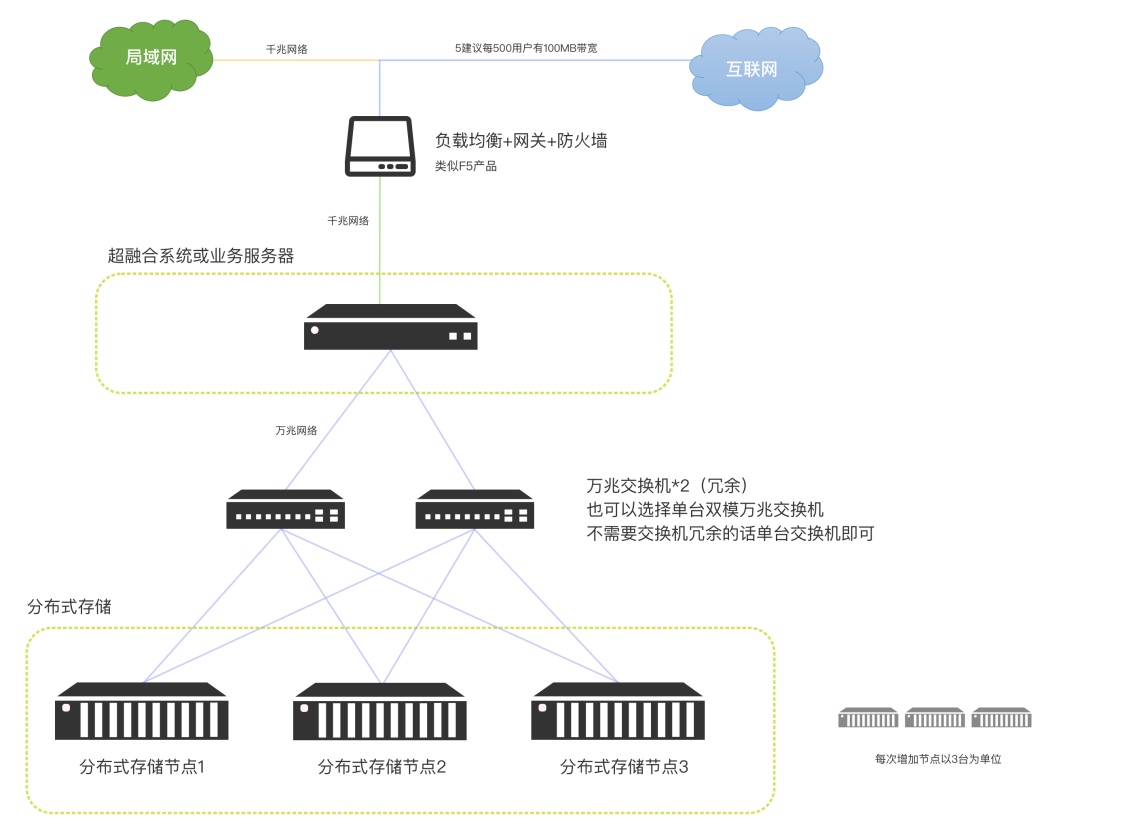
We also support building a distributed object storage system composed of multiple servers.
The minimum requirement for a distributed storage system is 2+1, which means three storage servers need to be prepared. The performance requirements are consistent with those of a single object storage.
*The currently recommended minimum unit for physical distributed storage is 3 storage servers. The 2+1 error correction code means that every time two storage nodes are expanded, one server needs to be added as an error correction server. In this way, 4+1 means that adding 4 storage servers requires adding an error correction server. So the disk utilization of 4+1 is higher than that of 2+1. The first construction using the 4+1 solution requires 5 storage servers. The minimum unit added for each expansion is the same as the minimum server unit required for the first construction.
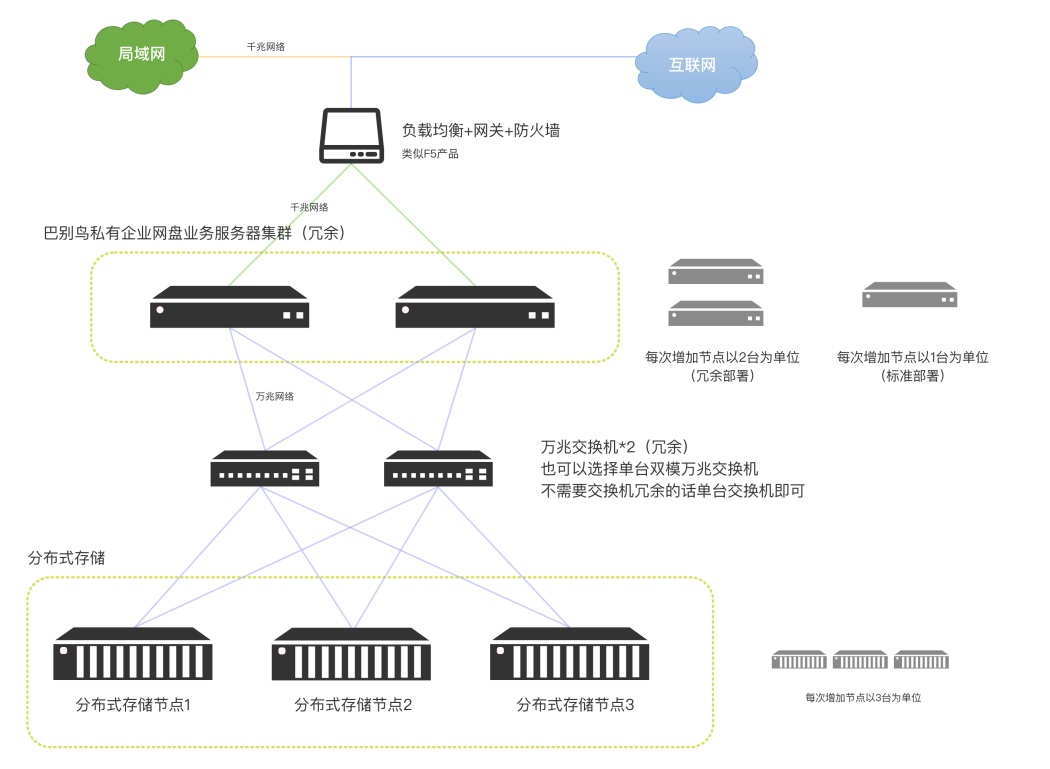
You can add a new storage server or a set of storage servers for real-time backup. If there is a problem with the primary storage server, quickly switch to the backup server and it can be used normally.
Distributed high availability and high redundancy deployment:
Because financial institutions, hospitals, energy, and very large enterprises have hard targets for uninterrupted business, they need systems that can achieve high availability and high redundancy. Services will not be interrupted due to a single point failure of the server, and hot switching and hot repair can be performed. In extreme cases, even network equipment such as switches need to be separated from active and backup, which requires the use of distributed high-availability and high-redundancy deployment.
Babel supports a variety of high availability and high redundancy solutions and can be deployed in traditional distributed systems to achieve high availability and high redundancy.
We can also build a distributed system suitable for Babel for customers. (Customers need to purchase hardware by themselves as required)
Babel distributed deployment can ensure that any single point of failure will not affect the normal use of the system.
The recommended distributed and easy-to-deploy solution uses active-active-active backup for the business server and distributed storage for the storage system.
If there is a need for management and control of confidential and non-confidential areas, please see the "Data Ferry Chapter" for details.
Babel High Availability System Network Topology Off-site disaster recovery deployment
For users who have higher requirements for data preservation, BabelBird also supports off-site disaster recovery solutions. It means backing up important database and file storage contents to an off-site backup system. If there is a problem in the local computer room, as long as the backup data is there, the system can be rebuilt anywhere and restored to normal use.
BabelBird can build off-site disaster recovery servers for customers, but it does not support advanced backup methods such as hot and cold data separation. If the amount of data is very large (above 1PB) and considering cost-effectiveness, it is recommended to use a professional backup system (such as NBU, Yunqi).
BabelBird has a backup API that supports the NBU standard and can be called.
Off-site disaster recovery deployment has higher requirements on the network environment. It is best to have dedicated lines or stable VPN connections between computer rooms in different locations.
Using the backup system can only restore and reconstruct data through backup after a problem occurs. Direct switching to backup data is not supported. Generally, the data reconstruction cycle will take a long time.
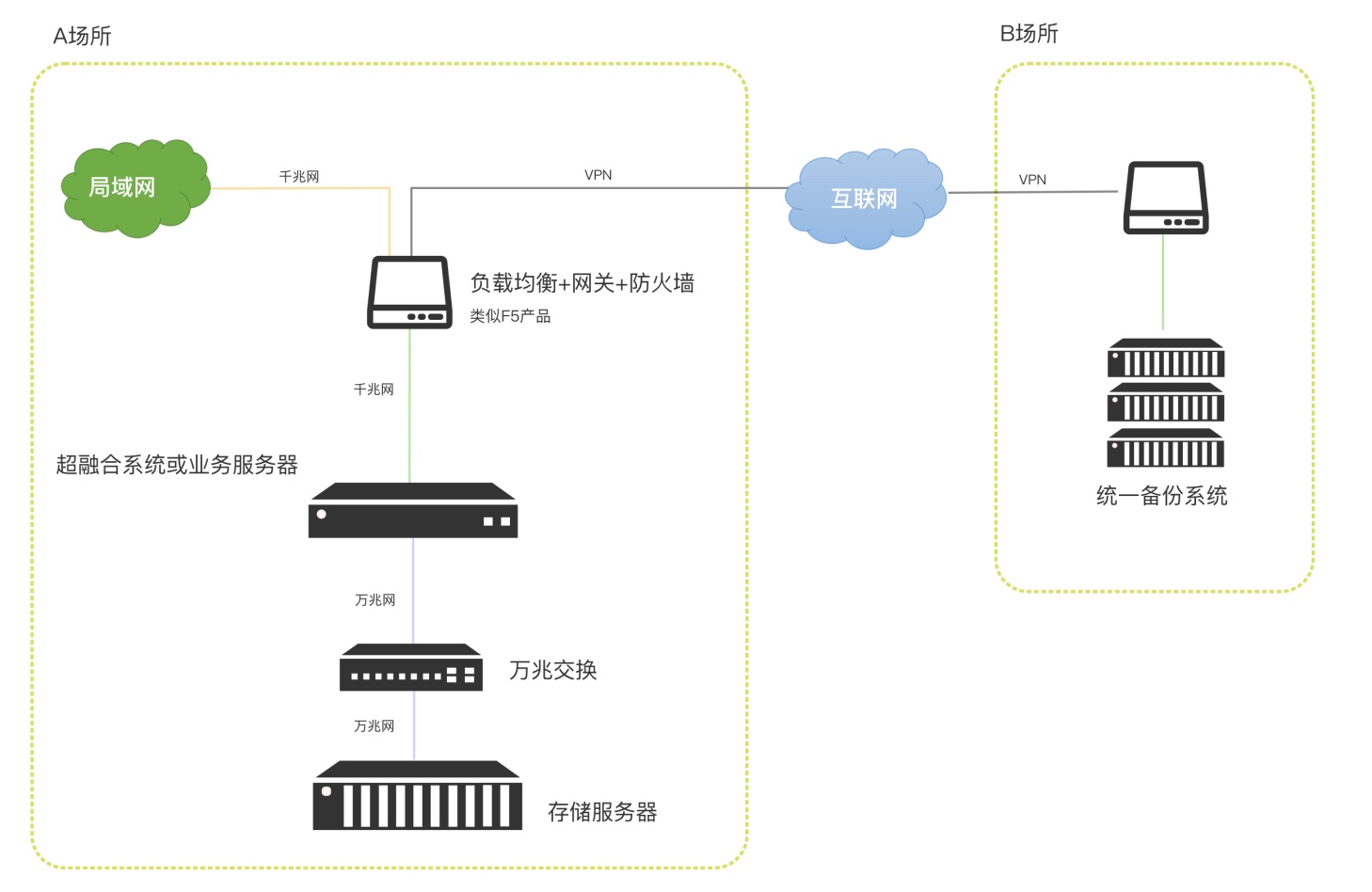
If hot and cold data do not need to be classified and saved, BabelBird can also use the off-site disaster recovery function of object storage to complete off-site disaster recovery deployment for customers.
Use object storage for remote disaster recovery. When the main system has a problem, you can quickly switch to the disaster recovery server.
Self-built object storage server
Babel object storage is an object storage system developed on the open source MinIO system. It inherits MinIO's advantages of high performance, scalability, and data security, and is more suitable for the application scenarios of BabelBird Enterprise Drive.
As an advanced object storage system, Babel object storage system has unparalleled advantages over traditional storage systems in terms of speed, security, stability, high availability, and horizontal expansion.
Advantages of Babel object storage system
Performance
MinIO is claimed to be the fastest object storage server in the world. Published GET/PUT results of over 325 GiB/sec and 165 GiB/sec on 32 NVMe drive nodes and 100Gbe network, a clear advantage compared to Amazon S3 and far superior to traditional HDFS.
High availability: MinIO ensures high reliability and availability through multiple copies of data, failover and automatic recovery, thereby ensuring that data is not lost and business is not interrupted. Low redundancy and high tolerance for disk damage: the standard and highest data redundancy coefficient is 2 (that is, storing a 1 M data object actually takes up 2 MB of disk space). However, data can still be read even if any n/2 disks are damaged (n is the number of disks in an erasure coding set). And this damage recovery is based on a single object, not based on the entire storage volume.
Security:
MinIO delivers more functionality with the highest levels of encryption and extensive optimizations that virtually eliminate the overhead typically associated with storage encryption operations.
Data is stored in blocks and on each hard disk, and data cannot be restored even if you obtain read and write permissions from the hard disk or server.
Extremely high scalability: MinIO supports distributed deployment and can be expanded horizontally. When more storage space or higher performance is needed, MinIO can be easily expanded by adding new nodes.
At least it supports the deployment of object storage systems on a single machine, instead of the traditional requirement of three independent servers.
Object storage system and erasure coding
About erasure coding
Babel Object Storage System (MinIO) uses erasure coding and checksums to protect data from hardware failures and silent data corruption. Even if half (N/2) of the hard drives are lost in the highest redundancy state, you can still recover data.
Erasure coding is a mathematical algorithm for recovering lost and damaged data. MinIO uses Reed-Solomon code to split objects into N/2 data and N/2 parity blocks. This means that if there are 12 disks, an object will be divided into 6 data blocks and 6 parity blocks. Any 6 disks can be lost (regardless of whether they store data blocks or parity blocks) and can still be recovered from the data in the remaining disks. We call the data storage D and the erasure code (parity) P.
By default, the drive is sliced in N/2 data and N/2 parity blocks (customizable to support higher space utilization)
Erasure coding is different from traditional multi-copy technology. It has higher disk utilization and higher data recovery efficiency. (However, many storage manufacturers promote erasure coding as multiple copies and refer to the P number as the number of copies. This is inaccurate and will cause a lot of misunderstandings.)
Multiple copies in the context of Babel refers to adding backup servers to fully synchronize and store data.
Characteristics of erasure coding and differences from raid technology
Erasure coding protects data from multiple drive failures
RAID6 tolerates two drive failures while MinIO erasure coding allows the loss of half the drives RAID is a volume-level erasure code, while MinIO erasure code is an object-based erasure code (without downtime).
Effective space calculation (space utilization)
Assuming you need 100TB of storage space, how many hard drives you need to buy depends on the redundancy standard you choose. For example: using the 3+1 redundancy method, 100TB of available space requires the purchase of 12 12TB hard drives, 4 hard drives forming 3 groups, 9 data disks and 3 parity disks, the available space is 9*12, a total of 108TB available. If 2+1 redundancy is adopted, 15 10TB hard drives, 10 data disks, and 5 parity disks are required.
In the 3+1 plan, only 3 of the 12 hard disks can fail without affecting system usage and data restoration. However, if you use the 2+1 plan, although you need to purchase more hard disks, any 5 of the 15 hard disks can fail without affecting the system usage.
After replacing the damaged hard drive, the system can automatically repair the data.
Please refer to the table below for space utilization. If the space requirement is large (more than 150TB) and continues to grow, considering storage density and cost performance, it is recommended that a server be equipped with 16 hard disks at a time.
Different numbers of disks and space utilization can be calculated by clicking the link below
https://min.io/product/erasure-code-calculator?ref=docs
Hardware preparation
Required hardware configuration.
Babel supports a single server to build an object storage system (single node), using hard disk groups as redundant objects. Up to half of the hard drive can be damaged without affecting the normal use of the system.
The Babel object storage system requires customers to prepare hardware servers in advance for deployment as required. The minimum configuration requires 2 Xhiqiang CPUs, 64GB memory and 400G solid-state drives (system disks), and then the mechanical hard drives required to increase the corresponding storage capacity.
To calculate the storage space required and the number of hard drives to purchase, click the link below to calculate it.
https://min.io/product/erasure-code-calculator?ref=docs
The recommended hardware configuration is as follows:
| Server type | Configuration requirements | Operating system | Server purpose | Notes |
|---|---|---|---|---|
| Storage server | If storage density and future expansion investment are considered, a 12T hard drive can be used. | Linux | Object Storage Server | It is recommended to add a server with the same disk capacity for future expansion. |
Babel object storage uses software-defined storage technology, so the hard disk does not require RAID. Considering that some servers require RAID to support multiple disks, in this case, each hard disk can be set to RAID0 pass-through mode.
Each expansion in single server mode requires adding a server with the same configuration. Uninterrupted service is possible during capacity expansion.
Single-server deployment also supports adding a server with the same configuration to establish active-standby mode for real-time synchronization. If the hardware of a server is damaged, it can be quickly switched to the backup server.
The effective disk space capacity is related to the selected redundancy method. For example: use 8 10T hard drives to build an object storage system, and adopt a 3+1 redundancy scheme, which is equivalent to a group of 4 hard drives, divided into 2 groups, with an effective available space of 60TB. At the same time, if any two of the 8 hard drives are damaged, the data and system usage will not be affected. The damaged hard drive can be automatically rebuilt. If a 7+1 redundancy scheme is adopted, the effective available space is 70TB. Any damage to one of the eight hard drives will not affect data and system usage.
Multi-server deployment (distributed).
Babel object storage system supports multi-server deployment. If the server is used as a redundant unit, at least 3 servers are required, that is, 2+1 mode. However, considering the space utilization, it is recommended to adopt the 3+1 solution (that is, 4 servers).
The configuration requirements for each node (server) are consistent with the single-server deployment above.
It is recommended that the node configuration be consistent (same operating system, same number of disks and same network connection)
The number of drives provided by each node must be the same
The time difference between nodes cannot be greater than 15 minutes (it is recommended to use NTP to ensure time consistency)
The space utilization calculation is the same as for a single server.
Privatization requirements and service procedures
In order to ensure the experience and quality of using the BabelBird system, all privatized deployment work of BabelBird is deployed remotely or on-site and certificates are issued by the BabelBird team. Deployment by an agent team or self-deployment by customers is not currently supported. At the same time, the maintenance work of the system is also carried out by the Babel operation and maintenance team on a regular basis remotely. Customers only need to prepare the hardware and access resources as required, and leave the rest to the Babel team.
Things that need to be prepared in the early stage of privatized deployment: Calculate the approximate number of users, concurrency, storage space and space growth rate and let the Babel account manager evaluate the required configuration.
The customer evaluates the remaining resources (if any) of the existing server and selects a deployment method based on the actual situation.
Babel issued a privatization deployment plan.
Customers prepare corresponding servers and access resources according to the plan, allocate servers, and install operating systems.
Ensure that the server can be accessed via external remote desktop (you can also use Sunflower) and ssh, and open the corresponding port (our deployment technicians will put forward specific port requirements)
It is best for the user to provide a domain name. If there is no domain name, a fixed IP address is required. The solution using IP address to access needs to ensure that the IP address will not change during use.
If you need to access your email to retrieve your password or send a verification code to your mobile phone number, you need to prepare the corresponding email access or SMS gateway.
| Number | Project | Requirements | Remarks |
|---|---|---|---|
| 1 | Domain name | An independent primary domain name or secondary domain name is required | A secondary domain name can be set based on the company's original domain name. Such as yun.company.com |
| 2 | An email address that can send notification emails is required | An email address that supports SMTP is sufficient ########## Email push related ########## MailUser=xxxx@mail.com MailPassword=password MailHost=Mail server address MailPort=Port number | |
| 3 | Remote access | Remote access to the server for configuration | Support remote access and control of the server |
| 4 | SSl certificate | https needs to apply for an SSL certificate | Apply like a digital certificate authority CA. Recommended Application OV Wildcard |
| 5 | SMS interface | If you need a mobile invitation, please register with your mobile phone. You need to activate the SMS interface service (optional) | Cloud service providers such as Alibaba Cloud and Tencent Cloud also provide SMS service interfaces, which can be activated by applying |
implementation stage
Notify us after the preparation work is completed, and we will give users a specific implementation time schedule. Please maintain smooth access to the external network during the implementation time period.
Implementation generally takes 2-3 working days. On the first day, Babel is deployed and installed remotely, on the second day it is tested and accepted, and on the third day, problems encountered are corrected.
Once the implementation is complete we will notify the user and then start the initialization phase
Initialize service
Babel provides initialization services to all private cloud customers, including:
Maintenance personnel training (remote or on-site)
Help users with data migration, user import, permission assignment, etc. (remotely or on-site)
User training (remote or on-site)
Access third-party services
As an office platform centered on corporate documents, the privatized BabelBird Enterprise Drive can easily integrate various third-party services into BabelBird to meet different needs by accessing third-party APIs. These services include but are not limited to: electronic signature, advanced CAD preview, office, text recognition, image recognition... and other third-party services to solve your needs.
Conditions for accessing third-party services
In theory, third-party applications or service modules that support the BS architecture can be accessed.
Third-party services must provide open APIs so that BabelBird Enterprise Drive can be integrated with them
If it is an Internet service, the server needs to be able to access the external network.
Enterprises need to authorize themselves or entrust us to purchase third-party services for access.
Recommended accessible services
File anti-leakage system: ipguard
Online office editing: onlyoffice (self-contained), office365, WPS Online, Yongzhong office
Advanced CAD preview: Haochen Cloud Atlas, Dream CAD
CAD online editing: Dream CAD
Online signature: Sign on
Text recognition and image recognition: Baidu Qianfan (Smart Cloud)
AI related: Zhichao AI (self-owned), ChatGPT, Zhipu AI
Open API (unified storage platform)
The private version of BabelBird provides an open API. Using the BabelBird API, you can use almost all capabilities of BabelBird in your system. And build custom applications and integrations in the cloud without having to build and maintain your own content management service.
Unified storage platform
Unified management of unstructured data: The core value of BabelBird Enterprise Drive's open API is that it can be used as a unified storage platform to integrate and manage unstructured data from various enterprise platforms. This includes but is not limited to OA (office automation), CRM (customer relationship management), ERP (enterprise resource planning) and other applications, so that all unstructured data of an enterprise can be managed uniformly on one platform, improving security and saving storage resources.
Enterprise-grade object storage:
BabelBird Enterprise Drive can also open its own object storage interface as a unified storage management platform for enterprises. This means that enterprises can store data from different sources, including documents, media, reports, etc., in BabelBird Enterprise Drive, and access and manage these data through APIs.
Documentation and support
Detailed documentation:
BabelBird Enterprise Drive provides detailed API documentation, including sample code and use cases, to help developers quickly integrate APIs.
Attachment 2: Babel API document https://www.babel.cc/p/api-integration.do
Development support:
We provide development support services, and technical staff will participate in joint debugging to solve one-on-one problems and challenges that may be encountered during the API integration process.
Single sign-on SSO
The BabelBird privatization system supports docking with the SSO single sign-on platform or third-party platforms such as Enterprise WeChat, DingTalk, Feishu, OA, ADFS, and ERP to achieve single sign-on.
For more information about single sign-on, please refer to the security chapter above: Single Sign-On (SSO) integration
Data ferry
BabelBird can use the "department security policy" method to isolate a certain department's data to implement functions such as security and outbound approval of confidential departments. However, when it comes to file transfer between confidential and non-confidential areas isolated by the network, data ferrying is required to ensure safe and controllable exchange of files between confidential and non-confidential areas. Here, the BabelBird data ferry function needs to be deployed. In BabelBird, this functional module is named "Transfer File" to make it easier for ordinary users to understand.
Implementation method
Deploy one set of Babel birds in each of the secret area (R&D area) and the non-confidential area (office area), and transfer files between the two sets of Babel birds:
Need to install the Babel data ferry module
Transmission ports need to be configured between the two sets of servers
Transfers are encrypted using SSL
Support file transfer between multiple sets of BabelBirds
Super administrator can set specific document recipients and reviewers
Can be configured to transfer files from non-confidential area to confidential area without approval
All transfers are recorded and logged
Multiple sets of Babel birds transmit files across multiple networks:
Simplified file transfer method for single set of BabelBird*: The core requirement of some customers is to transfer files quickly and easily from the non-confidential area to the confidential area. They only want to deploy a set of BabelBirds in the confidential area and have no need to use a network disk in the non-confidential area. In this case, a simplified data ferrying method can be used.
For security reasons, this method only supports transferring files from non-confidential areas to encrypted areas, but does not support transferring files from encrypted areas to unencrypted areas.
In addition to deploying a complete Babel system in the secret area, a file transfer service also needs to be deployed in the non-confidential area.
Transferring files from non-confidential areas to confidential areas does not require approval.
Usage steps
After deploying the data ferry module, Babel will add a "Transfer File Configuration" module to the enterprise console. If you can see the module entry in the enterprise console, it means that the data ferry module has been deployed successfully.
Create a new receiving port and sending port in the "Transfer File Configuration" of the enterprise console. The receiving end and sending end of the data ferry have been determined.
If one set of Babel birds is only configured with an interface port and no sending port, then it can only receive files but cannot send files. For example: the secret area can only receive files but cannot send files.
When a new receiving end is created, a token will be automatically generated, and the sending end must fill in the token to achieve encrypted transmission.
A Babel bird can establish multiple receivers, and each receiver can choose different members. For example: the receiving ends of the R&D department and the technology department are separated.
After passing the review, the recipient can find the transferred files in the "Transfer Files" column of his or her Babel account.
Users can directly right-click "Send File" in the BabelBird Enterprise Drive and select the receiving end to send the file (send). And check the files that have been sent and passed the review under the "Send Files" column.
To ensure security, files are transferred in file units (important files are entrained in multi-layer folders to cheat the review). Folder selection is not supported for transfer, but multiple file selection is supported for transfer.
Administrators or department managers with approval authority can review received and sent files under the "Transfer Files" column. Only files that pass the review can be transferred.
Customized development
The private version of BabelBird can provide customers with professional customized development (secondary development) services. Based on BabelBird's existing products, we will launch products more suitable for customers based on their specific needs.
Advantages of customized development of BabelBird
Help you design products based on product thinking
Different industries have different work processes and usage habits, and there is often a deep gap between demand and final products. Only demand without good product design will often delay the implementation of the project. In order to better suit your usage scenarios, our Babel care team led by professional product managers will customize your own solutions and secondary development support for your company. Refined time estimate management
We have a refined time estimation management system that has served Peking University Founder, which can accurately manage development time estimates and improve project success rate and implementation efficiency. Project estimates are clear and well-documented, effectively reducing corporate costs and improving efficiency.
Transparent project follow-up and acceptance
At every stage of the project, we have dedicated project managers and product managers to follow up. Ensure project progress and acceptance standards. And we can open our Jira (project management tool) to customers so that customers can know the progress and time-consuming of the project at any time.
Keep it updated and maintained
The most common problem with custom development is future updates and maintenance. Because traditional custom development is quite different from standard products, new branches are often used, and the development team does not have the energy to maintain new branches. This causes custom development products to lose continuous maintenance and feature updates, become increasingly difficult to use or isolated, and are eventually abandoned. Babel noticed and solved this problem. We will use a modular approach to develop new customized requirements based on standard products, or integrate customized requirements into standard products and manage them in the form of configuration items. In this way, even customized products can enjoy the update and maintenance services of standard products, achieving sustainable development.
Support white label service (OEM)
For commercial purposes or brand building needs, some companies need to use their own product names and logos. Babel can provide a white label (OEM) version that meets the company's requirements.
Transparent, professional and responsible
Responsibility is what our customers give us the most and the highest praise. During the project maintenance period, we will consider it from the perspective of the enterprise, correct bugs and complete functional adjustments in a timely manner. Provide long-term sustainable maintenance services for enterprises.
Babel bird custom development scope
API-based system docking: such as docking and integration with OA, CRM, PDM and other systems.
Custom development of API: open API for a certain function of BabelBird Enterprise Drive.
Customized development of independent functional modules or subsystems using the Babel API interface.
Focusing on the functional expansion, process customization and data exchange of the existing functions of BabelBird Enterprise Drive.
Interface reshaping and functional customization development based on Babel bird source code.
Babel bird custom development process
Determine needs and technical implementation plans with customers. Issue: "Requirements Analysis Instructions"
Product managers have in-depth discussions with customers to design prototypes and interactions. Issue "Secondary Development Plan", "Product Prototype", "Detailed Modules and Time Estimation Schedule"
In the business and contract phase, the customer pays the advance payment.
Design drawings and development started.
Internal testing and joint debugging.
Trial launch and user testing.
User training.
User acceptance and delivery
The customer pays the balance.
Xinchuang support BabelBird has been actively responding to the call for localization for many years, and BabelBird's products can also run in most innovative environments. Especially for the server side, whether it is CPU, operating system or database, BabelBird has corresponding Xinchuang solutions.
CPU and server architecture support.
Babel supports domestic CPUs with X86 and ARM instruction sets, such as X86's Loongson, Feiteng, Kirin, and Haiguang... It also supports domestic CPUs with ARM architecture, such as Kunpeng architecture and Feiteng ARM architecture.
operating system.
Babel uses docker for deployment and supports all Linux operating systems that support docker. Such as open Euler, Galaxy Kirin, and Tongxin UOS
database.
Babel recommends using AliSQL database or other MySQL-compatible databases such as: open Causs (Gauss).
BabelBird can also access other domestic databases for customization. Such as: Dameng, Renmin University Jincang, Nanda General...
client.
The Babel client can run on Linux systems and supports domestic systems such as Kirin and Tongxin.
Since the Linux system file management interface is not unified, the Linux version of Babel does not support the synchronization of folders and mapped disk functions.
| Classification | Classification | Standard deployment system (non-Xinchuang) | BabelBird Xinchuang solution (x86) | BabelBird Xinchuang solution (arm) | Functions not supported by Xinchuang version |
|---|---|---|---|---|---|
| Business Server | Operating System | Centos, openEuler, Ubuntu | openEuler, Kirin | Kunpeng, Kirin, Tongxin | None |
| Business Server | BabelBird Version | Standard Edition | BabelBird Xin Chuang Edition (X86) | BabelBird Xin Chuang Edition (arm) | None |
| Business Server | Database | MySQL | Gaussian, TiDB, aliSql | Gaussian arm | None |
| Business Server | Component/Middleware | tomcat | tomcat, TongWeb7 | tomcat | None |
| Business Server | Component/Middleware | pomleo | pomleo (Xinchuang) | pomleo (Xinchuang) | None |
| Business Server | Component/Middleware | Elastic Search | Elastic Search (Xinchuang) | Elastic Search (arm) | None |
| Business Server | Component/Middleware | Redis | Babel-readis | Babel-readis | None |
| storage server | storage system | minio | minio | minio-arm | none |
| Client | Client | Babel win/mac client | Babel linux/Kilin/Ubuntu client | Need to be transplanted | Linux version client does not support mapping disk and synchronizing folder functions |