
Sharing And External Delivery
Invitation sharing, link sharing, snapshot sharing, outgoing, sharing logs and corporate strategies.
Detailed description
Sharing function
BabelBird Enterprise Drive provides a variety of flexible sharing methods, including invitation sharing and link sharing, to meet the different needs of users.
- Invite to share:
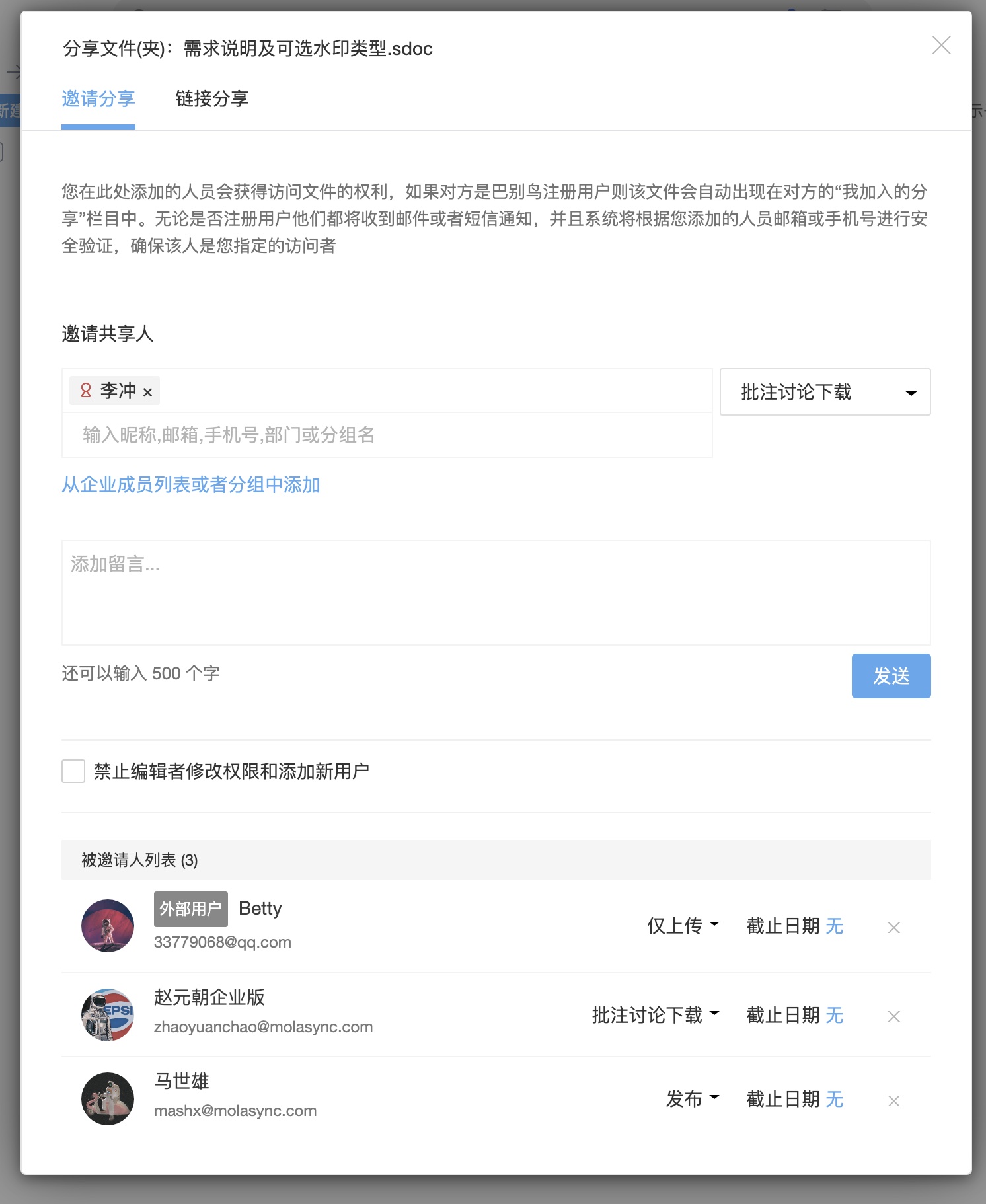
Invite sharing is a way to share a file or folder with specific people. Features are as follows:
Identity verification: Invitees need to undergo identity verification. They can log in through their Babel account or receive a verification code to confirm their identity.
Each invitee can independently manage permissions and set the permission validity period. This means that for the same invitation sharing, different invitees can set different access rights.
Permission control: Sharers can customize sharing permissions, including viewing, editing, downloading, etc. This helps to provide granular control over what is shared.
Approval mechanism: If the user does not have sharing permissions, the sharing operation needs to be approved to ensure that only authorized personnel can share files.
- Link sharing:
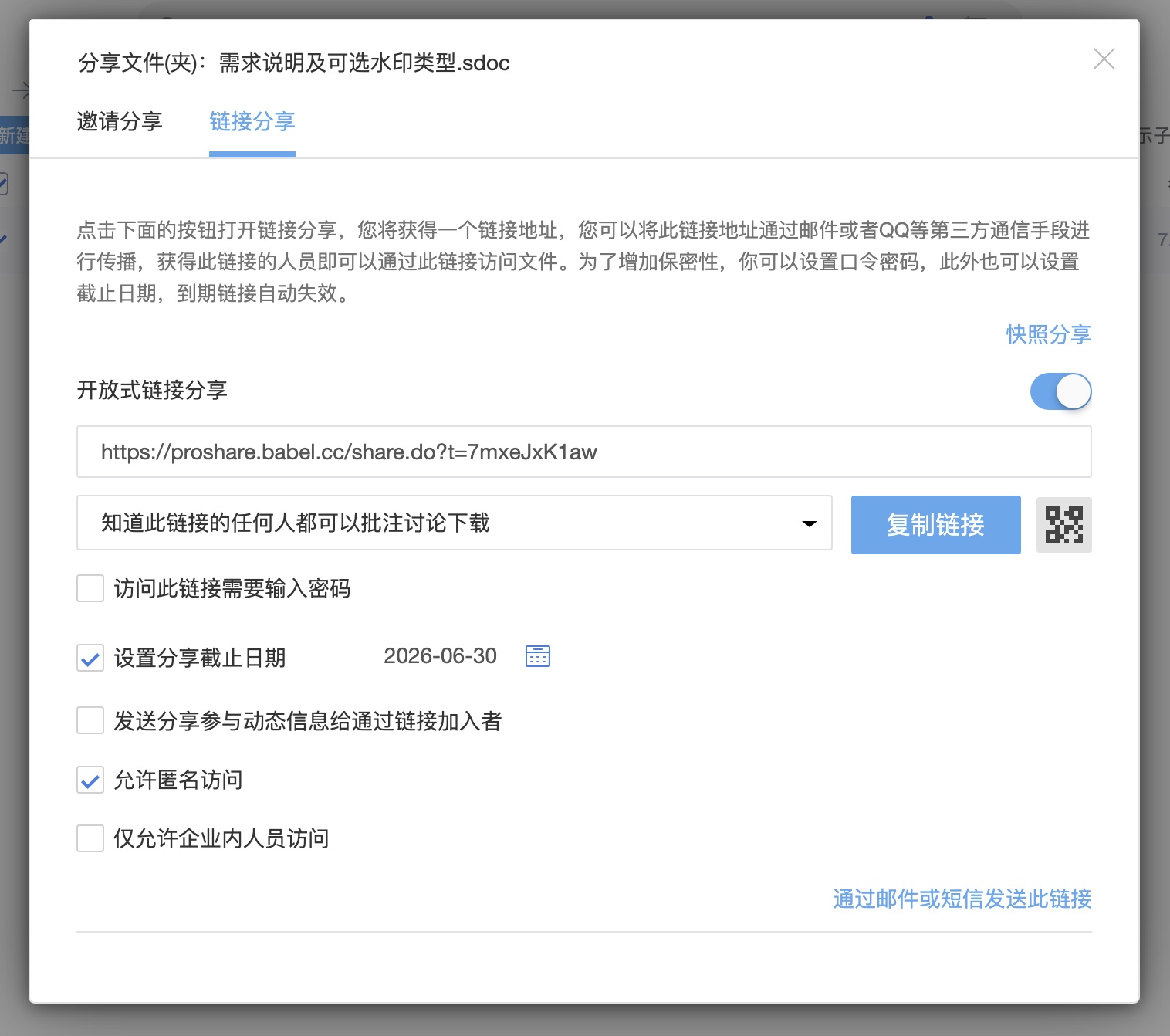
Link sharing allows users to create a public link for others to access a file or folder. Features are as follows:
Allow anonymous access: Sharers can choose whether to allow anonymous access. If the anonymous access option is turned off, visitors will need to have a Babel account to access.
Snapshot sharing: In snapshot sharing mode, the content shared is the current version at the time of sharing. Even if the file content is updated, the content shared by the snapshot will not change.
Password protection: Users can set a password to ensure that only those who know the password can access the shared link.
Validity period: Link sharing can set a validity period to ensure that the file will not be made public permanently. Once the validity period expires, the shared link will automatically expire.
- Custom settings:
In the enterprise console, administrators can customize sharing permissions, set sharing behavior by department (support or prohibit sharing), set sharing rules by file (prohibit sharing of high-confidence files), and turn off the external sharing function of the entire enterprise.
- Share log:
All sharing behaviors and external access behaviors have independent logs, and each shared access log can be queried. You can know who accessed a shared file or folder when, and updated versions of shared files will alert users.
- Unified management and sharing:
Department administrators can uniformly view and manage all shared files in the entire department. Shared personal files can also be uniformly viewed and managed in the "My Shared Files" column to ensure that no omitted shares will be leaked without knowledge.
Outbound function (send files)
The outgoing function is a way to send files to other users via email or mobile phone number for direct downloading. Outgoing is different from sharing. It is only used for the recipient to download outgoing files without configuring permissions. Features are as follows:
Send files: Users can use the outgoing function to send files to other users' email addresses or mobile phone numbers so that they can download and use them directly.
The file sending function can also send files to internal users. There will be a notification when the file is received. Click the notification to download or transfer the file.
No permissions required: Outsourcing does not require configuration permissions and can be used as long as the user has sharing and download permissions.
Email or SMS sending: Outsourcing can send file links via email or SMS to ensure that the recipient can easily obtain the files.
Quick download: The recipient can directly download the file by clicking on the link, which is simple and convenient.
User Controls and Enterprise Policies
Users' sharing permissions can be controlled by enterprise administrators to ensure that file sharing and outgoing files are strictly managed. In addition, enterprise administrators can also customize sharing rules and permissions through the enterprise console to adapt to different enterprise needs.
- Security
Sharing and outgoing functions are subject to strict security controls to protect corporate files from being accessed by unauthorized personnel. Administrators can flexibly configure sharing and outgoing permissions and rules according to the enterprise's security policy.
Flexibility and convenience
Sharing and outsourcing functions provide enterprises with flexibility and convenience, meeting the needs of different users and scenarios. Users can choose the most suitable sharing method according to specific situations to better manage and share files.