
Custom agents and knowledge base robots
Custom agents are used to build enterprise-specific knowledge bases, AI customer service, industry assistants, and multi-agent workflows.
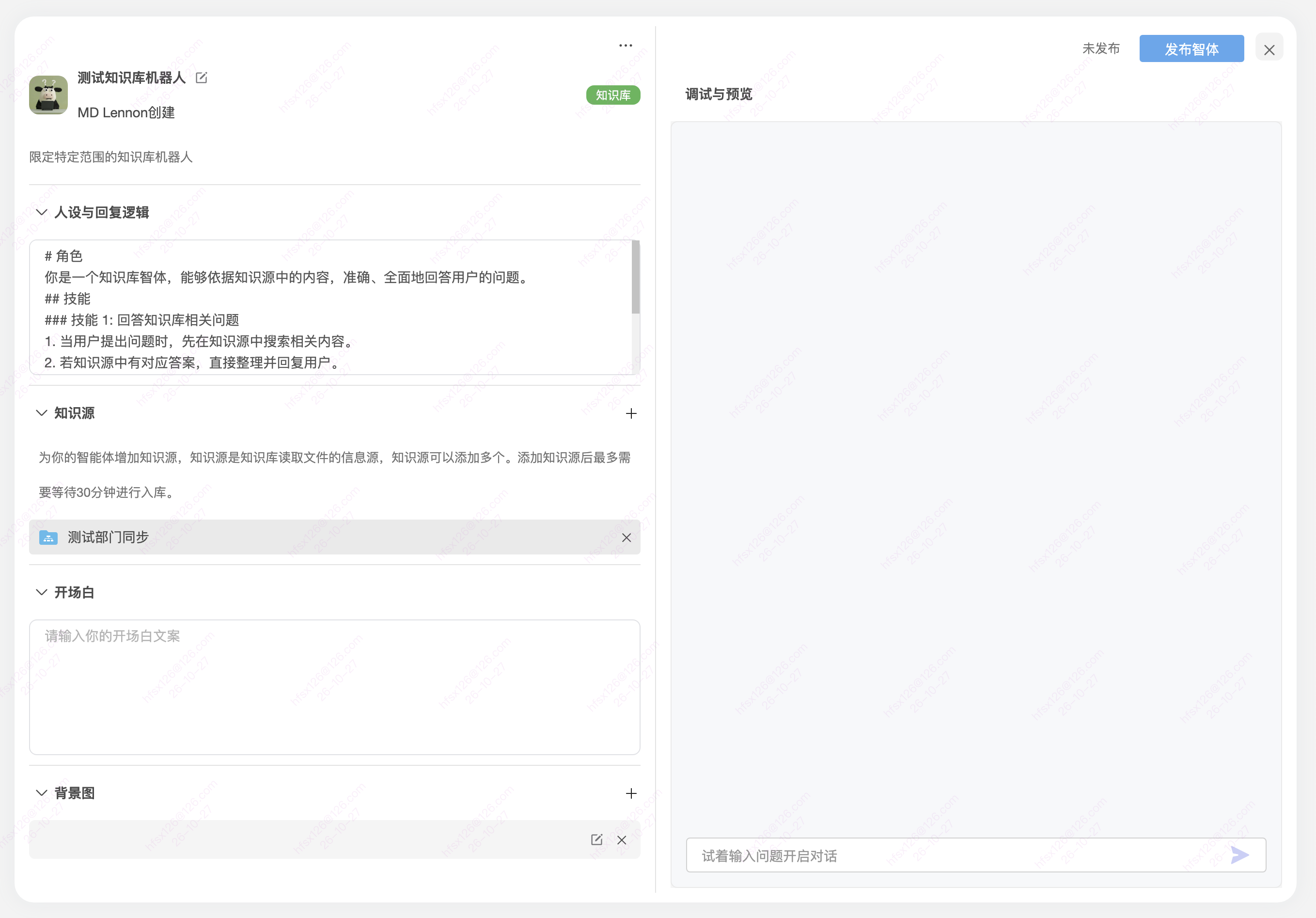
First task: validate an internal knowledge-base agent
Prepare: Choose a test document you are authorized to use and that suits the intended audience. AI-readable files uploaded to BabelBird are automatically ingested and vectorized; a custom bot uses the knowledge scope selected for that bot.
- Open Zhichao AI > My AI Tools (Agents) (我的AI工具(智能体)) and choose Create Agent (+创建智体), or edit an existing knowledge-base bot. In Persona and Response Logic (人设与回复逻辑), describe its purpose and answer rules, such as consulting the sources first and stating when evidence is missing.
- Expand Knowledge Sources (知识源) and click + on the right. Select a file scope from the BabelBird directory or add newly uploaded files. You can add multiple sources; selected entries appear below. This selection defines the bot's knowledge scope. Check the names and remove unwanted entries using the × beside them.
- Wait for ingestion. The current interface says adding knowledge sources may require up to 30 minutes for ingestion. This message applies to that source-addition workflow, not to every preview, AI search or image-indexing task.
- Use the input at the bottom of Debug and Preview (调试与预览) to ask a question with a clear answer in the sources, followed by an out-of-scope question. Check the answer against the original and any citations. Adjust the sources or instructions and retest if needed. Opening Message (开场白) and Background Image (背景图) control presentation separately from knowledge scope.
- When the test answers are satisfactory, click Publish Agent (发布智体) at the top right and select an Access Level (开放级别) as described below. Choose Private (私密) for your own use; check the intended audience and source material before sharing with others.
- Completion check: Known answers match the sources and out-of-scope responses do not invent facts. After publishing, test access and answers with an intended user's account. If anonymous use is needed, confirm the deployment's anonymous-access method and test as an unsigned-in visitor.
If an agent is missing or answers are wrong: Check source entries, original content, the ingestion wait and publication scope. If the wait exceeds the interface's stated time, give the administrator the bot name, source path, addition time, question and error message to investigate readability, ingestion and service status. Preview support alone does not establish AI readability.
External embedding: Embed code can be generated for websites or portals; follow the actual deployment configuration. Anonymous publication should use knowledge approved for external access. Automatic ingestion for basic AI services is not a reason to add all enterprise files to an external bot.
Publication scope and access checks
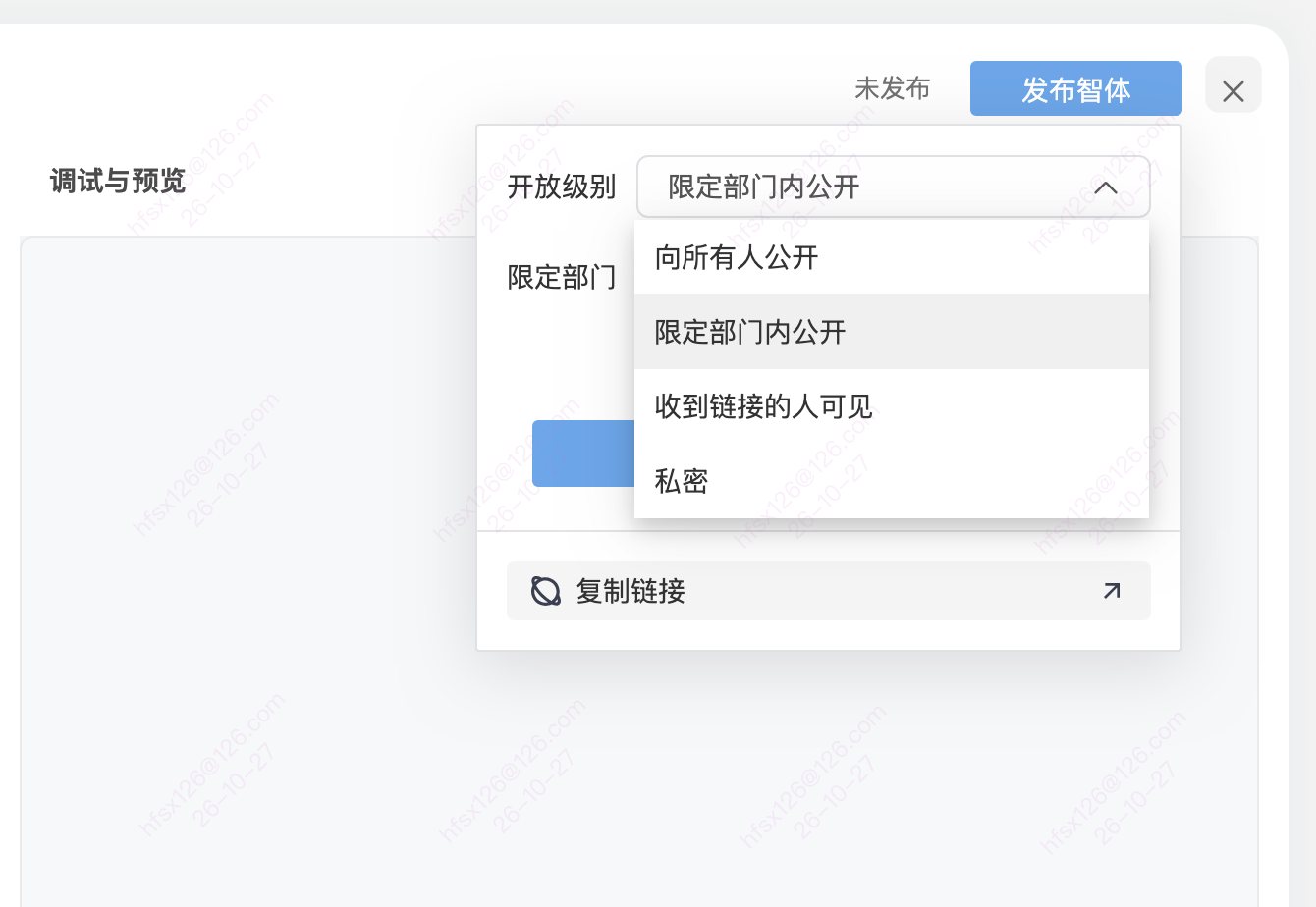
Click Publish Agent (发布智体), expand Access Level (开放级别) and choose the audience for this use. Knowledge sources determine which material supplies answers; the access level determines who can view the bot. Check both separately.
| Access level (Chinese label / English meaning) | How to choose and check |
|---|---|
| 向所有人公开 / Visible to everyone | All enterprise members who can access Zhichao AI can access the bot. This does not mean everyone on the public Internet |
| 限定部门内公开 / Visible within selected departments | Check Selected Departments (限定部门), then test with an intended member of those departments |
| 收到链接的人可见 / Visible to people with the link | Complete publication, use Copy Link (复制链接) and give it to the intended audience; the label alone does not establish whether sign-in is required |
| 私密 / Private | Visible only to the creator, for personal use; copying a link does not change this access level |
Complete publication as prompted and check the publication status. To distribute the bot, select Copy Link (复制链接) and open it with an identity that matches the chosen scope. If a member cannot access it, check the level, selected departments and publication status before broadening the audience.
BabelBird supports anonymous access, but its mapping to the other access levels must be confirmed for the current deployment. Private does not mean anonymously public.
Function description
Custom agents are the core modules of Zhichao AI for enterprise knowledge bases and business assistants. Administrators or implementation teams can configure different agents for different business scenarios, such as customer service, knowledge base, analysts, writers, project assistants, pre-sales consultants or industry experts.
Main abilities
- Customize the agent's personality, response logic and prompts.
- Specify the target folder or document scope for the agent.
- Supports access to third-party data sources as URLs, depending on implementation configuration.
- Provides preset templates for customer service, knowledge base, analysts, writing and other industries.
- Supports multiple agents, allowing different agents to serve different problems according to business division.
- Can generate embed code for use in third-party websites or corporate portals.
- Can be used as an enterprise knowledge base robot to configure different assistants for different knowledge areas.
Knowledge base construction method
Enterprises can hand over product manuals, FAQs, customer service documents, policy documents, training materials, project materials, etc. to designated agents for learning. Compared with traditional manual knowledge base compilation, Zhichao AI emphasizes directly using the company's existing documents to reduce the cost of repeatedly writing knowledge base entries.
Usage suggestions
- Split agents according to business domains, such as "customer service robot", "pre-sales knowledge base", "internal policy assistant" and "project data assistant".
- Each agent specifies a clear knowledge scope and intended audience to prevent one agent from carrying too much irrelevant knowledge.
- External customer service agents should set answer boundaries, disclaimers, handoff to human support and sensitive issue handling rules.
Permissions and usage boundaries
For shared requirements on source authorization, model services and human review, see Zhichao AI Overview. The completion checks for this task do not replace your organization’s access approvals.
FAQ
Where do I add knowledge sources? Can I add more than one?
In the bot editor, expand Knowledge Sources (知识源) and click + on the right. Select file scopes in BabelBird or add newly uploaded files. Multiple sources are supported, and the selected scope defines the bot's knowledge base. Remove an unwanted entry with its × button. See the editor screenshot on this page.
Why can the bot not answer immediately after I add sources?
Sources need ingestion. The current interface says this can take up to 30 minutes after addition. Check that the source appears in the list, wait, then test with a question clearly answered by the material. If the stated time is exceeded, ask the administrator to check AI readability and ingestion. This message is not a time limit for all AI search or transcoding jobs.
How do I test answers before publishing?
In Debug and Preview (调试与预览), ask a question with an answer in the source and compare the result with the original. Ask an out-of-scope question and check whether the bot acknowledges missing evidence. Adjust response instructions or sources and test again if needed. Testing does not publish the bot; use Publish Agent (发布智体) and select an access level afterward.
How does knowledge scope differ from publication scope?
Knowledge scope is the source material selected under Knowledge Sources (知识源). Publication scope controls who can view the bot and is set using Access Level (开放级别) when publishing. Automatic file ingestion does not add the file to every bot or make it publicly shared.
Who can see a Private bot?
Only its creator. To give department members or other users access, first check that the sources are suitable for them, then choose the appropriate publication scope. Copying and sending a Private bot's link does not change its visibility.
How do I publish to selected departments and obtain a link?
Click Publish Agent (发布智体), select Visible within selected departments (限定部门内公开), check Selected Departments (限定部门) and complete publication. Use Copy Link (复制链接) and test with an intended department member's account. See Publication scope and access checks.
Does “Visible to people with the link” mean anonymous access?
The label alone is not enough to determine this. BabelBird supports anonymous access, but the administrator must confirm how this option maps to anonymous use. Confirm the access method and test as an unsigned-in visitor before external use. Private remains visible only to the creator.
Does “Visible to everyone” mean everyone on the Internet?
No. It means all members of the enterprise who can access Zhichao AI. Choose Department only for selected departments, or Private for the creator only. Confirm the access method separately for external or anonymous use.