
Auto Clean Files
Clean up temporary files, process files and short-term circulating materials according to rules.
Function Overview
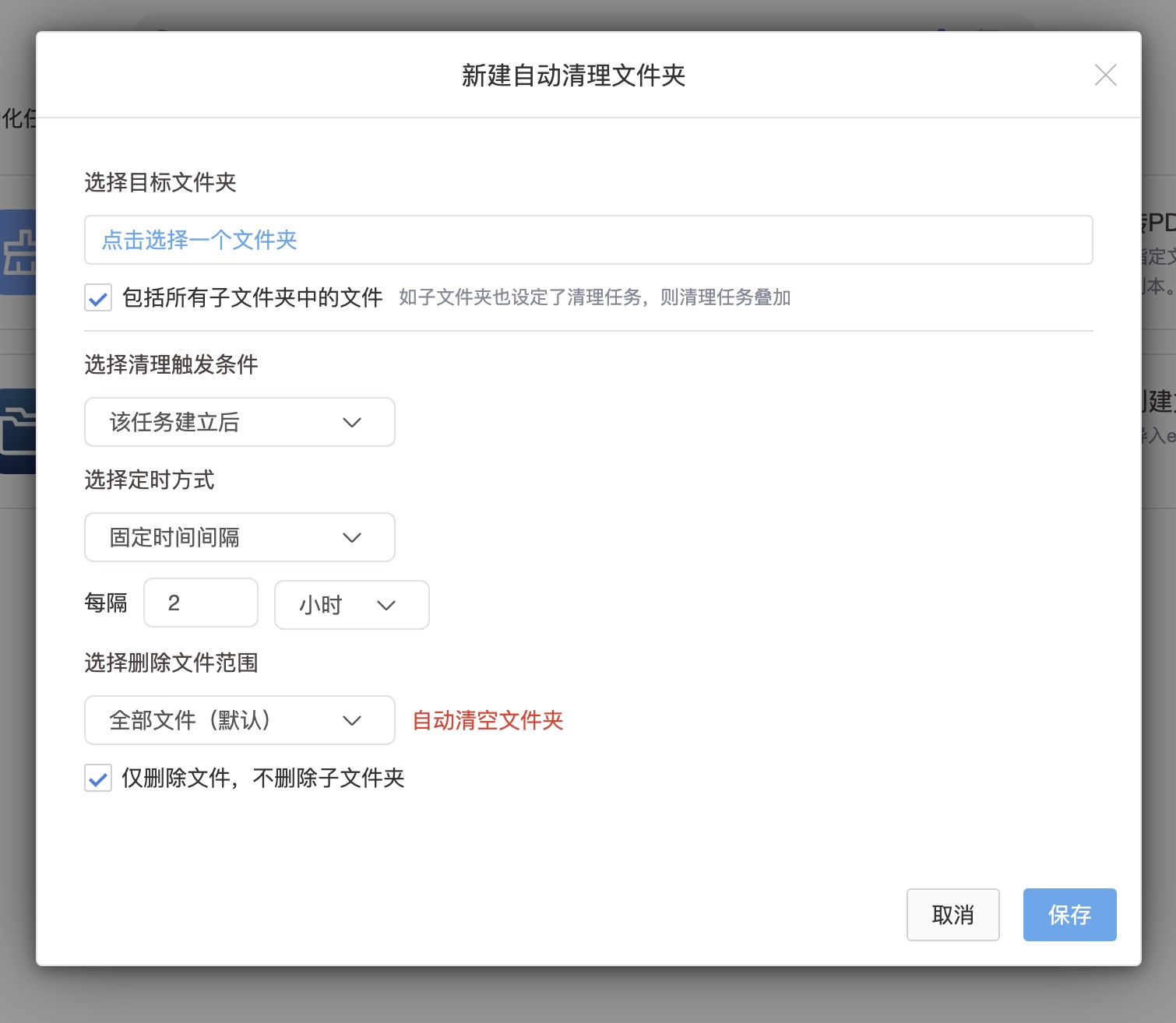
In daily cross-department collaboration or project cycle management, a large amount of temporary data, process files or short-term circulation materials are often inevitably generated in the enterprise network disk. The "Automatically Clean Files" function is designed to provide enterprises with automated storage space optimization and directory slimming solutions. Through this function, the system can automatically delete redundant files in specified folders according to specific rules set by the user, keeping the project directory clean for a long time and releasing high-value storage resources.
Core operation and configuration rules
This module uses a strict logical rule engine to perform file cleaning actions to ensure the accuracy and efficiency of data processing:
Target directory locking: The task configuration needs to explicitly specify the target folder to which the rule applies. Users can choose to apply the rules only to newly entered files in the folder, or to apply the rules to historical files that already exist in the directory at the same time.
Multi-dimensional rule triggering: Supports precise filtering and elimination of files based on specific rules. Common determination rules can cover file types (such as temporary files with specific suffixes), life cycles (such as files entering a directory for more than a specified number of days), and other dimensions to achieve highly customized cleaning strategies.
Workflow collaboration: As the end link of complete automated circulation, automatic cleaning can be seamlessly connected with other tasks. For example, after the "automatic conversion to PDF" task is completed, the system can immediately trigger the "automatic cleaning" rule to uniformly clean the original draft files, leaving only the standardized final version.
Permissions and data security control
Since the cleaning task involves the sensitive operation of file deletion, this function relies heavily on Babel's extremely fine-grained permission management system:
Configuration permissions: Only collaboration members with corresponding advanced permissions (such as management and deletion permissions) for the folder can create or modify automatic cleanup tasks to prevent data loss caused by unauthorized operations from the source.
Senseless and safe execution: Cleaning tasks are performed silently in the background to reduce interference with user front-end operations. At the same time, the company's established data compliance and recycle bin retention policies are strictly followed to ensure the absolute security of data assets.
Typical business application scenarios
Design and R&D projects: In architectural design or scientific research management, working software often automatically generates a large number of backup or cache files (such as .bak or temporary rendering files). By configuring automatic cleaning tasks, you can set up automatic identification and deletion of useless files with specific suffixes on a regular basis to keep core drawings and literature catalogs pure.
Public data exchange area: For the "temporary transfer station" or "temporary sharing area" set up within the enterprise, automatic cleaning tasks based on the time dimension (such as "automatic cleaning after 7 days of retention") can be configured to achieve self-organization and self-purification of public spaces and reduce operation and maintenance management costs.