
Security and Audit
security
User Authentication: Use strong user authentication mechanisms, including single sign-on (SSO), OAuth authentication, and multi-factor authentication (MFA).
Authorization: Use an authorization framework such as Spring Security to define and enforce access control policies to ensure that users can only access the resources they are authorized to use.
Data Encryption: Implement encryption of data transmission and storage to protect the security of user data.
business logic
File Management: Developed business logic to handle file upload, download, version control, sharing and collaboration functionality.
User management: Implement user management, rights management and user organizational structure.
Search function: An efficient search engine has been developed to support fast retrieval of files and metadata.
Online editing: Responsible for online editing and collaborative editing of documents.
File transcoding: Responsible for batch queuing transcoding of files and generating preview files.
Object storage: file blocking and disk placement, storage system management.
Web services
RESTful API: Use RESTful API to support data interaction and collaboration between the front end and other clients.
Cache management
Caching strategy: Use caching to improve performance, including page caching, data caching, and session caching.
Asynchronous task processing
Message queue: Use the message queue system RabbitMQ to handle asynchronous tasks, such as file transcoding, file preview generation, etc.
By using the Struts2 and Spring framework, combined with the above design considerations, a powerful, high-performance, safe and reliable enterprise network disk back-end system can be built to meet user needs and support future expansion and function additions.
Cloud infrastructure selection (public cloud SAAS version BabelBird)
The choice of public cloud infrastructure can directly affect the performance, reliability and security of enterprise network disk products. The Babel public cloud version selected Alibaba Cloud's ECS, OSS services and CDN distribution business after many comparisons. Currently (in 2023), the Babel system running in public cloud SAAS mode has been operating online with zero server failures for more than 10 years.
Cloud service provider selection
The business server SAAS version BabelBird uses Alibaba Cloud's ECS (cloud server) cluster
Alibaba Cloud's ECS is an elastic computing service that provides you with virtual machine instances so that you can run applications in the cloud. These are some of the key advantages of choosing ECS:
Flexibility: ECS allows you to create, start and stop virtual machine instances as needed. This means you can scale your computing resources up or down based on your traffic needs. Scalability: Alibaba Cloud provides a variety of ECS instances of different specifications to meet the needs of different workloads. You can choose based on the performance requirements of your application.
Reliability: Alibaba Cloud's ECS instances are generally highly available, providing multiple data centers and availability zones to ensure business continuity.
Security: Alibaba Cloud provides various security features, including network isolation, firewalls, and security groups, to help you protect your virtual machine instances from malicious attacks.
The object storage SAAS version of Babel uses Alibaba Cloud's OSS (Object Storage Service)
Alibaba Cloud's OSS is a highly scalable, safe and reliable cloud storage service suitable for storing and managing large amounts of files and data. Here are some advantages of choosing OSS:
Scalable storage: OSS provides scalable storage capacity that can be dynamically expanded according to your needs. This is very important for file storage in enterprise network disk products.
Data backup and recovery: Alibaba Cloud's OSS has data backup and version control functions that can help you protect your data from loss or damage.
Security: Data stored in OSS is usually protected by encryption and access control to ensure data security.
CDN integration: Integrating with CDN services can improve file distribution speed and user experience.
To ensure smooth access around the world, BabelBird also uses CDN distribution
A CDN (Content Delivery Network) service caches content to globally distributed edge nodes to reduce loading times and improve user experience. Alibaba Cloud's CDN service can bring the following benefits to enterprise network disk products:
Fast distribution: Accelerate the distribution of files, ensuring that users can quickly access and download files, regardless of geographical location.
Load balancing: CDN can help share the load of the server, reduce the pressure on the server, and improve the performance of the website.
Security: CDN services usually have DDoS attack protection features to protect the website from malicious attacks.
Global coverage: Alibaba Cloud's CDN service has global coverage, ensuring that your content is quickly delivered to users around the world.
Data center location
Currently, BabelBird uses two data centers of Alibaba Cloud:
Hangzhou Data Center and Weihai Data Center
The configuration of one south and one north can ensure the sustainability of services and disaster recovery needs.
Database design
Database type
BabelBird Enterprise Drive uses various types of databases, and can also support Xinchuang's database products or large databases such as Oracle according to customer needs.
The default product database of BabelBird is:
The core database is a relational database mysql Auxiliary databases include: Redis database, MongoDB database
Database schema
Data architecture plays a vital role in enterprise network disk systems, ensuring high availability, performance and consistency of data. The following is the database structure of BabelBird:
A. Master-slave database architecture
Master
The main library is responsible for processing write operations, including users uploading files, modifying file information, etc.
The main database provides high availability, data consistency and transaction processing.
Slave
The slave library is mainly used for reading operations, including file query and search.
The slave library can provide load balancing and share the read load of the master library.
Data synchronization: Use data replication mechanism to ensure that the data of the slave database and the master database are synchronized.
Failover: The slave database can take over write operations when the master database fails, ensuring system continuity.
B. Relational database (MySQL)
Database design
The database is designed to support file and user management, including the definition of tables such as file metadata, user information, and permissions.
The relationship between data tables is clear, and foreign keys are used to maintain data consistency.
Data redundancy
The slave database in the master-slave architecture is used for data redundancy to prevent data loss when the master database fails.
The data synchronization mechanism ensures that the data of the slave database is consistent with that of the master database.
C. NoSQL database (MongoDB)
File metadata storage
MongoDB can be used to store metadata of files, such as file name, size, version information, etc.
MongoDB with elastic schema works well with changing data schemas.
D. Cache database (Redis)
Cache read data
Redis is used to cache frequently read data to reduce the load on the database.
Cached data can include user session information, popular files, access logs, etc.
E. Data backup and recovery
Backup strategy
Regularly back up the data of the master and slave databases to ensure data security.
Babel backup data is stored in reliable storage in various geographical locations.
disaster recovery
We develop detailed recovery plans that include steps and timelines for restoring data from backups.
The Babel operations team regularly tests the disaster recovery process to ensure its effectiveness.
F. Data consistency and transaction management
Transaction support
Use database transactions to ensure consistency across a range of operations, such as file uploads, sharing, and permission changes.
Transactions should be managed correctly to avoid data corruption and inconsistency.
Concurrency control
Use database locks and isolation levels to manage concurrent access to avoid data races and conflicts.
G. Monitoring and Performance Optimization
Performance monitoring Implement database performance monitoring, including query response time, load, and resource utilization.
Perform performance adjustments based on monitoring results to ensure database stability and performance.
Query optimization
Optimize complex queries to improve query performance, including index optimization and query plan analysis.
These data architecture elements will help ensure that your enterprise network disk system can achieve high availability, excellent performance, and data security. With proper database design and maintenance, you can provide stable and reliable services that meet user needs and ensure data integrity.
Data backup and recovery strategy (public cloud)
A. Data backup
Regular backup plan: BabelBird has a regular backup plan to ensure continuous backup of data (data backup in the early morning every day).
Full backup and incremental backup: Babel adopts a combined strategy of full backup and incremental backup. A full backup backs up all data in the database, while an incremental backup only backs up data that has changed since the last backup to reduce backup time and storage space consumption.
Multiple backup locations: The public cloud version of BabelBird has two geographical locations: Hangzhou computer room and Weihai computer room to cope with natural disasters or hardware failures. Cloud storage and remote data centers are common backup storage options.
Automated backup: BabelBird's database backup adopts a fully automatic backup mechanism without manual intervention to improve reliability.
Backup testing: We regularly test backups to ensure their integrity and availability. Test by restoring the backup data to a test environment and verifying the consistency of the data.
B. Disaster recovery
Recovery Plan: We create a detailed recovery plan that clearly identifies each step and responsibility. Make sure team members understand how to perform the recovery process.
Backup and recovery testing: We regularly test our backup and recovery processes to ensure that data can be restored quickly and efficiently in the event of an emergency. Testing should include simulations of various failure scenarios.
Backup monitoring: Monitor the running status of backup tasks, and automatically remind and report errors when problems occur to ensure the normal operation of the backup system.
Disaster recovery team: We have a dedicated disaster recovery team, on call 24/7, responsible for taking action in emergencies to ensure the continued operation of the business.
Communication plan: We have established an effective communication plan and automatic alert message delivery monitoring to inform relevant stakeholders about disaster events and recovery processes.
Documentation and training: Ensure detailed documentation of recovery plans and procedures and provide training to team members on recovery strategies and procedures.
The above strategies and efforts are based on ensuring the security and availability of database data and minimizing the risk of data loss and system downtime.
Preview and transcode
The file preview function allows users to open files directly on the network disk for preview without installing an application. In order to preview files on the web page and client and ensure the security of the file in a read-only state (no content or source files can be obtained by others), file preview and transcoding are one of the core functions of the enterprise network disk system. This chapter will introduce how BabelBird implements online preview and transcoding of files to provide a more convenient user experience.
File types supported for online preview
Text, code and office files:
Pdf, md, js, xml, htm, html, css, scss, jsp, c, cpp, java, php, m, h, hpp, mm, mail, msg, epub, doc, docx, ppt, pptx, xls, xlsx, txt, rtf, wps, wpt, dps, dpt, et, ett
Xmind,km
Optional support: (optional options require additional server and corresponding module fees)
key, numbers, pages
Audio and video:
mp3, mp4, wav, asf, ape
Optional support: (optional options require additional server and corresponding module fees) flv, f4v, mp4, m4v, webm, 3gp, 3gpp, wmv, avi, rm, rmvb, mkv, asf, mov, mpeg, swf, mpg, mts, m2ts, ogv
3D graphics:
dae, 3ds, abc, fbx, mtl, obj, ply, stl, x3d
Optional support 1: (Optional options require additional server and corresponding module fees)
x3d, ply, 3ds, abc, m3d
Optional support 2:
revit, solidworks, 3DMax
Image format:
bmp, jpg, jpeg, gif, png, bmp, psd, tif, tiff, raw, cr2, arw, dng, nef, pef, dcm, ico
dicom (medical images)
Vector image:
ai, svg, eps, indd, indt, idml
CAD
dwg, dwt, dxf, dcm
Compressed file:
Optional support:
rar,zip
Online preview tool (BabelBird Previewer)
BabelBird Enterprise Drive uses the self-developed BabelViewer online preview tool for online preview, which supports unified preview of different files after transcoding. Allows users to view file contents without downloading them locally.
BabelViewer is a powerful H5 online preview tool developed for the needs of enterprise network disk users. It has the following features:
Supports multiple libraries to facilitate rendering preview files in multiple ways.
Supports multi-layer technology, allowing multiple people to draw on the preview file.
Supports online comments and can be discussed by multiple people in the comment area.
The annotation list can be expanded to manage annotations of the current version and historical versions in a unified manner.
Supports version comparison of multiple files.
Vectorized rendering, vector files can be enlarged at high magnification without distortion.
You can quickly switch to preview multiple files in the preview state.
Use webGL technology to support online rendering of 3D files and online annotation of 3D files.
File transcoding function
Transcoding tools:
Babel Transcoding Service integrates multiple transcoding tools to convert files from one format to another format that can be opened by Babel Previewer. Private deployment systems require a dedicated server (or virtual machine) to handle file transcoding.
For example, convert high-resolution pictures to web-friendly JPEG format.
Automatic transcoding: BabelBird has implemented an automatic transcoding function. Files uploaded by users will automatically be converted into appropriate formats and file list thumbnails will be extracted to save storage space and improve performance. For the transcoding processing of a large number of files uploaded at the same time, BabelBird has a unique scheduling mechanism, which strives to allow users to open previews in a more timely manner under limited resource usage.
When the server is idle, user files uploaded will be automatically transcoded immediately and a preview file will be generated.
When the server is busy, if the user uploads more than a certain number of files at the same time, these files will not be transcoded. When the user clicks on the file to prepare for preview, it will be added to the transcoding process first and the preview file will be generated in real time.
Because the probability that users will preview a large number of files immediately after uploading them at once is very low, this setting can prevent users from being unable to open files that really need to be transcoded due to a busy server when uploading a large number of files at the same time.
Transcoding queues and asynchronous processing:
Add transcoding tasks to the queue and use asynchronous processing to perform transcoding operations to avoid blocking other system functions.
Caching and performance optimization
Preview and transcoding cache:
Implement a caching mechanism to store transcoded files and preview data to reduce repeated transcoding and improve responsiveness.
Load balancing:
At the same time, the transcoding queue is configured with a load balancing policy to ensure that multiple preview and transcoding requests can be distributed to different processing nodes in a balanced manner.
Performance optimization
Performance monitoring:
Real-time performance monitoring, including transcoding speed, cache hit rate and response time, and automatic clearing of the queue and retry processing when errors occur. Notify operation and maintenance personnel via SMS of serious errors.
Resource adjustment:
Based on monitoring results and load conditions, preview and transcoding resources are dynamically adjusted to ensure high performance and availability.
Integration testing
Performance test:
Conduct performance tests that simulate a large number of concurrent preview and transcoding requests to evaluate how the system performs under heavy load.
office family files
Babel supports online preview of files from the Microsoft office family and WPS. To ensure the display accuracy of office files, especially word files, Babel provides two ways to preview office files:
Use the office transcoding module running on the Windows server to transcode the file and preview it (default).
A window server needs to be deployed to generate preview files.
It can open and preview word files and ppt files quite accurately with Microsoft Office or WPS.
Supports using BabelViewer to annotate, discuss, circle, and compare versions of files.
You can use the "Zhichao AI" document assistant function. Because there are no layout or font problems with Excel files, they are previewed using the preview function of the online office.
All preview files can have embedded watermarks and can be saved as watermarked PDF files.
Use the preview function of the online office running on the Linux server to provide online preview of office and wps files.
For users who can only use Linux and do not have high requirements for the accuracy of the word file preview format.
*Due to differences in system fonts, online office parsing, etc., the online office in the Linux system cannot perfectly display the layout of the word file at 1:1. There will be slight differences in aspects such as bullet numbering, paragraph height, paging, and the position of inserted graphics.
Because there are no layout or font problems with Excel files, they are previewed using the preview function of the online office.
Word and ppt files opened using the online office preview function will no longer support the annotation function of the Babel previewer.
The document assistant function of "Zhichao AI" is not supported.
All preview files can have embedded watermarks and can be saved as watermarked PDF files.
Taking into account the performance of the browser and the efficiency of the server, there will be a certain file size limit for online preview of office files. Files exceeding this limit cannot be previewed online. Private cloud users can customize these limits, but it is not recommended to increase them too high.
The maximum previewable file size of Word (Document) documents is 200MB.
The maximum preview size of PPT (slideshow) documents is 200MB.
The maximum preview size of Excel (table) documents is 50MB.
Pictures and graphics files
Babel supports online preview of most image files, including psd, gif family, jpg family, bmp family, png, raw family (part), arw, tif, TIFF, dicom, ico and other files. It also supports the dicom format commonly used in medical graphics. And thanks to Babel's powerful image processing technology, Babel can preview ultra-high-resolution large pictures online in a 1:1 manner (optional component), annotate and discuss the pictures, and Babel supports reading the metadata of the photos.
Image formats such as PSD, RAW, and BMP require automatic transcoding by the server before they can be previewed.
Under normal circumstances (the large image display module is not turned on) large images with a resolution exceeding 4K will be processed by the server into a size and format that is convenient for web page display. After turning on the large image display module, the server will cut the large image into several small pieces and load them into 1:1 displays, which will consume a lot of server resources. Pictures with transparent backgrounds such as PNG can also show transparency in BabelBird, and the background can be changed.
The BabelBird system will read image metadata information for search, query, and sorting. This information includes: resolution, size, shooting equipment, shooting time, shooting location.
All previewable image formats will generate thumbnails for quick search in file list display and waterfall flow mode display.
All image formats support annotation discussion, circle drawing and version comparison in BabelViewer.
If the watermark function is turned on, the server will preprocess the previewed image and embed the watermark in the image.
All image files can be saved as watermarked PDF files.
BabelBird can also well support online preview of vector graphics, including but not limited to ai, dwg, dcm, dxf, dwt, pdf, eps, svg, idml, indd... and other vector graphics formats. More importantly, Babel can open documents in these formats in vector rendering, which means that such graphics can be enlarged dozens of times in Babel without blurring or distortion.
AI, eps, ind and other files need to be automatically transcoded by the server before they can be previewed.
Displayed in vector format, supporting changing background color.
The graphics will not be distorted or blurred after enlargement.
Other features are the same as images. It also supports embedding watermarks, saving as watermarked PDF, annotating discussions in BabelViewer, circle drawing and version comparison, and generating file list previews.
3D and CAD files
Thanks to BabelViewer's support for 3D formats, we support online preview of dae, 3ds, abc, fbx, mtl, obj, ply, stl, x3d and other 3D graphics by default, and support annotation discussions in 3D space.
Currently, BabelBird Previewer only supports single file 3D graphics. If the file has plug-in files such as plug-in skin, it will only be able to load the model itself.
3D files currently do not support generating previews, but custom development is supported if there is a need for this.
3D files can be rotated, enlarged, reduced, and split in the Babel Previewer, and annotation discussion points can be established. The system will remember the viewport when the annotation was created. Clicking an annotation will automatically rotate to the perspective when the annotation was created.
If you need to support professional formats such as Revit, Solidworks, 3DMax, etc., private deployment users can choose to access third-party 3D online display and transcoding plug-ins (such as Autodesk viewer), which will incur related fees. Previewing 3D files on mobile devices is currently not supported. Only supports previewing 3D files on web pages and clients.
- Babel supports preview of CAD files. Such as: dwg, dwt, dxf formats. Currently on the public cloud, Babel provides powerful CAD preview services to professional and enterprise version users. Private users who want to preview CAD files need to purchase the corresponding CAD transcoding service privatization authorization.
Babel CAD preview supports CAD version R12-2021.
CAD files can generate preview thumbnails for file list and waterfall mode.
Compatible with Tianzheng full professional T20V7 version.
Supports previewing and annotating CAD files in browsers, clients, and mobile terminals.
Supports drawing browsing above 100Mbps.
Layer open/hide/multi-select/select all.
Layout switching, view pan, zoom, change background color, eagle eye view.
Audio and video transcoding
Without using a transcoding server
BabelBird can directly play video files that support the HTML5 standard online without the need for transcoding services.
The supported formats are as follows:
- Video file formats
MP4: MPEG-4 Part 14, supports H.264 encoding. Almost all browsers support this format.
WebM: A format developed by Google that uses VP8 or VP9 encoding and can be played in most modern browsers
Ogg: Open media format, using Vorbis encoding, can be played in most modern browsers.
- Audio file formats
MP3: MPEG-1 or MPEG-2 Audio Layer III, can be played in almost all browsers.
AAC: Advanced Audio Coding, can be played in most modern browsers.
Ogg: Open media format, using Vorbis encoding, can be played in most modern browsers.
WAV: Waveform Audio File Format, can be played in almost all browsers, but the file size is large and not suitable for playing on the Internet.
- Compatibility
Video compatibility
Audio compatibility
When using a transcoding server
If you need to use BabelBird to manage and query a large number of video materials, you need to build a dedicated video transcoding server and purchase the corresponding video transcoding module authorization. (Currently this service only supports private deployment users)
BabelBird video transcoding module uses FFmpeg solution. FFmpeg supports more than 40 encodings such as MPEG, DivX, MPEG4, AC3, DV, FLV, etc., and more than 90 decodings such as AVI, MPEG, OGG, Matroska, ASF, etc. FFmpeg supports more than 280 types of codecs, covering almost all common audio and video encoding formats, and can decode almost all audio and video.
- Hardware configuration required for video transcoding server
Video transcoding is a service that consumes considerable computing resources and requires a dedicated physical machine to perform the transcoding operation. At the same time, server performance requirements are related to the type, duration and bit rate of the video that needs to be transcoded.
Based on the daily conversion of 50 hours of HDR 4K video (using CUDA) to 1080P H.264 AC3 MP4, the required server hardware configuration is as follows:
| Server type | Configuration requirements | Operating system | Server purpose | Notes |
|---|---|---|---|---|
| Video transcoding server | Xeon Intel-E5-2630v3CPU*2 64G memory 2TB SSD hard drive + Nvidia Tesla M4 4G graphics card | Linux | Video transcoding server | Using GPU (CUDA) |
The transcoding time required varies depending on the video bit rate. Under normal circumstances, it takes 8 seconds to transcode a 100-second 2K video into 1080P MP4 (using the hardware configuration above). If there are many videos being transcoded at the same time, the server will perform multi-thread queuing processing. After using the transcoding server, the video file can be played after the transcoding is completed, and the thumbnails can be viewed in the file list.
Security
Secure architecture
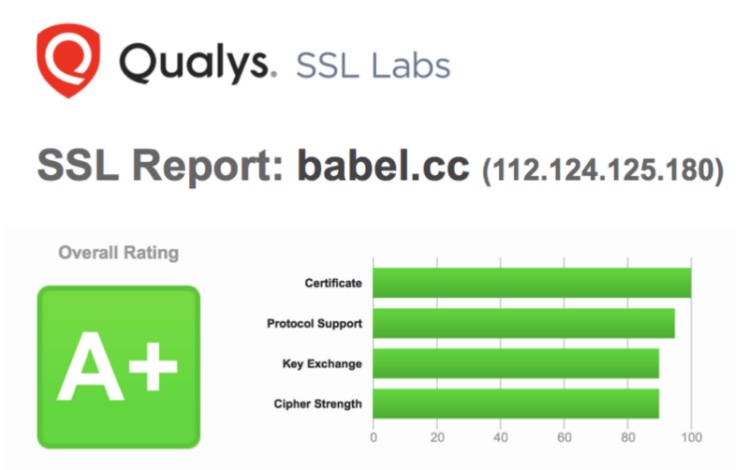
- Security is key to business! Babel prioritizes security from product design to architecture construction and server management, and includes many important security features. You can control the access behavior of each file and each member, add file watermarks, view access logs, classify important files into archives, and set encryption levels and security policies for files and departments... This series of measures can protect important digital assets to the greatest extent. At the same time, BabelBird uses EV SSL certification with the highest security level, bank-level encrypted transmission, and distributed backup in multiple computer rooms to ensure that your data is safe and worry-free. These measures have enabled BabelBird to obtain QUALYS security A+ certification, and we also have ISO27001 information security quality system certification.
Since its launch, BabelBird has implemented full-link encrypted transmission and storage from uploading, downloading, to disk. With detailed processing of rights management and file management, as well as risk analysis and corresponding functional response strategies encountered in various usage scenarios, BabelBird has become one of the most secure enterprise network disks on the market.
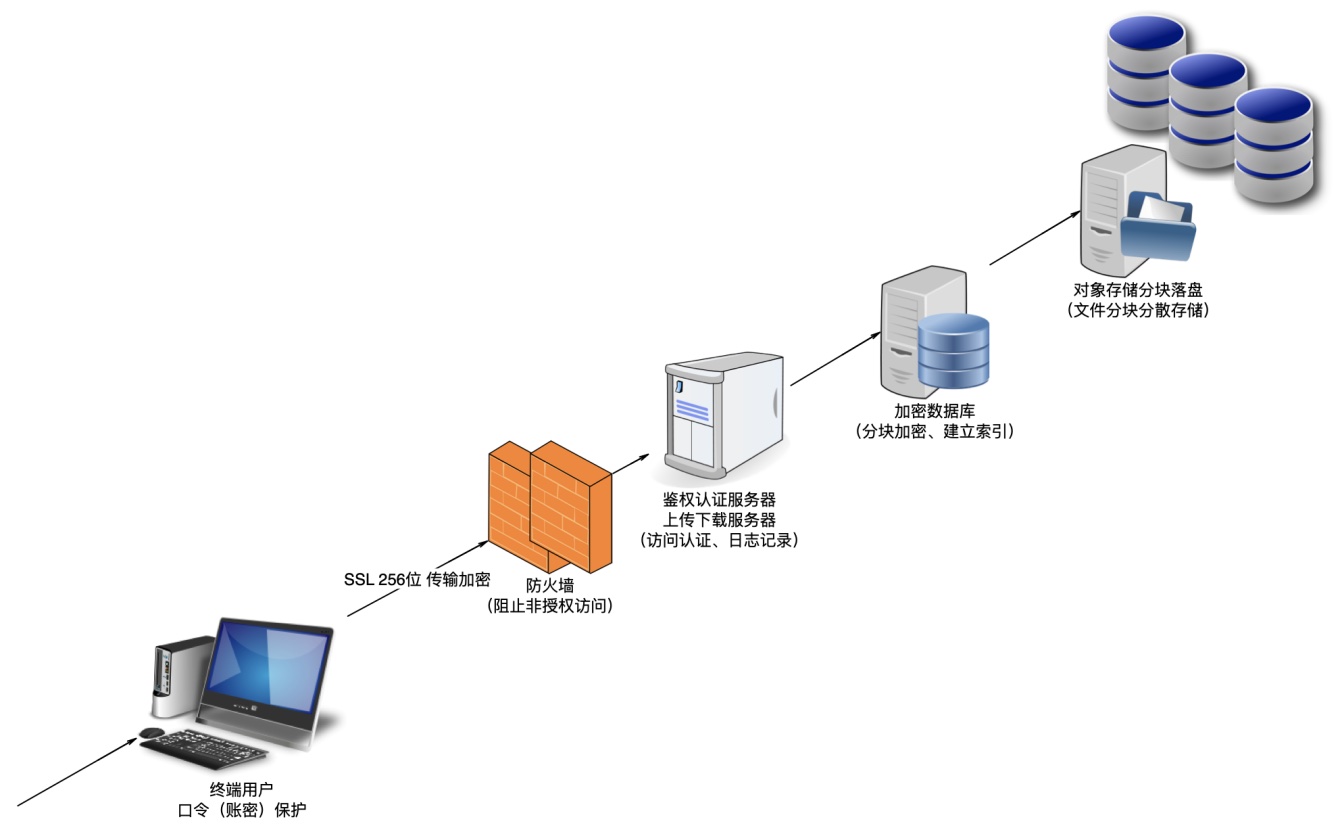
- Firewall, bastion host, VPN, SSL... In terms of transmission and server deployment architecture, we have more and more means to ensure the data security of the system. However, according to our many years of experience in providing enterprise security services, 80% of data breaches often originate from insider leaks and management chaos. Even if the system is physically isolated, there is no way to eliminate the risk of data leakage. Babel has considered this from the beginning of product design, providing a variety of safety designs and functions from the perspectives of management, personnel and equipment. A variety of optional settings and solutions are also provided at the contradiction between ease of use and security. Ensure data security as much as possible from the product structure and usage logic. Significantly eliminate the risk of data leakage due to insider negligence or sabotage.
User Authentication and Authorization (SSO)
Own user system
Babel Free User System Authentication Types
| Account type | Verification method | Remarks |
|---|---|---|
| Password, verification code | Public cloud needs to be bound to a mobile phone number for verification | |
| Mobile phone number (global) | Password, verification code | The private cloud needs to be connected to the SMS sending platform |
| User ID | Password | Only supported by private clouds. If you forget your password, it can only be reset by the administrator. When logging in for the first time, you will be asked to forcefully reset the password |
| Scan code, APP jump (mobile) | Only supported by public cloud, need to bind mobile phone number for verification |
Babel supports a mix of authentication types.
Multi-factor authentication (MFA) could be mandated to improve security
Hybrid authentication:
When using single sign-on (SSO), it supports using your own user system and SSO at the same time. Users can choose to log in using their own credentials or log in through SSO (such as using corporate WeChat to scan the QR code to log in or using the account password to log in).
Single Sign-On (SSO) integration
Single Sign-On (SSO) integration is a key feature in enterprise network disk products. It allows users to access multiple different applications and services after one authentication, improving user experience and security.
Babel supports OAuth2.0, CAS and other methods to integrate single sign-on, and has been actually used in docking with various systems.
Supported SSO standards and protocols
BabelBird Enterprise Drive supports a variety of SSO standards and protocols, including but not limited to the following:
ADFS integration:
Babel supports integration with Active Directory Federation Services (ADFS), which makes Windows Authentication-based SSO possible. This integration allows users within the enterprise to log in using their Windows credentials.
AD domain controller integration:
Babel also supports integration with an enterprise's local Active Directory (AD) domain controller. This allows internal enterprise users to log in using their local domain credentials.
Enterprise WeChat integration:
BabelBird supports docking with corporate WeChat, which allows companies to directly use corporate WeChat accounts to scan QR codes to authenticate and log in. And you can simultaneously import WeChat's organizational structure and users, use Enterprise WeChat to send notifications, and access BabelBird in the workbench.
DingTalk integration:
BabelBird supports docking with DingTalk, which allows enterprises to directly use DingTalk accounts to scan and authenticate login. You can also import DingTalk's organizational structure and users simultaneously, use DingTalk to send notifications, and access BabelBird in the DingTalk workbench.
Feishu integration:
BabelBird supports docking with Feishu, which allows enterprises to directly use Feishu accounts to scan and authenticate login. You can also import Feishu's organizational structure and users simultaneously, use Feishu to send notifications, and access BabelBird in the Feishu workbench.
Integrated documentation: The integration of AD Domain Control, Enterprise WeChat, DingTalk, Feishu, and Zhiyuan OA has been embedded in the privatized version of BabelBird. After purchasing the corresponding modules, users only need to configure them according to the corresponding documents before they can be used. For relevant configuration documents, please consult BabelBird customer service personnel.
Third-party SSO integration:
If your organization uses a third-party SSO provider (such as Okta, OneLogin, Auth0, Qianfan, Panwei, etc.), we also support product integration with these providers. This means that external users can log in with SSO through these vendors' products. But this requires secondary development and a certain fee.
Third-party own user system integration
We understand that many organizations may have their own user systems at the same time, so our SSO integration supports hybrid authentication:
Hybrid authentication:
Our system allows users to choose between logging in using their own credentials or using SSO. This provides maximum flexibility to adapt to different user needs.
User mapping and synchronization:
We ensure that user accounts in our own user system are synchronized with user accounts in SSO. This means that a user's attributes and permissions remain consistent across the system.
Security and authorization
We pay great attention to the enforcement of security and authorization policies to ensure that only authorized users have access to resources:
Authentication strategy:
We support flexible authentication strategies, including advanced options like multi-factor authentication (MFA). This helps ensure that the user's identity is properly verified.
Authorization and access control:
We allow administrators to configure and manage user access rights, including authorization of files and resources. This ensures that only authorized users have access to sensitive data. Users imported from other platforms will only have the initial permissions of their department (default is department member). Administrators can uniformly change the initial permission scope of imported users by customizing the "department member" role permissions.
User experience
We focus on user experience and strive to provide a seamless login experience:
Login page:
Our login page is clear and intuitive, giving users the option to choose different login methods. Users can choose to log in using SSO or log in with their own credentials. At the same time, we also support using the user's own login page for single sign-on system (such as the ADFS system authentication page)
Single point of logout:
If the connected single sign-on system (SSO) supports single logout, we can also support single logout, which means that users can log out in any connected application, and the system will automatically log out of sessions in other applications.
Access control list (ACL) design
Overview
In BabelBird Enterprise Drive, permission management is a core component to ensure the security and accessibility of files and resources. ACL (Access Control List) is used to define the access rights of users and roles to resources in different departments. This chapter will introduce our ACL design in detail, including role management, user assignment, role permissions and change management.
role management
Role definition:
We allow administrators to customize roles. Each role represents a set of permissions. There are 32 optional combinations of permissions to form a role.
Each role should have a clear name and description so administrators and users understand its functionality.
Permission assignment:
Each role is assigned specific permissions, which determine the role's ability to operate within the department.
Permissions should be carefully chosen to ensure that users have the necessary permissions but are not over-authorized.
User management
User role assignment:
Each user can be assigned one or more roles, which determine the user's permissions in different departments.
Allow one user to have different roles in different departments to accommodate diverse needs.
Association between users and departments:
Users should be associated with the departments they belong to so that appropriate permissions are automatically assigned based on department roles.
Users can only access the department in which they are located, and have roles that determine access rights within the department.
Whether you can access sub-departments is also determined by role permissions (roles have permissions to access sub-departments).
Role permission management
Role permission definition: Each role has clearly defined permissions, including readable, writable, deleteable, shareable and other operations.
Roles can be added or deleted as needed.
Permission inheritance:
Our system supports inheritance of permissions. When a user is assigned to a role, they automatically inherit the permissions of that role.
This reduces the effort of manually assigning permissions while ensuring consistency.
Change management
Role permission changes:
When an administrator changes the permissions of a role, the permissions of all users with that role in the department also change accordingly.
We will log these changes in detail for auditing and troubleshooting purposes.
Permission audit:
Security administrators can regularly audit roles and user permissions to ensure the accuracy and security of authorization.
Permissions that are no longer needed should be canceled promptly.
security
Access control:
The ACL system of BabelBird Enterprise Drive will strictly control users and roles' access to resources.
Only authorized users with a role in the department can access department files.
Departments are isolated from each other, and different confidentiality levels (department security policies) can be set to protect department files.
Audit and Monitoring:
All permission changes and role changes will leave log records. Convenient management and query.
Implement monitoring and auditing mechanisms to monitor permission changes and access activities to detect and respond to potential risks in a timely manner.
best practices
Principle of least privilege:
Follow the principle of least privilege, which means giving users and roles the minimum permissions required to reduce potential security risks.
Department files can use file access control to accurately increase the permissions of a certain member (or a certain role) and set the permission validity period.
Regular review:
Regularly review role and permission configurations to ensure system security and performance.
future expansion
Multi-tenant support:
Public cloud systems support multi-tenant control.
Private cloud considers extending the ACL system to a multi-tenant environment to support the needs of multiple customers or organizations.
Data encryption
Data transmission encryption (SSL/TLS)
encryption protocol
In BabelBird Enterprise Drive, we attach great importance to the security of data transmission. In order to ensure that data is protected during transmission, we use the Secure Socket Layer (SSL) protocol to implement transmission encryption.
HTTPS:
We use the HTTPS protocol, which is a secure version of HTTP, to encrypt all data transfers.
HTTPS provides end-to-end data encryption through the TLS/SSL protocol, preventing third-party malicious users from intercepting or eavesdropping on transmitted data.
Certificate management
SHA-256 certificate: Our SSL certificates are hashed with SHA-256, a powerful hashing algorithm that provides advanced security and integrity protection.
SHA-256 certificates are critical for verifying the server's identity and protecting data transfers.
Certificate update:
BabelBird Enterprise Drive will regularly update the SSL certificate to ensure the validity and security of the certificate.
We monitor certificate expiration dates and renew them in advance.
Data encryption
Data transmission encryption:
All data transmission between BabelBird Enterprise Drive and user terminals will be encrypted by TLS/SSL.
This includes user logins, file uploads and downloads, and the transmission of any sensitive data.
Data integrity protection:
TLS/SSL not only provides data encryption, but also verifies the integrity of the data during transmission to prevent data from being tampered with or damaged.
security
Strict encryption policy:
We follow strict encryption policies to ensure that all data transmissions pass through secure channels and cannot be accessed by unauthorized parties.
Protect user privacy:
Encryption of data transmission helps protect users' privacy and sensitive information, including personally identifiable information and confidential documents.
best practices
Security upgrade:
We will continue to monitor new security standards and best practices to ensure that the security of data transmission encryption is continuously improved.
Security audit:
We conduct regular security audits and vulnerability scans to ensure that our encryption mechanisms are not affected by potential threats.
Data storage encryption
Overview
In BabelBird Enterprise Drive, we use advanced block encryption technology to ensure the security and integrity of files. We use chunked encryption to break files into small chunks, each chunk is hashed and then stored in an object storage system. This technology ensures that even if control of the server or the hard drive is compromised, the attacker cannot obtain the complete file contents.
Block encryption
File chunking:
Files uploaded to BabelBird Enterprise Drive will be divided into several small chunks (chunks).
The size of each tile can be configured based on system needs to balance performance and security.
Hash encryption:
Each small block is hashed, using a powerful hashing algorithm to ensure data integrity.
The hash value will be stored along with the stored chunk for subsequent verification.
Storage security
Object storage:
The encrypted small blocks will be stored in the object storage system of BabelBird Enterprise Drive to ensure high availability and data redundancy.
Unrecoverable encryption: We use an irreversible hash encryption algorithm to ensure that the small blocks stored cannot be restored to the original file content to ensure the security of file storage.
Secure transmission:
Small pieces of data are also encrypted when transferred to the object storage system to prevent man-in-the-middle attacks.
File download
Temporary download link:
When a user needs to download a file, the authentication system will dynamically combine the chunks to form a temporary download link.
This link is unique and only valid for a short period of time for downloading. To download again, you need to regenerate the download link. This setting prevents files from being exposed by obtaining download links.
Download decryption:
When the user requests a download, BabelBird Enterprise Drive will decrypt the chunked data on the server side and then merge it into a complete file.
This ensures that the file will not be exposed to any unauthorized accessor even if the hard drive is illegally read while the file is being stored.
security
Data isolation:
Blocked encryption technology breaks data into small chunks, each of which is encrypted with an independent hash to prevent the entire file from being exposed.
Irreducibility:
The use of an irreversible hash algorithm ensures that the data is irreducible. Even if an attacker obtains a small piece of data, the original file cannot be restored due to missing data.
Prevent data leakage
Security audit log
Overview
In BabelBird Enterprise Drive, we emphasize the traceability and security of data access and operations. In order to achieve this goal, we have established a powerful access log system to record historical access logs of the entire system. These logs include file uploads and downloads, permission changes, user discussion comments, file additions, deletions, modifications, approvals, and department changes. This chapter will introduce our security audit log system and role management in detail.
Access log function
Comprehensive logging:
Our log system records various access behaviors of the entire Babel Enterprise network disk, ensuring that every operation can be traced and audited.
Recorded operations include but are not limited to file management, authority control, user operations and department management.
For more information about BabelBird logs, please refer to: Logs and Reports chapter.
Default save time:
By default, we save complete access logs for 90 days.
This ensures that sufficient historical data is available for auditing and inspection.
Expandable storage time:
If needed, administrators can extend the retention period of access logs based on specific compliance requirements (supported only on privatized systems).
Third-party log management system
Integrated support:
BabelBird can connect to third-party log management systems to import access log data to external log platforms for further analysis and long-term storage.
Security administrator role Security Officer:
Security officers have advanced permissions and can view and manage files of all departments at the front desk.
In the enterprise management background, the security officer has the following permissions:
Develop company security policy (exclusive authority).
Manage organizational structure.
Member management.
Permission management.
Security Auditor:
Security auditors can view and manage all department files from the front desk.
In the enterprise management backend, security auditors have the following permissions:
Review corporate security policies.
Review the organizational structure.
View member permissions.
View permission management.
View file access logs.
security
Data isolation:
Security audit log data is strictly isolated and only authorized administrators can access and manage them.
Confidentiality:
The roles of security security officers and security auditors are carefully designed. One is responsible for security policy and the other is responsible for security auditing. They supervise each other to ensure data confidentiality and compliance.
Expand
Automated alerts:
Supports automated alarm mechanism, and monitoring items can be added to promptly notify super administrators when abnormal activities are discovered.
The security audit log system of BabelBird Enterprise Drive, including functions, role management and security measures, ensures the traceability of data access and operations, and supports integration with third-party log management systems to further improve security and compliance.
Security review and testing
Penetration testing
Test delegate:
BabelBird Enterprise Drive will regularly conduct penetration tests by itself or entrust third-party organizations, such as NSFOCUS Technology, to conduct penetration tests to evaluate the security of the system.
The goal of penetration testing is to use cutting-edge attack techniques, mature hacker attack methods, and standard software testing techniques to test the security of the specified system and discover potential security vulnerabilities and risks.
Testing phase:
Penetration testing includes the following processes:
Information collection: Testers collect necessary information, such as IP addresses, DNS records, software version information, IP segments, and public information.
Penetration testing: Testers attempt to hack into networks and systems based on the results of the information gathering phase. If successful, normal permissions may be obtained.
Flaw Exploitation: A tester attempts to escalate privileges to gain full control of the system. If necessary, they may go back to the information-gathering phase and start over.
Collection of results: Testers classify and organize the problems discovered in previous stages, such as weaknesses and vulnerabilities, and display them in a centralized manner.
Threat analysis: Testers classify the threats found and analyze their potential impact.
Output report: Testers write intuitive penetration testing service reports based on the results of testing and analysis.
Main goals of penetration testing: Discover security vulnerabilities and potential risks in systems.
Evaluate the security of the system, including authentication, access control, data protection, etc.
Provides suggestions for improvements to enhance the security of the system.
The results of the test will help us take appropriate measures to fix the problems found and improve the overall security of the system.
best practices
BabelBird Enterprise Drive will conduct regular penetration testing to maintain the security of the system.
Use a combination of automated tools and manual testing to increase the comprehensiveness and accuracy of penetration testing.
After the test is completed, make timely corrections based on the report to ensure the safety of the system.
future expansion
We will continue to evolve our penetration testing processes to adapt to evolving security threats.
Consider introducing advanced analysis tools to more deeply assess the security of your system.
Security vulnerability scanning
In order to maintain the security of BabelBird Enterprise Drive, we conduct security vulnerability scans regularly. This measure is designed to automatically detect potential security vulnerabilities in the system and problems that may lead to security threats. We rely on professional scanning tools (such as Qualys, Rapid7 InsightVM, OpenVAS) to ensure that the system continues to remain in a highly secure state.
Scanning process
Security vulnerability scanning includes the following key stages:
Regular scan:
We scan our systems for security vulnerabilities on a regular basis, usually at scheduled intervals. Scanning tools automatically perform a series of tests to find potential vulnerabilities.
Scan target:
The targets of security vulnerability scanning include various aspects such as applications, operating systems, and network devices in the system.
Scanning ensures the overall security of the system.
Scan results:
Scanning tools will identify and report vulnerabilities found in the system.
The report will include the type of vulnerability, its severity, and possible remediation recommendations.
Fixes:
Based on the scan results, we take necessary remediation measures to address the discovered vulnerabilities and issues to ensure the security of the system.
BabelBird safety-related features