Enterprise Console
Enterprise configuration, organizational structure, permissions, members, labels, watermarks, logs, IP policies and module management.

Detailed description
The BabelBird Enterprise Console centralizes the administrator's functions for managing the entire enterprise. Enterprise administrators can configure various options of the enterprise network disk in the enterprise console, turn on or off the required functional modules, set the organizational structure, customize roles and permissions, manage members, set watermarks, set department security policies, IP access policies, bind accounts and mac addresses, monitor network disk usage...
Main columns
- Enterprise configuration: Comprehensive management of enterprise network disk configuration items, such as space allocation, whether personal files are allowed, allowed file upload size, historical version validity period or number of historical versions, various administrator assignments, changing logo and login background, prohibiting or enabling external sharing, and whether to accept email notifications. Various enterprise configuration options can be found in the enterprise configuration column.
- Organizational structure: Unified management and maintenance of the enterprise's organizational structure and departments. Ability to view departments and management departments in a tree view. View department members, allocate department space, create sub-departments, set department security policies...
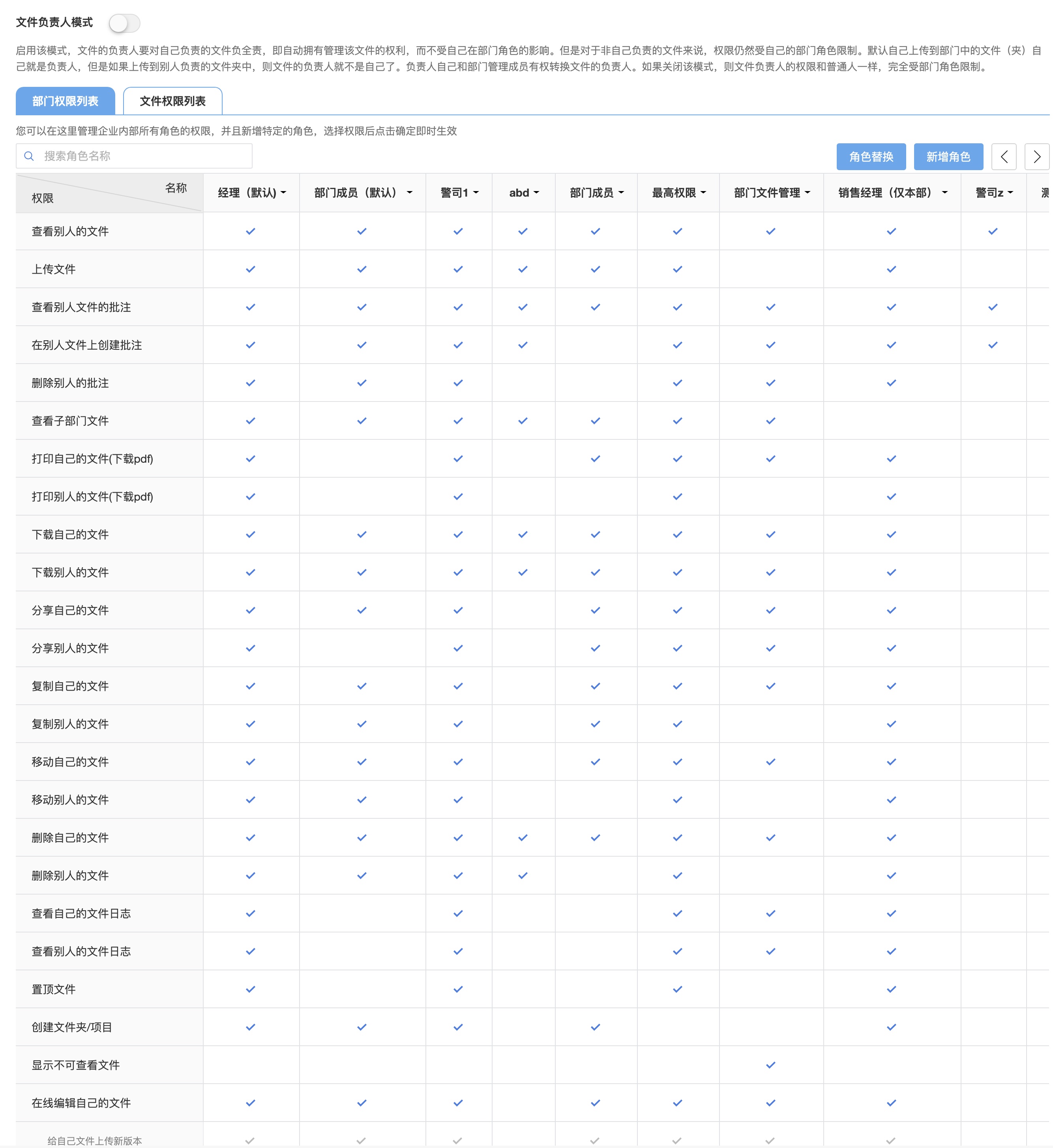
- Permission Management (权限管理): Use Department Permission List (部门权限列表) for department roles and File Permission List (文件权限列表) for custom combinations used in sharing, projects and file access control. See Permission system for selectable options and how to interpret combination names.
- Member management: You can search and filter the member accounts of the entire enterprise, add new members, import members in batches, assign member departments and roles, view and manage the information and usage of each member in detail, handover when members leave, add, delete, modify and check member accounts, allocate and limit member space and traffic.
- Tag management: unified management of tags used by enterprises, adding tags and classifying tags to facilitate users to select tags.
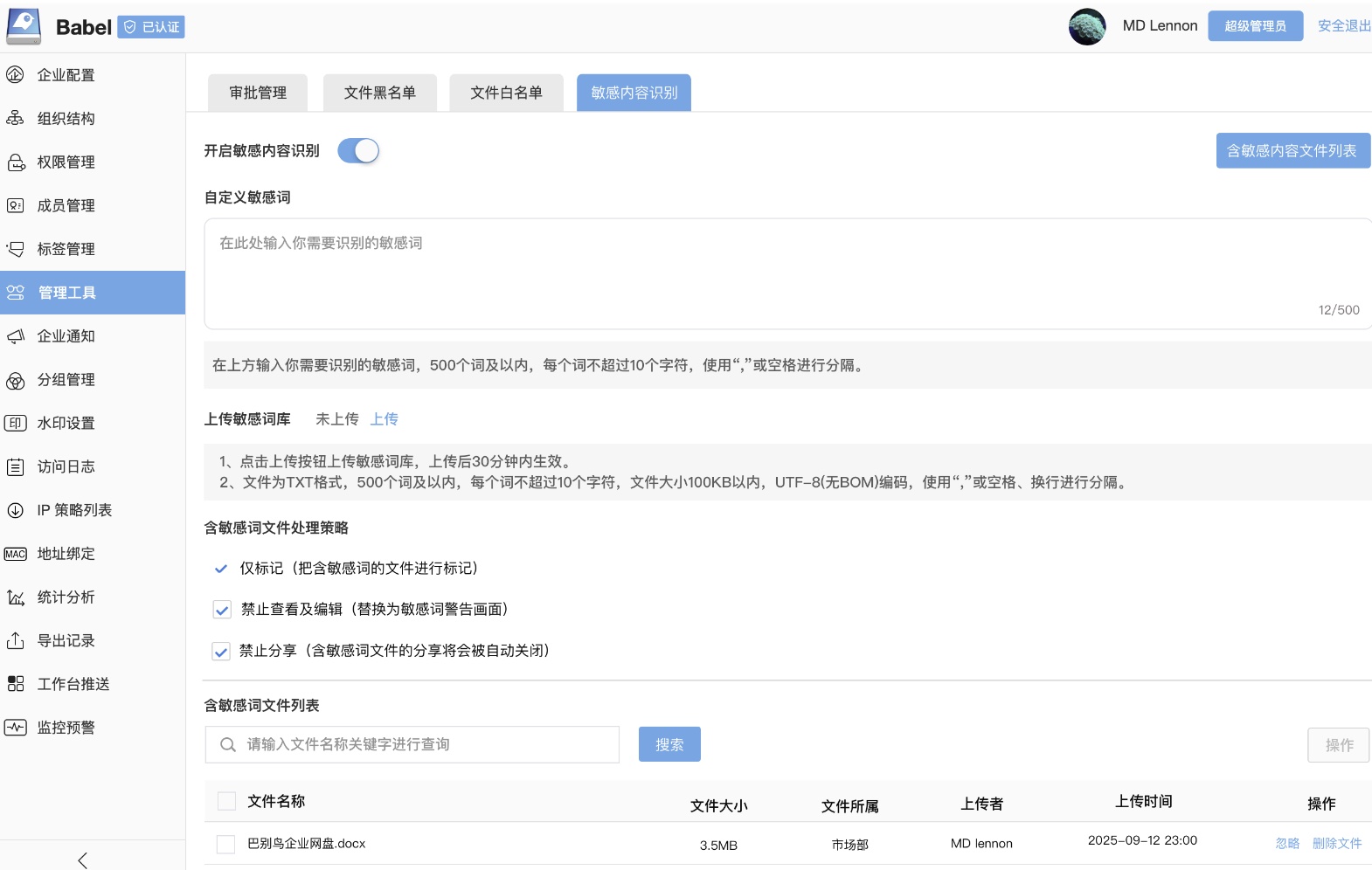
- File approval and upload type restrictions: Manage approval workflows and the file blacklist. Older documentation calls this group “File configuration”; newer documentation uses “Management Tools” (see Sensitive content recognition). The verified interface shows Management Tools in the sidebar. Exact migrated paths and versions for approval and upload type restrictions still require verification; a missing old menu name does not establish that a feature is unavailable.
- Custom File Metadata: Define shared business fields, required status, field type and candidate values. Users can assign values in file details and filter by field. See Custom File Metadata.
- Corporate notifications: Create corporate notifications, manage historical corporate notification lists, and send corporate notifications.
- Group Management: Create and maintain enterprise public groups in the console. Members can also create personal private groups in their own settings. Both types can be selected for file sharing and project membership, with access configured in each share or project.
- Watermark settings: manage document watermark types, adjust watermark parameters, and set watermark display range.
- Access log: Manage and query all access records of the entire enterprise network disk. Log reports can be exported.
- IP policy list: The upload and download behavior of corporate files can be managed through IP policies. For example: downloading files is prohibited in a certain IP range, and you can download files by returning to a certain IP range.
- MAC address binding: You can bind the user account to the mac address of a specific device, so that the account can only be used on the device bound to the mac address. You can also create a mac address pool.
- Statistical analysis: Statistically analyze the usage of network disk. Including system activity, file number statistics, active files, number of new files within a period of time, number of uploads per month, and traffic usage.
- Workbench push: Set the default display card of the workbench.
- System configuration (private deployment version only): configure the mail server, bind third-party SSO authentication, and set the third-party authentication login method.
- Third-party account synchronization (private deployment version only): Set the third-party account synchronization time and query the third-party account synchronization record.
- Optional modules (private deployment version only): Select the functional modules that the enterprise needs to display and turn off some functional modules.
- Monitoring and warning: Set warnings for abnormal behavior, and notify administrators when abnormal behavior occurs (for example: users delete files in large numbers)
- Transfer file configuration: The configuration of the data ferry system allows data ferrying between multiple sets of BabelBirds. Configure the receiving port and sending port of data.
Key Management Areas
Organization, permissions, tags and security tools are the most frequently used areas in the enterprise console. Administrators typically configure organization and role permissions first, then tags, watermarks, sensitive content recognition, logs and analytics.