
Data ferry deployment
Data ferry
Babel Data Ferry supports Babel birds deployed in secret areas and Babel birds deployed in non-confidential areas to transfer data to each other in a secure and approved manner. To achieve data exchange between confidential and non-confidential areas under corporate supervision.
For detailed information about BabelBird Data Ferry, please refer to the BabelBird Data Ferry chapter.
Zhichao AI
Zhichao AI is the AI platform of BabelBird Enterprise Drive, including three main modules: Zhichao AI customer service, Zhichao AI knowledge base, and Zhichao AI document assistant. These modules combine large model APIs and custom training to meet the enterprise's intelligent customer service, file content analysis and question answering needs.
The three main modules of Zhichao AI
- Zhichao AI customer service: This module serves as the AI customer service of the enterprise. BabelBird Enterprise Drive itself also uses this module to answer the problems encountered by users when using BabelBird Enterprise Drive. We also open this service to corporate customers. Companies can provide product manuals, FAQs, customer service documents and other materials to Zhichao AI for learning and fine-tuning to meet corporate customer service needs. Enterprises can also embed Zhichao AI's code blocks into their websites to quickly establish an external intelligent customer service system. Zhichao AI customer service can significantly reduce customer service costs and save time and resources.
- Zhichao AI Document Assistant: This module is used to answer questions about a single document. By analyzing the document content, Zhichao AI can answer various questions about the document content, from summarizing to revealing key findings. Users can ask questions to the AI instead of having to read lengthy documents themselves, improving work efficiency.
- Zhichao AI knowledge base: This module allows companies to customize their own AI assistants. The Zhichao AI team will help prepare training sets and adjust parameters based on the company's data, thereby establishing an exclusive AI model that can provide answers within the scope of permissions for people with different permissions on BabelBird. It can be used as a corporate knowledge base assistant in the form of questions and answers.
Technical Solutions
- Answer questions intelligently: Zhichao AI uses large models and custom training to ensure accuracy. It also uses small models to assist the work of large models, reducing problems such as talking nonsense, pretending not to understand, or leaking secrets. In addition, Zhichao AI follows BabelBird’s authority management mechanism to ensure that users can only obtain answers within their authority.
- Automatic learning: Zhichao AI can accumulate knowledge by studying the files provided by users and provide users with more accurate answers. All documents participating in training are specified and agreed to by the user to ensure data privacy and compliance.
Advantages
- Reduced customer service costs: Zhichao AI customer service can significantly reduce the customer service costs of enterprises. There is no need to train personnel on a large scale, and AI can provide answers at any time.
- Quick question answering: Zhichao AI can answer users' questions instantly, improving work efficiency.
- Document content analysis: Zhichao AI Document Assistant can quickly analyze document content to help users quickly obtain information without reading the entire document.
- Customized AI assistant: Enterprises can customize exclusive AI assistants for Zhichao AI knowledge base according to their own needs to meet specific knowledge management and question answering needs.
- Permission management: Zhichao AI can provide answers within different ranges based on user permissions to ensure data security and compliance.
Automate tasks
Facing the growing number of digital assets, the traditional manual file management model can no longer meet the demand for efficient circulation. The "automated task" engine launched by BabelBird aims to hand over tedious and repetitive file processing actions to the system background for automatic execution. By establishing a "self-organizing and self-standardizing" intelligent circulation system, the cost of manual intervention is significantly reduced, allowing the team to focus on core business creation.
Automated tasks are included in the standard version and users do not need to purchase it separately.
Core operating mechanism:
Flexible permission-driven: Relying on the platform's extremely fine-grained permission management system, users with corresponding permissions on the target network disk or folder can independently configure, turn on or off specific automation tasks as needed.
Multi-task flow concatenation (Workflow): Automated tasks do not run in isolation and support the free combination of multiple rules to form a workflow. For example: after a file is uploaded, the system can first trigger "automatic rename" to standardize the file name, and then immediately trigger "automatic sorting" to archive it to the relevant directory, achieving multiple steps in one go.
Continuously expanding capability matrix: The automation engine is highly scalable. In addition to the existing basic functions, the platform will continue to access more automated processing nodes to meet increasingly complex business scenarios.
Currently supported core tasks (including but not limited to):
Automatic renaming: Unify and standardize naming according to preset rules (such as keyword replacement, case conversion).
Automatic organization and cleaning: Automatically classify archived files based on trigger conditions, or clean up space regularly based on policies.
Automatic PDF conversion and signature: Automatically generate a PDF copy of the source file, or stamp the company signature in the cloud.
Create folders in batches: Generate a standard business directory tree with one click by importing data templates (such as Excel).
Multi-task collaboration and execution flow weight
In complex business scenarios, multiple automated tasks are often configured in one folder. In order to ensure the logical rigor and security of data processing, a strict automated processing sequence is preset at the bottom of the system.
The specific execution weight (the higher the value, the priority for execution) is as follows: Automatically clean folders (weight 10): highest system priority. If there are qualified cleaning tasks, they will be executed first to avoid investing subsequent computing power in invalid data that will be discarded.
Automatic decompression (weight 9): Prioritize the release of packaged assets for subsequent circulation.
Automatic renaming (weight 8): Priority is given to completing the standardization and unification of naming before files enter classification and archiving.
Automatic format conversion category (weight 7): Prioritize conversion tasks such as transferring PDF, pictures or audio and video formats.
Automatic sorting/sorting (weight 6): Executed as the end node of the flow. This means that core pre-standardization operations such as cleaning, renaming and format conversion have been completed before files are moved and classified.
Automatically clean files (Auto Clean)
Function Overview
In daily cross-department collaboration or project cycle management, a large amount of temporary data, process files or short-term circulation materials are often inevitably generated in the enterprise network disk. The "Automatically Clean Files" function is designed to provide enterprises with automated storage space optimization and directory slimming solutions. Through this function, the system can automatically delete redundant files in specified folders according to specific rules set by the user, keeping the project directory clean for a long time and releasing high-value storage resources.
Core operation and configuration rules
This module uses a strict logical rule engine to perform file cleaning actions to ensure the accuracy and efficiency of data processing:
Target directory locking: The task configuration needs to explicitly specify the target folder to which the rule applies. Users can choose to apply the rules only to newly entered files in the folder, or to apply the rules to historical files that already exist in the directory at the same time.
Multi-dimensional rule triggering: Supports precise filtering and elimination of files based on specific rules. Common determination rules can cover file types (such as temporary files with specific suffixes), life cycles (such as files entering a directory for more than a specified number of days), and other dimensions to achieve highly customized cleaning strategies.
Workflow collaboration: As the end link of complete automated circulation, automatic cleaning can be seamlessly connected with other tasks. For example, after the "automatic conversion to PDF" task is completed, the system can immediately trigger the "automatic cleaning" rule to uniformly clean the original draft files, leaving only the standardized final version.
Permissions and data security control
Since the cleaning task involves the sensitive operation of file deletion, this function relies heavily on Babel's extremely fine-grained permission management system:
Configuration permissions: Only collaboration members with corresponding advanced permissions (such as management and deletion permissions) for the folder can create or modify automatic cleanup tasks to prevent data loss caused by unauthorized operations from the source. Senseless and safe execution: Cleaning tasks are performed silently in the background to reduce interference with user front-end operations. At the same time, the company's established data compliance and recycle bin retention policies are strictly followed to ensure the absolute security of data assets.
Typical business application scenarios
Design and R&D projects: In architectural design or scientific research management, working software often automatically generates a large number of backup or cache files (such as .bak or temporary rendering files). By configuring automatic cleaning tasks, you can set up automatic identification and deletion of useless files with specific suffixes on a regular basis to keep core drawings and literature catalogs pure.
Public data exchange area: For the "temporary transfer station" or "temporary sharing area" set up within the enterprise, automatic cleaning tasks based on the time dimension (such as "automatic cleaning after 7 days of retention") can be configured to achieve self-organization and self-purification of public spaces and reduce operation and maintenance management costs.
Auto Rename
Function Overview
In business scenarios involving multi-party collaboration and multi-frequency data collection, due to differences in operator habits, file naming often lacks unified standards, which brings great trouble to subsequent retrieval, archiving and auditing. The "Auto Rename" function allows the system to automatically rename files uploaded to a specified folder according to highly customized preset rules. This mechanism effectively eliminates naming confusion caused by human factors and ensures that enterprise data assets meet the standards as soon as they are stored in the database.
Scope of application and permission control
Permission-driven: The enabling of this function strictly relies on the user's operation permissions. As long as the user has "upload" and "rename" permissions on the target folder (covering various folders such as personal, department, project or material library), the automatic renaming task can be configured for it.
Traceability processing: The rules not only apply to newly uploaded files, users can also choose to apply traceability to historical files that already exist in the target directory and all its subfolders. To ensure system performance and execution stability, the upper limit for batch source traceability renaming is 5,000 files at a time.
Core rule engine and configuration dimensions
Babel provides a highly flexible visual rule splicing engine. Users can add multiple naming rules and sort the rules freely by dragging and dropping. The configuration interface provides real-time changing "sample file names" throughout the entire process to help users visually preview the overlay results of renaming rules.
The rules engine supports the following multi-dimensional named elements:
Standard attribute variables: Supports extraction and insertion of system-level variables, including file uploader, file person in charge, parent folder name, and upload time. Multimedia metadata (Metadata): For files in specific formats such as images, the system can deeply analyze and extract their underlying metadata as the basis for naming, such as shooting date, camera manufacturer/model, lens model, size, and DPI/DPCM and other parameters.
Custom text and continuous numbering: Users can freely insert custom text content. In terms of numbering mechanism, unlike traditional single batch renaming, automatic renaming has state memory (continuity). The system will automatically read the last number in the target list that meets the rules to ensure that files uploaded across batches and time periods can achieve seamless continuation of serial numbers. Users can accurately set the starting value, incremental value and specific digits of the number.
Refined pruning and anti-conflict mechanism of original names
In addition to adding new prefixes/suffixes, the system also supports deep structural cleaning of the original names of files:
Name pruning and replacement: You can perform "replace specific content" and "delete specified content" operations on the original file name. In addition, it also provides a one-click "Delete Characters" function to accurately remove redundant spaces, numbers, quotation marks, dashes and underlines in file names.
Mandatory anti-collision protection: If the user chooses to completely delete the "original file name" in the rule (that is, the original name is not retained when uploading), in order to avoid the risk of files with the same name overwriting each other, the system will force and automatically add a "numbering" rule to the rule chain. Date logical mutual exclusion: When calling date class variables, the user can check "Replace the date detected in the file name". To prevent logical conflicts, in a single rename task, the replacement instruction is only allowed to be checked once by a certain time variable (such as "upload time" or "shooting time").
Global formatted output control
After completing the splicing of rule variables, the system supports unified formatting specifications on the output end:
Case standardization: Supports one-click conversion of assembled file names into uppercase, lowercase, all uppercase or all lowercase to meet the visual specifications of different companies.
Uniform word separation: Supports the uniform insertion of standardized separators (such as spaces, underscores or dashes) between each naming rule module to further improve the machine-readable and human-readable experience of file names.
Auto to PDF
Function Overview
In business links such as cross-enterprise collaboration, external data distribution, and project finalization and archiving, the PDF format has become a standard document exchange medium due to its consistency in cross-device display and anti-tampering properties. BabelBird's "Auto-to-PDF" function aims to establish an automated file format standardization channel. After configuring this task, when a file is added to the selected target directory, the system will silently trigger the conversion engine in the background to automatically convert it into a standard PDF file. This capability greatly eliminates the inefficient labor of manually exporting PDFs one by one, ensuring the standardization of data external output and internal archiving.
Execution logic and boundary conditions
In order to ensure the efficient operation of the underlying computing resources of the platform and the safe and controllable flow of enterprise data, the following execution logic and boundary restrictions are set for the automatic conversion task:
Scope and traceability processing: This task can be overridden downwards and supports checking to apply to files in the target directory and all subfolders. In addition, the rules also support traceability to historical data and can be applied to existing files in the directory. However, to ensure execution stability, the number of files processed in a single traceability process is strictly limited to 5,000.
System performance protection mechanism: In order to prevent extremely large source files from occupying computing power for a long time during the conversion process and causing the task queue to be blocked, the system has a built-in file size threshold, that is, large files exceeding 30MB will not trigger the automatic conversion mechanism.
Automatic release of storage space: For the specific business scenario of "only keeping the final PDF", users can check the "Delete original file after successful conversion" option in the task configuration interface. After turning on this policy, the system will automatically clean up the original files after confirming that the PDF copy is generated correctly, thereby greatly optimizing the utilization of network disk storage space.
Extensive format compatibility matrix
Babel's automatic conversion engine has powerful multi-format parsing capabilities and supports automatic dumping of mainstream business documents in 32 different industries into PDF. Users can choose to perform conversion on "all supported files", or use the drop-down menu to accurately select the extensions they need to convert by category. The specific supported format matrix is as follows:
Document typesetting: fully compatible with source files generated by mainstream office and publishing software, including doc, docx, ppt, pptx, wps, epub, dpt, indd, rtf, docm and pptm.
Pictures and images: Supports rendering and conversion of mainstream bitmaps, digital negatives and medical image formats, covering jpg, bmp, jpeg, jpg2, png, psd, tif, tiff, raw, cr2, dcm and heic.
Graphics and engineering drawings: Deeply adapted to vector and CAD drawing conversion in the fields of design and construction engineering. Supported formats include ai, svg, eps, dwg, dwt and dxf.
Auto Organize
Function Overview
With the accumulation of collaborative data in the platform, how to keep the underlying "any folder synchronization" architecture and permission control directory clean has become the key to enterprise digital asset management. The "Automatically organize files" function allows the system to automatically classify and route files to the corresponding target directory according to preset time periods or content characteristics. This function ensures that massive documents are highly structured during the circulation process and avoids the lag and errors of manual archiving.
Flexible triggering mechanism and scope
Users can enter the configuration through the "Task" option in the right-click menu of the folder or the automated task list panel on the left. The configuration covers the following triggering and action rules:
Event-driven (default): When a file is uploaded or moved to a specified trigger folder, the system responds immediately and starts organizing actions.
Period-driven: Suitable for centralized data archiving scenarios. The system can uniformly perform file sorting according to a fixed period (for example, set to 23:00 every day).
Historical traceability: Rules can be applied to new files and all subfolders, or you can check "Apply to existing files" to batch trace the historical inventory data. To ensure the stability of the system, traceability processing shall not exceed 5,000 files at a time.
Core intelligent sorting rule engine
The system provides three highly customized classification rules to meet data archiving needs in different dimensions:
- Structured archiving based on time dimension (classified by month/year)
The system can automatically create corresponding subfolders (such as "2025", "2025-10") according to the corresponding year or month when files are added to the network disk and move related files into .
The same as when classifying by year or month, the system has the intelligence to create files on demand. If no files are generated within a specific period (such as a certain month), the system will not redundantly create empty folders for that month.
- Content-based intelligent routing (classified by keywords)
Based on specific keywords contained in the file name, the system automatically distributes and moves files to preset destination folders.
Format recognition: File extensions (such as "jpg") can also be configured as keywords to achieve targeted aggregation of specific types of materials.
Multi-line parallel routing: Users can continuously add multiple routing rules through the "Add Keyword Classification" button. It not only supports distributing files containing different keywords to different directories, but also supports pointing multiple keyword tasks to the same target folder.
Anti-duplication and priority control: Keyword matching is strictly processed in the order set by the task. For example, when the file name is "123ABC final draft.jpg", if the first rule in the keyword list is "123" and the second rule is "final draft", then the file will give priority to matching the rule of "123" and execute the move. The system has built-in anti-repetition detection. Each keyword is only allowed to be entered once. Repeated entry will trigger the "Please re-enter" error interception.
Same-name conflict resolution: During the process of moving and organizing files, if a file with the same name is encountered in the target folder, the system will automatically append a number to the file name to ensure that the data is not accidentally overwritten.
Create signature (E-Sign)
Overview of business scenarios and functions
In key links such as contract approval, drawing countersigning, and business compliance transfer, digital signatures with anti-tampering properties are the core node for opening up the closed loop of online collaboration. Traditional cross-system signing is often accompanied by cumbersome file downloads and format conversions. The "Create Signature" function launched by Babel allows users to stamp and sign documents directly in the cloud disk workflow. The engine supports multiple mainstream file types to directly load printed signatures, and supports one-click export of signed files to standard PDF format, ensuring the security, compliance and non-tamperability of digital assets from the source.
Signature asset library and personalized configuration
The system provides users with a highly integrated digital signature management console to ensure the unified precipitation and rapid recall of electronic signature assets: Multi-signature collection: In the "Signature Settings" module, users can call the terminal to "add a handwritten signature" online, or directly "upload signature image files" (such as PNG materials with transparent channels) to meet different levels of signing compliance requirements.
Corporate seal management: In the "Stamp Settings" module, corporate users can upload business-specific electronic official seals or compliance seal images as needed.
Default priority status: For users who have multiple signature assets, the system supports one-click "setting a specific signature or stamp as currently used" (default signature). In the subsequent document preview and circulation interface, the system will give priority to calling this default signature, which greatly improves the signing efficiency in high-frequency approval scenarios.
Intelligent adaptive interaction and immersive guidance system
In order to take into account the display limits of different hardware terminals and lower the user's learning threshold, the signature configuration center adopts a multi-breakpoint intelligent responsive interface architecture and deeply embeds multi-language operation guides:
Widescreen workstation mode (window width ≥ 1120px): When the user operates on a desktop widescreen device, the system not only retains the standard signature configuration panel on the left, but also automatically expands an independent video teaching area on the right. This area will automatically load and play the tutorial on how to use the signature in a loop without any sense (it will replay after a 3-second pause), providing users with an immersive experience of "learning and matching at the same time."
Compact focus mode (window width < 1100px): When on a narrow screen or mobile window, the system will intelligently collapse the video playback area on the right to maximize the visual focus of the core signature setting area. At the same time, the system provides a "How to use signature?" entry at the bottom of the interface, and users can click to trigger a full-screen tutorial playback.
International bilingual support: Considering the collaboration needs of multinational enterprises, the system has a built-in localized teaching video library. In addition to the exclusive Chinese tutorials played in the Chinese language environment, all other multi-language versions match and play standard English tutorials by default to ensure barrier-free implementation for global business teams.
Batch Create Folders
Function Overview and Business Value
In business scenarios involving multi-project concurrency or enterprise department structure adjustment, manually establishing complex standard directory trees one by one not only consumes a lot of operation time, but also easily leads to directory hierarchy confusion or non-standard naming due to human oversight. The "Batch Creation Folder" function provided by Babel allows users to directly drive the generation of cloud directories through external structured data (such as Excel, CSV, TXT text). This function can instantly transform a standardized business directory template into a network disk folder array that can be implemented, greatly improving the efficiency of initial file creation during the startup phase of large-scale projects.
Large-scale generation of standard directory arrays
This module has powerful data analysis capabilities and manual fault-tolerant intervention mechanism:
High concurrency support: The system supports importing files in xls, xlsx, csv or txt format and quickly reading directory lists according to newline character rules. The upper limit of a single batch processing task is up to 5,000 lines, which meets the generation needs of most enterprise-level data structures.
Visual pre-review and dynamic intervention: Before the batch creation is officially executed, the system will complete the data analysis and visually render the folder list and hierarchical relationship to be generated in the interface. In this preview session, users can directly perform instant modification actions such as "create subfolder", "rename" or "delete" on a specific preset directory through the right mouse button or floating menu. This "review before building" mechanism ensures that the final directory tree is absolutely aligned with business needs.
"One-click deployment" of project-level folders and permissions
When the target path is set to the root directory of the department folder or personal folder, the system supports the creation of a more advanced "Project Folder". This model is deeply integrated with the underlying permission management system of BabelBird to realize the synchronization of directory construction and member permission configuration: Exclusive standard template: To batch generate project folders, you need to download and use the system's exclusive template to import data. If the uploaded non-standard file does not meet the parsing format, the system will strictly intercept it and prompt you to re-upload it.
Project role and permission preset: The template not only standardizes the "project folder name", but also supports the direct association of the account system to preset "project leader" and "project member".
Assignment of person in charge: The filled in person in charge ID (supports mobile phone number, email address or specific work ID format) must be a registered company member; if this field is left blank or the filled in identity cannot be verified, the system will follow the security principle and set the operator of the currently created task as the project leader by default.
Automatic member invitation and empowerment: Users can batch enter multiple project members in the template by separating them with commas. After the project directory is generated, the system will automatically send invitation notifications to these members and grant them basic "upload and download" default permissions, completely eliminating the cumbersome one-by-one authorization operations after file creation.
Real-time status monitoring and intelligent fault tolerance mechanism
When executing large-scale creation tasks, the system background will process it robustly in the form of a queue, and provide a full range of process monitoring and exception repair closed loops on the front end:
Global progress tracking: During the creation process, the list node will update its execution status in real time (smooth transition from the circle animation representing ongoing execution to the confirmation check state representing success). The global status of the task will also clearly flow from "Creating" to "Complete".
Accurate exception attribution and retry: After all tasks are executed, a clear summary of the results will be output at the top of the system (such as "A total of XXX folders were created, and X failed"). Users can check the "Failed to Create File List" with one click. The system will accurately classify the failure reasons as system-level conflicts such as "the file name contains characters that are not allowed" or "a folder with the same name already exists". For these abnormal entries, users can not only find out the cause, but also click the green "Retry" button directly on the interface to trigger secondary creation, which greatly reduces the resistance to batch operation and maintenance.
Document control project
The document control project is an industry application independent module of BabelBird (needs to be purchased separately). The BabelBird document control project solves the problem of process management (DCC) and automation of document control standards in the engineering design industry. It improves the work efficiency of a large number of document control personnel and also reduces the possibility of human errors.
Scope of use
Industries or businesses that need to strictly manage every document sent. Every document sent to a customer is sent by a specific person (document control personnel). Every time a document is sent, there is a sending document that can be checked, and the sending content can be clearly managed. Through the sending order number, you can check the specific information and files of each file sent to the recipient. At the same time, you can query whether the recipient has received the message and whether the sent content has been rejected. And the delivery order can be used as a voucher.
Problems that need to be solved
At present, the document control process of many enterprises is basically manual, and the files are stored in the EDMS system or locally on the computer of the document control personnel. Rely on folder classification to manage documents. Each time a file is sent, a folder is manually created and the folder is named according to the file name specification. After the file is sent by email, the sent file is placed in the folder and the TRANSMITTAL (file sending order) of this sending is attached. Each send will generate a folder and corresponding TRANSMITTAL. The manual operation of these tasks is quite cumbersome. In addition to sorting out files, you also need to manually fill in the document delivery form each time, manually write the delivery order number according to the rules, and manually check it in the future, which is extremely inefficient.
BabelBird Solution
- New document control project types can be created. This means that different projects can set different TRANSMITTAL (sending order) rules to generate different sending orders and sending order numbers. Different projects can also manage different recipients (recipient companies)
- You can set the file recipient for each project and manage the file recipients in a unified manner.
- Documents in document control projects support the sending function, and the sending function supports multiple selections. After selecting a file or folder to send, the recipient can receive the download link and TRANSMITTAL of the sent file via email. And the file downloaded through the download link is the version when sent.
- Each file sent is the current version of the file. File upgrade will form a new version number, which will be displayed on the delivery note.
- After the file is sent, the TRANSMITTAL and TRANSMITTAL NO. will be automatically generated according to the preset rules.
- You can manage and query the TRANSMITTAL (delivery order), and export the delivery order to PDF.
Instructions for use of the BabelBird Cultural Control Project:
Basic introduction
The BabelBird document control management system is based on the BabelBird enterprise private cloud version and adds a document control management module to realize the automation of document control work.
The way of document control management is to establish a "document control project". Document control projects are special projects customized for document control needs and are managed on a project-by-project basis.
- Establish document control projects
After logging in to the system, click "New" - "New Project" in the department where you want to create a document control project
*Projects can only be created in the root directory (enterprise files) or department root directory
Example: Establish a document control project under the document control department of HQSM
Click New Project, and the project type selection interface will appear.
Select "Create Document Control Management Project"
At this time, the project initialization selection interface appears.
Fill in the initialization information according to the requirements of the project
Each item is introduced as follows:
- Project leader
- Manage, transfer projects, modify project permissions and basic information. Cannot be empty. TRANSMITTAL can be deleted
- Project Secretary
- The project cannot be transferred, other people in charge of the same project can have multiple people, and can be empty. TRANSMITTAL can be deleted
- Document control staff
- Can send files to recipients. Other permissions are configurable, can be assigned to multiple people, and can be empty. After selecting people, use the permission drop-down box to modify member permissions in batches.
- other members
- There is no option to send files. Others are the same as ordinary members of ordinary projects. The permissions are configurable and can be empty.
- Version number rules
If the prefix is HQSM, the first version of the file is HQSM A, the second version is HQSM B, and so on.
- Basic information
- The filled-in basic information will be displayed in the TRANSMITTA header.
- The basic information appears in the transmittal header to identify the project, recipient and delivery context.
- Recipient information
- The recipient information determines the options when sending and the TRANSMITTA number of the sent file.
- The recipient's name refers to the recipient's name in the system. Generally, the recipient's company abbreviation is filled in, such as MCC.
- You can add multiple mailboxes. After adding multiple mailboxes, you can send files and TRANSMITTA to multiple mailbox addresses in one send.
- ATTN can be entered at will and will also be displayed on TRANSMITTA
- The waybill number rule is actually the automatic generation rule of the TRANSMITTA number. Different recipients can generate different waybill numbers. Therefore, different waybill number rules need to be set at each recipient.
- The rules customization interface is as follows:
- The 3 columns are the three components of the TRANSMITTAL number. If the required TRANSMITTA number requires more codes to form, you can also click the + sign to add more columns.
- Example:
- Select to enter text in the first column, a text input box will pop up, enter "HQSM-"
- Select the encoding rule in the second column as 1-2-3 numerical sequence
- Select text input in the third column and enter "-2020"
- Click the plus sign to add a column and select the alphabetical order of a-b-c
- The TRANSMITTAL number generated when sending for the first time is: HQSM-1-2020a
- The TRANSMITTAL number generated for the second transmission is: HQSM-2-2020b
- After selecting letters as numbers for more than 26 numbers, the next version of the z number automatically becomes a1
- If the project has multiple recipients, you can also click to add them. (After the project is established, you can also add or delete recipients in the project management interface.
- After completing these fillings, click "Add Project" to complete the new project.
- You can see the newly created document control project in the file list of the created project path, click to enter
- Document control management projects are different from ordinary projects. A button for document control management is added to the top bar of the project homepage.
- Among them, the "Sending Order List" can query all TRANSMITTA issued by the project, and the management project can manage the project.
- Upload files
Click on the newly created document control project to enter the project page.
Just drag and drop the files you want to upload into the project to upload the files. Of course, you can also use the synchronization function to upload and download just like using ordinary folders.
- Send files
Select the file to be sent (multiple selections are supported), then right-click and select "Send File" to display the file sending interface.
*The maximum number of files sent at a time is 2,000 (including folders). If the project requires all files to be sent, it is recommended to send them in a compressed package.
The recipient can drop down to select the recipient and ATTN filled in during project initialization.
You can fill in any other email address for CC, or you can leave it blank.
The selected submission file type will also be displayed in the generated TRANSMITTA
The file list lists the files to be sent this time.
The file name that the system wants to send TRANSMITTAL consists of file number + description. For example, if a file is named 1000+drawing.pdf, the file number displayed in TRANSMITTAL when sending is "1000" and the description is "drawing". If there is no + division in the file name of the sent file, the file number will display the file name. If the file name sent is "+drawing.jpg", the file number will not be displayed, and the description will be displayed as "drawing". Description can be changed midway.
The postscript will be displayed in the email received by the recipient and will not be displayed in TRANSMITTAL.
After filling in, click "Send File" and the system will automatically generate TRANSMITTAL and attach it as a link in the email and send it to the customer.
- Generate TRANSMITTAL
After successful sending, the system will pop up a prompt Click View to view the TRANSMITTAL automatically generated for this send
Click Export to PDF to save the TRANSMITTAL as a PDF file
You can also view all TRANSMITTAL sent in the project in the TRANSMITTAL list
The TRANSMITTAL received by the recipient in the mailbox is consistent with the TRANSMITTAL.
- View TRANSMITTAL
Click on TRANSMITTAL list on the project homepage
Open the list to see and query all dispatch orders for this project.
Click on the delivery number to view details and download the PDF file of TRANSMITTAL
Acceptance means that the recipient has not opened the sent email. If the other party opens the email and accesses TRANSMITTAL, the receiving status will change to received.
- View sending records
Right-click on any file to view the sending record of the file and its corresponding TRANSMITTAL
User interface
user interface design
Babel bird interface design concept
There are many functions integrated into the enterprise network disk. How to reasonably allocate function entrances to make it more convenient for users to actually use it? This is an issue that needs to be considered during interface design and interaction. Currently, there are two conflicting design concepts.
| Interface design concept | Advantages and disadvantages |
|---|---|
| Hide very commonly used functions to ensure a simple interface, reduce learning difficulty, make it easy to use, and provide a friendly first-time user experience. (Representative: 2C products such as Weiyun and Tencent Documents) | The learning curve is gentle at first and steep at the end. Users have a good experience during the first trial, but it is inconvenient for long-term use |
| The function entrance is explicit and the interface is complex, but the required functions can be found quickly. The interface is heavy, the learning cost is slightly high, and the first-time user experience is not friendly. (Represents: office, CAD and other professional software) | The learning curve is steep at the beginning and slow at the end. The user experience is complicated for the first time, but it is actually convenient for long-term use. Not good for marketing. |
Considering that enterprise network disk is a professional product for long-term use by enterprises, although the steep learning curve in the early stage is not conducive to marketing (the abandonment rate increases when users simply try it out), it is friendly to users who choose BabelBird for long-term use. After getting familiar with it, it can be used better and more organized. As a productivity tool, the convenience of daily use and reducing the probability of errors are more important. Therefore, BabelBird Enterprise Drive chose the second design concept:
As a professional product for enterprise scenarios, the complexity of getting started can be appropriately increased for the convenience of long-term daily use.
Interface design principles
User-friendliness:
On the premise of ensuring that the use of functions is given priority, user-friendliness is emphasized to ensure that users can easily use the enterprise network disk.
Consistency:
Maintain a consistent interface design to provide a consistent user experience.
Simplicity:
Use a simple design to reduce redundancy and complexity so that users can quickly understand the interface.
Availability:
Ensure that the functional modules are easy for users to find and have corresponding guidance, and can be used directly within 3 steps.
user interface elements
Web version (web)
It adopts the layout of left menu, right file list, and top functional partition. It is convenient for users to focus on the file list.
The left menu can be collapsed to display more file list content, providing an immersive experience.
In order to better manage files in a tree view, you can also open a tree view to manage files like Windows Explorer.
If there are a large number of image files in the folder, the waterfall preview mode can be automatically turned on to facilitate user viewing.
The left menu (shortcut) can be customized by users, making it easier for users to customize shortcut entries according to their daily usage habits.
All functional operations of files/folders are concentrated on the right click and are easy to find. Commonly used functions are displayed on the file list. At the same time, there are corresponding buttons in the file list bar to prevent user operations from being affected by the failure of the right mouse button.
Client (windows, mac, Kirin) The client uses Electron and C++ for cross-platform development, which ensures style consistency and operation consistency. And there are also optimizations for each platform. The client also includes synchronization module, upload and download list and virtual mapping disk (cloud bridge) module.
The main operation interface continues the style and layout of the web version, but the layout has been improved based on the usage habits of local software and the unique modules of the client. The top functional partitions are concentrated in the left column to make the top display more concise.
The left column adds two client-specific function buttons and entrances: transmission and synchronization.
The file transfer module manages the synchronization process and upload and download tasks.
Shortcuts for synchronizing, uploading, and sending files are integrated on the right-click menu of Windows and MacOS system files, allowing users to quickly create synchronized and uploaded files (folders).
A virtual mapped disk is integrated on Windows and MacOS, allowing users to access cloud files just like a local hard drive.
Responsive design
Responsive design principles
Multi-device compatibility:
The user interface of BabelBird Enterprise Drive is designed to obtain the best experience on various devices, including desktops, mobile devices and tablets, to ensure that users can have a good experience on various devices anytime, anywhere.
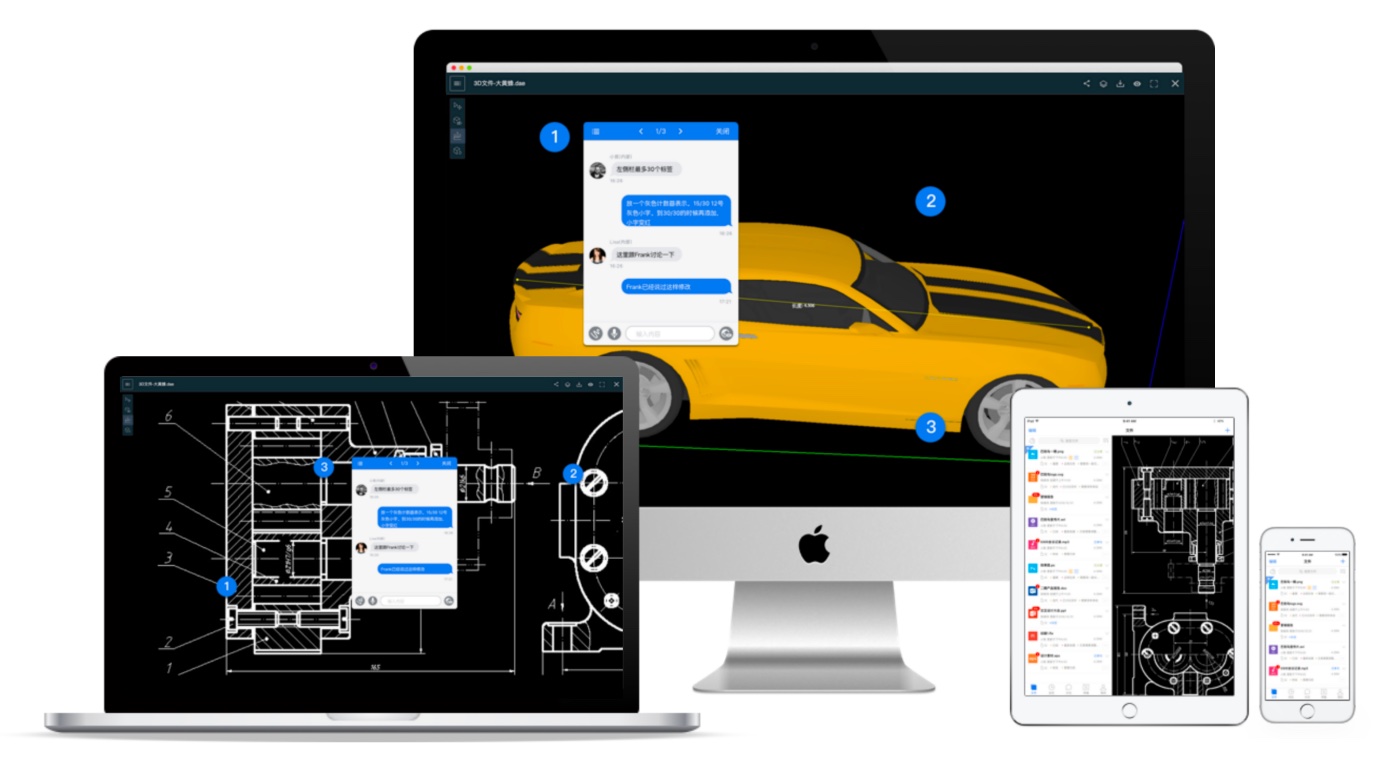
Adaptive layout
User interface elements automatically adjust to screen size and orientation to ensure content visibility and usability.
Touch-friendliness:
Optimize touch interactions on mobile devices, including gesture controls, swiping, and zooming.
Image and media optimization:
Preloading, image transcoding to generate thumbnails, and media compression techniques are used to reduce page load times and bandwidth usage.
Mobile support
Web version mobile device optimization
Mobile interface design:
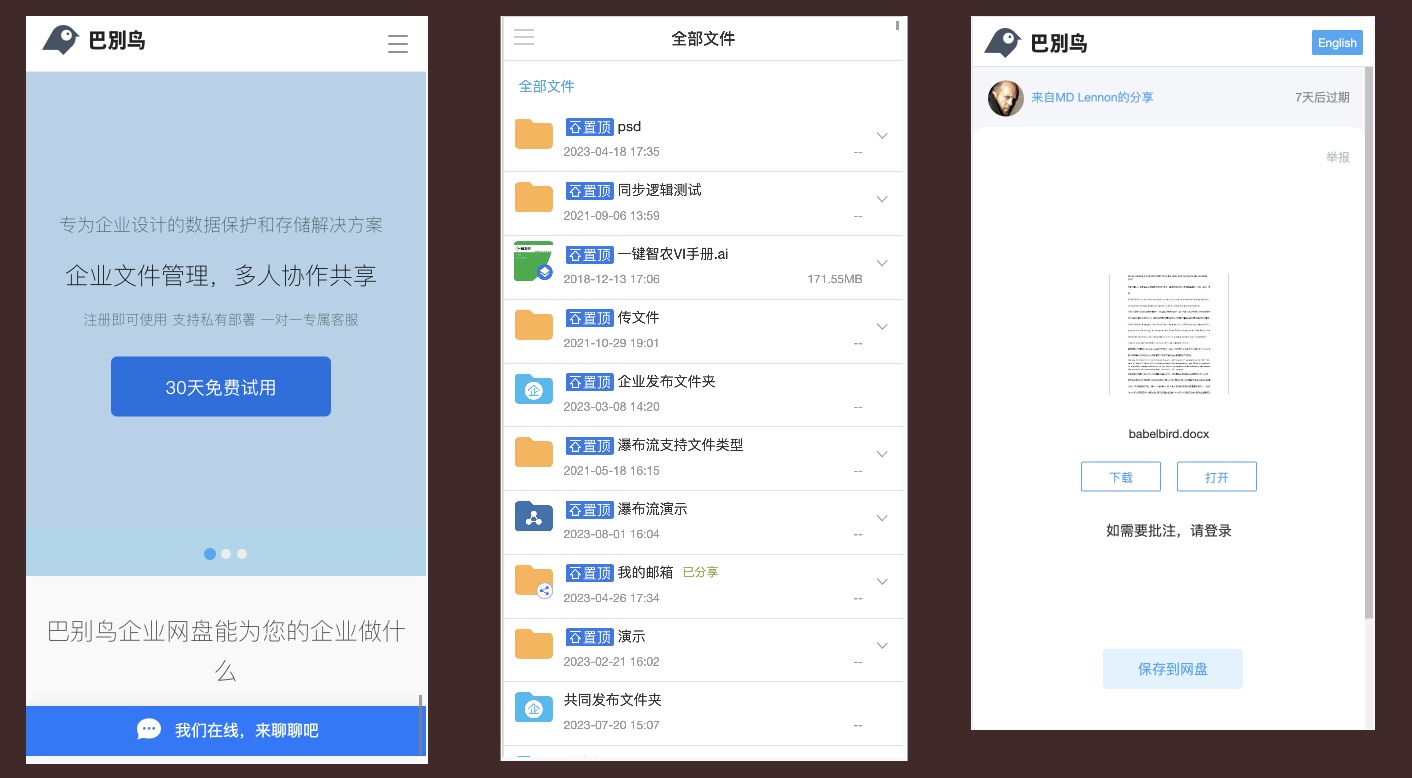
The BabelBird web version has an H5 page designed for mobile devices, as well as a mobile version of the promotional website and mobile version download interface for sharing links, and supports common touch gestures such as sliding, zooming and clicking.
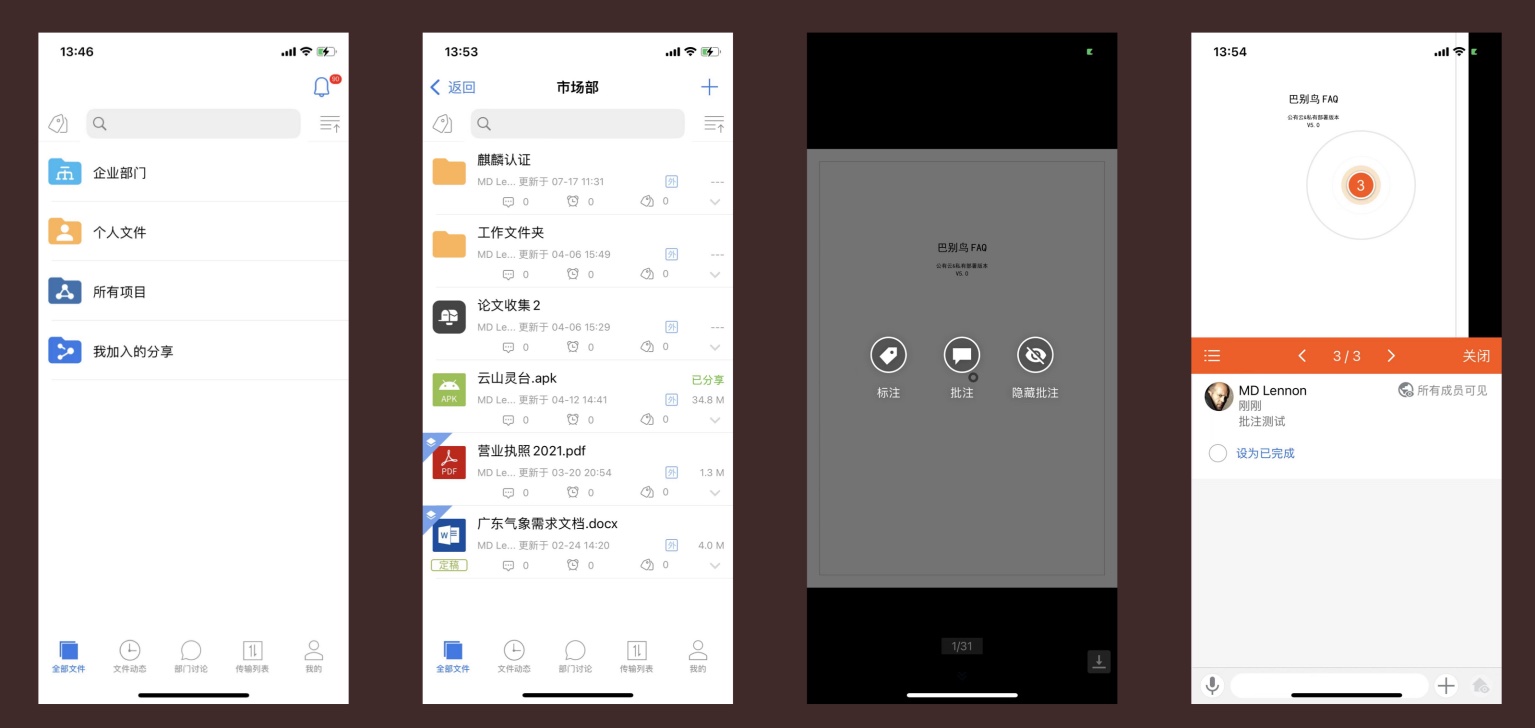
Mobile APP:
In order to obtain a better user experience, BabelBird has developed a mobile-specific APP that supports Android and iOS systems.
In order to ensure good performance, BabelBird APP is developed as a native application.
The interaction, interface, and functional modules of the APP have all been redesigned to be suitable for access on mobile devices.
Tablet optimization
The Babel iOS APP has a redesigned interface for the iPad to make it more suitable for working on a large screen.
Performance optimization
Load balancing strategy
Separation of authentication and services
Separate authentication: In order to improve the performance and security of the system, BabelBird Enterprise Drive adopts the strategy of separating authentication and core services. This means that the user's authentication request will be routed to a dedicated authentication server, and core service requests such as uploading, downloading, and query browsing will be routed to the corresponding core service server.
Request routing:
We use a load balancer to route requests to different servers based on the request type. This ensures that the authentication server does not become a performance bottleneck for core services and allows us to scale authentication and core services independently as needed.
Multiple server deployments for the same type of requests
Multi-server support:
BabelBird Enterprise Drive allows the same type of requests to be deployed on multiple servers to improve performance and availability. This multi-server support strategy ensures that even if one server fails, the other servers can still handle requests.
Requests are evenly distributed:
We use a load balancing algorithm to evenly distribute the same type of requests across multiple servers to avoid server overload and provide faster response times.
load balancer
Load balancer configuration:
We use professional load balancers to distribute and route requests. The load balancer sends requests to the appropriate server based on predetermined rules.
Monitoring and automatic failover:
The load balancer is equipped with monitoring features that can detect the health status of the server. If a server fails, the load balancer automatically routes requests to other available servers to ensure system continuity.
Advantages
Performance improvements:
Load balancing strategies improve system performance, allowing requests to be processed in parallel on multiple servers, reducing the load on a single server.
High availability:
The deployment of multiple servers and automatic failover ensure the high availability of the system, and services can still be provided even in the event of a failure.
Scalability:
Load balancing strategies allow more servers to be added as needed to accommodate growing users and requests.
Cache management
File buffer management
File buffer settings:
In order to optimize performance and reduce the burden on CPU resources, BabelBird Enterprise Drive implements file buffer management. The decrypted files will be temporarily stored in the buffer to reduce repeated decryption operations.
LRU strategy:
We adopt the least recently used (LRU) policy to manage the file buffer. This means that the least frequently used files are cached, thus maintaining efficient buffer utilization.
File authentication buffer management
File authentication buffer: Authentication checking for file access permissions is complex and time-consuming. Comprehensive authentication testing is required based on multiple factors such as the department, project, sharing, and confidentiality level of the file. In order to improve performance, we implemented file authentication buffering to cache the authentication results.
Expiration elimination mechanism:
The file authentication buffer adopts an expiration elimination mechanism. Each cache entry has a predetermined expiration time, and once this time is exceeded, the cache will be automatically evicted. This ensures freshness of cached data and reduces memory usage.
Advantages
Performance optimization:
Cache management reduces the repeated execution of decryption operations and authentication checks, thereby improving system response speed and performance.
Resource saving:
By using the LRU policy and expiration mechanism, we effectively manage memory resources and avoid memory leaks and over-occupancy problems.
Quick response to complex authentication:
The file authentication buffer ensures fast response to complex authentication test results and reduces the pressure on the authentication service.
Data compression and transmission optimization
File chunking technology
File storage in chunks:
In order to optimize the transmission and storage of files, BabelBird Enterprise Drive adopts file blocking technology. Large files are broken into smaller chunks and stored separately on the server. This helps improve file transfer efficiency and supports breakpoint resume downloads.
Parallel block request:
Chunked file storage allows the front end to make requests for multiple chunks in parallel when downloading a file. Once all chunks have been downloaded, the front-end assembles them into a complete file, significantly increasing download speeds.
File storage deduplication technology based on hash code
File deduplication:
BabelBird Enterprise Drive uses hash code-based file storage deduplication technology. When a user uploads a file, the file's hash code is calculated and compared with the hash code of an existing file. If the same hash code is found, the system will keep only one copy of the file, thus saving storage space.
Save storage space:
File deduplication technology effectively reduces storage redundancy, especially files that are frequently shared and transferred in enterprises, thereby reducing storage costs.
Advantages
Transmission efficiency:
File chunking technology and parallel block requests speed up file transfers, especially for large files and high-bandwidth connections.
Storage savings:
File storage deduplication technology based on hash codes reduces storage requirements and maintenance costs.
User experience:
Fast file transfer and storage space savings improve user experience, providing more efficient file management and sharing.
Asynchronous task processing
Background asynchronous processing
Task time-consuming processing: In order to handle tasks issued by the front desk that may be time-consuming or even cause HTTP requests to time out, BabelBird Enterprise Drive adopts a background asynchronous processing strategy. These tasks do not block the main HTTP request response, but are executed asynchronously in the background.
Improve response speed:
Background asynchronous processing ensures that the response speed of foreground requests is not affected by time-consuming tasks, improving user experience.
Configurable management of asynchronous tasks
Task queue:
In order to prevent server resource constraints, we have configured and managed asynchronous tasks. Asynchronous tasks can be configured as one or more processing queues, which can execute tasks independently. Task queues can be configured and managed based on task type and priority.
Message queue:
Another way to manage asynchronous tasks is to use message queues. BabelBird Enterprise Drive can be configured to use message queues to store and schedule asynchronous tasks. This mechanism ensures orderly execution and controllability of tasks.
Message processing mechanism:
Asynchronous tasks are controlled and executed through message processing mechanisms. After the task is added to the queue or message queue, it is processed and executed by a specialized processor.
Advantages
Responsiveness:
Background asynchronous processing improves the system's response speed and avoids long waits.
Resource control:
Configurable management of asynchronous tasks allows effective control of server resources to prevent resource exhaustion.
Scalability:
The message queue and message processing mechanism provide system extensibility, and new asynchronous task types can be easily added.
Scalability
Horizontal expansion
Cluster deployment: BabelBird Enterprise Drive Business Server adopts a cluster deployment model, which allows us to easily expand the capacity and performance of the system. Multiple servers in a cluster work together to share load and provide high availability. This model allows us to add new nodes as needed to meet growing user and data needs. Private cloud deployment customers can also expand performance by adding virtual machines or physical servers to meet high concurrency requirements as their users grow. For more information about the scalability of Babel Cluster deployment, see the Distributed Deployment chapter.
Object storage system:
Babel's storage system uses object storage technology, which is very suitable for large-scale data storage and horizontal expansion. Object storage systems are highly scalable and can accommodate large amounts of data and automatically expand storage capacity by adding storage nodes when needed. For more information about the scalability of Babel object storage, see the self-built object storage chapter.
Load balancing:
We have implemented a load balancing strategy to ensure that user requests are evenly distributed to various nodes in the cluster to avoid single points of failure and provide faster response times.
Auto-scaling (public cloud):
Thanks to Alibaba Cloud ECS elastic computing service, our system is configured with an automatic scaling mechanism to automatically increase or decrease server nodes according to load conditions. This automatic scaling ensures system stability and performance.
vertical expansion
Hardware upgrade:
In addition to horizontal expansion, for private cloud users we can also perform vertical expansion, that is, upgrading server hardware to increase the performance and capacity of a single server. This is an effective solution in situations where more computing power or memory is required.
Database optimization:
We can also optimize the database system to improve performance by adjusting configurations, using higher performance hardware, or upgrading the database management system. These improvements provide better query performance and data processing capabilities.
Cache:
We use caching technology to speed up data access and reduce the load on databases and storage systems. Caching supports memory caching, CDN caching and other methods, and you can choose the most suitable caching strategy according to your needs.
Containerization and SOA service architecture
Docker containerization
Docker deployment:
We use Docker containerization technology to deploy various components and modules of BabelBird Enterprise Drive. This approach allows us to package each major module as an independent Docker container, providing greater flexibility and scalability.
Container orchestration:
We use container orchestration tools to manage and coordinate individual containers to ensure they work together to achieve high availability and resiliency.
Container image management: BabelBird Enterprise Drive uses the container image warehouse to store and manage Docker images so that new container instances can be deployed at any time.
SOA service architecture
Service split:
We split the main functional modules of BabelBird Enterprise Drive into independent services, and each service is responsible for performing specific tasks or functions. This split improves the maintainability and scalability of the system.
API communication:
Services communicate through APIs, using compatible RESTful API protocols. This loosely coupled communication method allows services to be developed, tested, and deployed independently.
Standalone deployment:
Each service can be deployed and scaled independently, which means we can horizontally scale specific services based on demand without affecting the operation of other services.
Advantages of containerization and SOA service architecture
High availability:
Containerization and SOA service architecture provide high availability, allowing us to quickly restore services in the event of a failure.
Flexibility:
Containerization allows us to easily deploy, upgrade and maintain each container, while SOA service architecture provides flexible modular development and deployment options.
Resource utilization:
We can allocate resources as needed to avoid resource waste and achieve higher resource utilization.
Fast delivery:
Containerization and SOA service architecture enable new features and improvements to be delivered to users faster. Private cloud users can also enjoy fast update and upgrade services that are comparable to public cloud systems.
Challenges of containerization and SOA service architecture
Complexity:
Managing multiple containers and services can introduce a level of complexity that requires appropriate management tools and strategies.
Monitoring and logging:
We use monitoring and logging tools to ensure the normal operation of containers and services, and to identify and solve problems in a timely manner. We are equipped with an automatic restart mechanism. If there is a problem with the service, the problematic module will be automatically restarted to ensure the smooth flow of the overall service.
Private deployment
The BabelBird public cloud network disk system needs to provide continuous and uninterrupted services to 600,000 users including free users at the same time, block various attacks on the public network, and continuously improve system efficiency to reduce the high cost of public cloud servers. As many as 10 years of experience in uninterrupted public cloud services have made the Babel system time-tested. The Babel private cloud system is developed on the basis of the Babel public cloud system. It inherits all the functions and features of the public cloud Babel, and is updated synchronously with the public cloud Babel, providing you with high stability and high availability that other private network disks cannot match.
Deployment plan In response to the different IT system construction needs of different enterprises, the Babel privatization system supports a variety of flexible deployment methods and deployment requirements. Whether it is single server, multi-server, cluster, hyper-converged system, distributed system, third-party cloud platform or even Docker deployment, we support it. Our deployment team can work with you to develop a deployment plan based on your needs. At the same time, because private cloud only serves a single enterprise, we can provide optional customization settings that far exceed those of public cloud systems. From interface operations to processes to permissions, everything can be adjusted according to your needs.
Recommended server configuration and performance requirements
Server type and function:
The hardware system required by BabelBird Enterprise Drive consists of two parts: business servers and storage servers. Business servers can be divided into 4 types. These 4 types of services can be deployed in one physical machine or virtual machine according to needs, or can be deployed dispersedly in four or more servers. Therefore, the minimum unit for deploying the Babel system is two physical servers or two virtual machines (one for business and one for storage)
| Service name | Purpose | Operating system |
|---|---|---|
| Main business server | web services, load balancing, main business function implementation | Linux |
| Database Server | Database Service | Linux |
| Search server | Provides file full-text search and advanced search functions | Linux |
| Transcoding server | Transcode and add watermarks to files that require transcoding preview | windows 2012, Linux |
| Storage server | Provides file storage | Linux |
In extreme cases, if the hard disk mounted on the server is used as storage space, Babel also supports deploying all services and storage in a physical machine or virtual machine (all-in-one machine mode). However, considering performance and disaster recovery or future upgrade and expansion issues, such a deployment method is not recommended.
The best deployment method we recommend is a small cluster deployment of 4 servers (virtual machines). The main business services and database services are placed on one server, the search server and transcoding server are independent, and then a storage server is added.
If the storage space requirement is less than 10TB, a storage server is not required. You can directly mount a hard disk or NFS disk for storage.
BabelBird also supports access to third-party storage. In theory, as long as the third-party storage system supports the NFS or S3 protocol, it can be connected to BabelBird as a storage service. Most storage systems support both protocols. Each server must ensure smooth communication between each other. If the intranet has higher security requirements, please refer to 9.1.2 Ports that need to be opened
Minimum performance configuration:
The lowest performance configuration of BabelBird can support normal use by about 100 users and manage less than 10TB of data.
| cpu | memory | system disk | storage disk | network | operating system |
|---|---|---|---|---|---|
| 8-core CPU (reference benchmark E5-2609) | 32G ECC memory | 500G | Below 10TB | Gigabit | Linux |
Recommended performance configuration examples:
The recommended performance configuration of BabelBird can support normal use by 1000-2000 users and manage documents up to 1PB.
Babel supports multiple deployment methods, and this instance is the standard deployment method. Use virtual machines to deploy business servers to connect to independent single or multiple object storage servers. Business servers and storage servers are managed separately.
Business server:
It is recommended that business servers be deployed using virtual machines
| Number | Server type | Configuration requirements | Operating system | Server purpose |
|---|---|---|---|---|
| 1 | Virtual machine | 8-core CPU 64G memory 500G SSD system disk | CentOS8 or openeuler22 | Main business server/database |
| 2 | Virtual machine | 8-core CPU 32G memory 500G SSD system disk | CentOS8 or openeuler22 | Search server |
| 3 | Virtual machine | 8-core CPU 16G memory 200G SSD system disk | windows 2012 R2 | transcoding server |
*The performance of the 8-core CPU should be close to that of the Zhiqiang 4410
BabelBird Enterprise Drive is deployed using Docker. In theory, it can be deployed as long as it is a Linux operating system. CentOS or open Euler is recommended.
If there are no ready-made virtual machine resources, you need to purchase a new business server. The business server hardware configuration requirements are as follows:
| Number | Server type | Configuration requirements | Operating system | Server purpose |
|---|---|---|---|---|
| 1 | Business server | Xeon Silver 4210*2 20-core CPU 64G memory 2TB SSD hard drive | Linux | Main business server |
*It is best to purchase VM for business servers and use virtualization for management.
Storage server (object storage):
Babel supports building an object storage system on a general-purpose server. If the storage space is expected to be less than 100TB, it is recommended to use a single server to build the object storage system. A single object storage can use disks for data verification redundancy, and can be horizontally expanded by adding one storage server at a time. (The expansion operation can be done without stopping the server)
It is recommended to use an independent physical machine for the object storage server, and the recommended configuration is as follows:
| Server type | Configuration requirements | Operating system | Server purpose | Notes |
|---|---|---|---|---|
| Storage server | If storage density and future expansion investment are considered, a 12T hard drive can be used. | Linux | Object Storage Server | It is recommended to add a server with the same disk capacity for future expansion. |
If the required storage space is greater than 300TB, multiple servers are required to build a distributed object storage system.
BabelBird also supports building distributed object storage systems for customers. To learn about distributed object storage, please refer to the "Self-Built Object Storage" chapter.
Need to open the port For the security of the server system, we need to open only specific ports. The following are the ports that need to be opened:
Ports open to the outside world (ports required for external network access):
| Port number | Port purpose | Protocol | Open host |
|---|---|---|---|
| 80 | Network disk main business web external access port, not encrypted | http | main business server |
| 443 | Network disk main business web external access port, encrypted | https | Main business server |
| 3060 | Network disk main business node external access port, not encrypted | TCP | Main business server |
| 3080 | Network disk main business node external access port, encryption | TCP | Main business server |
Open ports are required between servers (open ports are required for internal server communication):
Generally, during actual deployment, only external network ports (external) will be restricted, and internal ports between servers will not be restricted. However, some users who deploy across networks and computer rooms will also need to limit internal ports.
| Host | Port number | Port purpose | Protocol | Target network segment |
|---|---|---|---|---|
| Business server | 6379 | redis access port for windows transcoding and search server | TCP | transcoding server and search server |
| Business server | 8080 | Used by windows transcoding server to access network disk business server | TCP | Transcoding server and search server |
| Business server | 3306 | Database port, used by the search server to access the database | TCP | Transcoding server and search server |
| Business server | 9000 | Docker cluster deployment, internal visual interface port | TCP | Transcoding server and search server |
| Business server | 111 | portmap port | TCP+UDP | Transcoding server and search server |
| Business server | 2049 | TCP+UDP | TCP+UDP | Transcoding server and search server |
| Business server | 35000 | mountd port | TCP+UDP | Transcoding server and search server |
| Business Server | 2376 | docker REST API port for TLS encryption | TCP | Native |
| Business server | 2377 | TCP port used for communication related to docker cluster management | TCP+UDP | Native |
| Business server | 7946 | TCP and UDP ports, used for communication between docker swarm nodes | TCP+UDP | Local machine |
| Business server | 4789 | docker overlay network default port | TCP+UDP | Local machine |
| Search server | 9200 | elastic port, used by the main business server | TCP | business server |
| Search server | 5601 | Kibana port, internal visual elastic interface access port | TCP | Business server |
| Search server | 9998 | tika port, extract document text server port | TCP | Business server |
| Search server | 9000 | Docker cluster deployment, internal visual interface port | TCP | Transcoding server and search server |
| Search Server | 2376 | docker REST API port for TLS encryption | TCP | Native |
| Search server | 2377 | TCP port used for communication related to docker cluster management | TCP | Native |
| Search server | 7946 | TCP and UDP ports, used for communication between docker swarm nodes | TCP+UDP | Local machine |
| Search server | 4789 | docker overlay network default port | TCP+UDP | Native |
| Transcoding server | Transcoding server | Can access the business server | Can access the business server | Can access the business server |
Ports that need to be opened during deployment:
| Port number | Port purpose | Open server | Destination IP address |
|---|---|---|---|
| 22 | SSH port number, used for SSH access | All servers | Springboard machine for deployment |
| 443 | Obtain authorization | All servers | 47.96.234.200 |
| 443 | Get installation source | All servers | 120.27.245.68 |
| 443 | Docker installation source | All servers | 13.35.121.100 |
POC deployment
POC deployment is suitable for users to conduct POC testing in the production environment before selection.
POC deployment requirements:
Basic POC deployment can test software functions, concurrency, API interfaces, security, and trial in the production environment. It is recommended to use standard deployment as POC test.
If you need object storage, data transfer in different density areas, and high-availability POC, you need to add corresponding servers and network segments.
Environmental preparation
It is recommended to use a virtual machine for deployment:
BabelBird's privatized enterprise network disk is deployed using Docker. In theory, it can be deployed as long as it is a Linux operating system. It is recommended to use CentOS or open Euler. After preparing the virtual machine as required, contact us to make an appointment and you can start POC deployment.
| Number | Server type | Configuration requirements | Operating system | Server purpose | Remarks |
|---|---|---|---|---|---|
| 1 | Virtual machine | 8-core CPU 32G memory 500G system disk +500G storage disk | CentOS8 or openeuler22 and above | Main business server | |
| 2 | Virtual machine | 8-core CPU 16G memory 500G system disk | CentOS8 or openeuler22 and above | Search server | |
| 3* | Virtual machine | 8-core CPU 8G memory 200G system disk | windows 2012 R2 | transcoding server | CAD, office transcoding |
*Win server is for better office file preview effect. BabelBird also supports pure Linux environment deployment
Other requirements for POC deployment are as follows:
| Number | Project | Requirements | Remarks |
|---|---|---|---|
| 1 | Remote access | You can remotely access the server for deployment | You can use a bastion machine or springboard machine or Sunflower or VPN, and you can remotely access the server for deployment. |
| 2 | External network connection | The server needs to be able to connect to the external network, pull the installation package, and obtain authorization | The external network address that needs to be connected: software.babel.cc docker.babel.cc |
The authorization period for POC deployment is 30 days, and the number of authorized accounts is 100.
initialization
After the deployment is completed, the Babel team will help users initialize the system and initialize the system according to user needs. Including but not limited to:
Initialize the administrator account. (You need to prepare an email address as a super administrator account)
Initialize the notification sending email address. (The user needs to prepare an email address that can provide password and SMTP server address as the system default outbox)
Initialize department structure. (Connect with AD or import department)
Initialize basic configuration. logo, company name, various configuration items.
training
BabelBird is a professional enterprise-level application and requires certain training to help customers implement it. After POC, it is recommended to contact our sales staff for usage training.
Training is divided into 3 categories:
Administrator training (training administrators on configuration, use, and realization of required functions. It takes 1-2 hours)
Department manager training. (Training department managers on daily management methods such as authority allocation, member addition and reduction, etc. It takes 1 hour)
User training. (Training of using members. It takes 1 hour)
Start POC trial
After the training is completed, the formal POC trial can be started. Any questions encountered during use can be directly asked in the relevant group, and the BabelBird team will respond and answer within 2 hours. The POC system is valid for 30 days. If you need to extend it, please contact our sales staff.
Introduction to common deployment methods of BabelBird
BabelBird can support multiple deployment methods on demand. Here we introduce the commonly used deployment methods of BabelBird.
Deployed on public platforms such as Alibaba Cloud, Tencent Cloud, Huawei Cloud, etc.:
Babel supports deployment on virtual machines (ECS) and object storage (OSS, OBS...) of public cloud service providers such as Alibaba Cloud, Tencent Cloud, Baidu Cloud, Huawei Cloud, and Tianyi Cloud, and provides services to users on the Internet.
The difference compared with purely private deployment is as follows:
| Advantages and Disadvantages/Deployment Method | Image Service | Video Service | Public Network Access | Stability | Hardware Cost |
|---|---|---|---|---|---|
| Using Alibaba Cloud storage and Alibaba Cloud servers | You can use the picture service provided by Alibaba Cloud | You can use Alibaba Cloud's video transcoding service, but it requires an additional fee (expensive) | It can be accessed on the public network. The speed of user access depends on the user's own bandwidth and the purchased Alibaba Cloud bandwidth. | The system is very stable, simple to deploy and easy to manage. | You need to pay Alibaba Cloud's storage and server fees, which can be paid monthly or annually. Users can be responsible for the maintenance of the server themselves, or they can entrust us to perform maintenance and upgrades. |
| Storage and servers are built on your own intranet | Use self-built image processing services (requires customers to provide high-performance servers) | Use self-built transcoding services (requires customers to provide high-performance servers). If the user does not have this requirement, you can ignore it. | If there is no external network exit, users cannot access the external network. But intranet access is very fast. | Stable, customized development for modules such as storage systems. The security of data is the responsibility of the user. | Requires independent host and storage systems. The server can be purchased by the user or by us. Server maintenance is the responsibility of the user, and we can provide corresponding software upgrade services. |
Public cloud deployment (1000+ users) requirements:
| Number | Server type | Configuration requirements | Operating system | Server purpose |
|---|---|---|---|---|
| 1 | ECS | 16-core CPU 32G memory 500G SSD system disk | CentOS8 or openeuler22 | Main business server |
| 2 | ECS | 8-core CPU 16G memory 500G SSD system disk | CentOS8 or openeuler22 | Database server |
| 3 | ECS | 8-core CPU 16G memory 500G SSD system disk | CentOS8 or openeuler22 | Search server |
| 4 | Storage | Object storage system. Such as Alibaba Cloud OSS, Huawei Cloud OBS | Object Storage System. Such as Alibaba Cloud OSS, Huawei Cloud OBS | Object Storage System. Such as Alibaba Cloud OSS, Huawei Cloud OBS |
The main advantages of deploying on a public cloud platform are that it does not require dedicated maintenance, top-level disaster recovery can be achieved without purchasing hardware, access to the Internet is fast, and servers and data are managed by oneself.
The main disadvantages of deploying on a public cloud platform are: data is not localized, and annual server rental fees and corresponding bandwidth storage costs need to be paid.
Self-purchased servers (2 physical machines) for deployment:
If you want to deploy a purely private BabelBird in your own computer room and do not have spare virtual machine resources, you need to purchase hardware deployment. The requirements are as follows:
| Physical server brand recommendation: It is recommended to use 2 DELL T440 servers to complete the system setup. And purchase DELL 3-year gold service. The server's system disk can optionally use raid to enhance redundancy. If you use the raid1 solution, the number of hard disks required needs to be increased by 2 times. (2TB SSD becomes 2TB SSD*2) | Physical server brand recommendation: It is recommended to use 2 DELL T440 servers to complete the system construction. And purchase DELL 3-year gold service. The server's system disk can optionally use raid to enhance redundancy. If you use the raid1 solution, the number of hard disks required needs to be increased by 2 times. (2TB SSD becomes 2TB SSD*2) | Physical server brand recommendation: It is recommended to use 2 DELL T440 servers to complete the system construction. And purchase DELL 3-year gold service. The server's system disk can optionally use raid to enhance redundancy. If you use the raid1 solution, the number of hard disks required needs to be increased by 2 times. (2TB SSD becomes 2TB SSD*2) | Physical server brand recommendation: It is recommended to use 2 DELL T440 servers to complete the system construction. And purchase DELL 3-year gold service. The server's system disk can optionally use raid to enhance redundancy. If you use the raid1 solution, the number of hard disks required needs to be increased by 2 times. (2TB SSD becomes 2TB SSD*2) | Physical server brand recommendation: It is recommended to use 2 DELL T440 servers to complete the system construction. And purchase DELL 3-year gold service. The server's system disk can optionally use raid to enhance redundancy. If you use the raid1 solution, the number of hard disks required needs to be increased by 2 times. (2TB SSD becomes 2TB SSD*2) | Physical server brand recommendation: It is recommended to use 2 DELL T440 servers to complete the system construction. And purchase DELL 3-year gold service. The server's system disk can optionally use raid to enhance redundancy. If you use the raid1 solution, the number of hard disks required needs to be increased by 2 times. (2TB SSD becomes 2TB SSD*2) |
|---|---|---|---|---|---|
| Two server plan business + storage | Two server plan business + storage | Two server plan business + storage | Two server plan business + storage | Two server plan business + storage | Two server plan business + storage |
| Number | Server type | Configuration requirements | Operating system | Server purpose | Remarks |
| 1 | Server | Zhiqiang Silver 4410 *2 16-core CPU, 64G memory, 2TB SSD hard drive | open Euler, Ubuntu, CentOS | Main business server | It is recommended to install VM |
| 2 | Storage | 4410 *2 16-core CPU, 64G memory, 500G SSD hard disk + required hard disk space (no raid or raid0 required) | open Euler, Ubuntu, CentOS | Storage server | Hard disk capacity is configured according to storage space requirements |
The above configuration can support 1000+ users and about 150TB of storage space.
Babel storage server uses an object storage system and supports distributed deployment (multiple storage servers) with a minimum requirement of one physical server. Supports the use of hard disk groups for verification, and supports multiple verification types such as 2+1, 3+1, 4+1... etc. See the self-built object storage chapter for details.
If you need to expand the storage space, just add a single storage server.
You can also add a storage server as a backup server to synchronize the backup in real time. If there is a problem with the main storage server, switch to the backup server and it can be used normally.
Single server (1 physical machine) deployment:
Some customers who do not have a computer room but need to deploy BabelBird privately and have small storage space requirements (less than 10TB) can choose to deploy BabelBird on a single server. Just purchase a tower server that meets the requirements and place it in your company to meet the needs of using BabelBird.
| Physical server brand recommendations: If there is no computer room, it is recommended to use tower servers for deployment. It is recommended that the server storage hard disk is raid1 or raid5+1. The system disk of the server can optionally use raid to enhance redundancy. If you use the raid1 solution, the number of hard disks required needs to be increased by 2 times. (2TB SSD becomes 2TB SSD*2) | Physical server brand recommendations: If there is no computer room, it is recommended to use tower servers for deployment. It is recommended that the server storage hard disk is raid1 or raid5+1. The system disk of the server can optionally use raid to enhance redundancy. If you use the raid1 solution, the number of hard disks required needs to be increased by 2 times. (2TB SSD becomes 2TB SSD*2) | Physical server brand recommendations: If there is no computer room, it is recommended to use tower servers for deployment. It is recommended that the server storage hard disk is raid1 or raid5+1. The system disk of the server can optionally use raid to enhance redundancy. If you use the raid1 solution, the number of hard disks required needs to be increased by 2 times. (2TB SSD becomes 2TB SSD*2) | Physical server brand recommendations: If there is no computer room, it is recommended to use tower servers for deployment. It is recommended that the server storage hard disk is raid1 or raid5+1. The system disk of the server can optionally use raid to enhance redundancy. If you use the raid1 solution, the number of hard disks required needs to be increased by 2 times. (2TB SSD becomes 2TB SSD*2) | Physical server brand recommendations: If there is no computer room, it is recommended to use tower servers for deployment. It is recommended that the server storage hard disk is raid1 or raid5+1. The system disk of the server can optionally use raid to enhance redundancy. If you use the raid1 solution, the number of hard disks required needs to be increased by 2 times. (2TB SSD becomes 2TB SSD*2) | Physical server brand recommendations: If there is no computer room, it is recommended to use tower servers for deployment. It is recommended that the server storage hard disk is raid1 or raid5+1. The system disk of the server can optionally use raid to enhance redundancy. If you use the raid1 solution, the number of hard disks required needs to be increased by 2 times. (2TB SSD becomes 2TB SSD*2) |
|---|---|---|---|---|---|
| One server (all-in-one solution) | One server (all-in-one solution) | One server (all-in-one solution) | One server (all-in-one solution) | One server (all-in-one solution) | One server (all-in-one solution) |
| Number | Server type | Configuration requirements | Operating system | Server purpose | Remarks |
| 1 | Server |
The entire Babel system deployed on a single server does not support object storage and uses read-only hard disks or NFS for storage. It is recommended to use raid1 to improve system reliability.
A backup server can be added for data synchronization and backup. If there is a problem with the main server, you can use the backup server to reconstruct the data.
Deploy on existing virtual machine (hyperconverged) system:
This is currently the most commonly used deployment method. It is deployed under the existing servers and hardware of the enterprise without purchasing new equipment.
Deployment is completed in the customer's existing VM or virtual machine allocated by the hyper-converged platform, which is suitable for users who already have certain IT construction and management.
It is deployed in a small cluster, and the virtual machine platform is responsible for the unified management of the server.
Supports most virtualized systems.
It is recommended to deploy four virtual machines with storage space mounted.
| Number | Server type | Configuration requirements | Operating system | Server purpose |
|---|---|---|---|---|
| 1 | Virtual machine | 8-core CPU 32G memory 500G SSD system disk | CentOS8 or openeuler22 | Main business server |
| 2 | Virtual machine | 8-core CPU 16G memory 500G SSD system disk | CentOS8 or openeuler22 | Database server |
| 3 | Virtual machine | 8-core CPU 16G memory 500G SSD system disk | CentOS8 or openeuler22 | Search server |
| 4 | Virtual machine | 8-core CPU 16G memory 200G SSD system disk | windows 2012 R2 | transcoding server |
| 5 | Storage | Support NFS or S3 interface storage system or virtual machine mounting disk as storage disk | Support NFS or S3 interface storage system or virtual machine mounting disk as storage disk | Support NFS or S3 interface storage system or virtual machine mounting disk as storage disk |
If there is a need for system redundancy, you can prepare 6 virtual machines to complete database backup and system redundancy.
| Number | Server type | Configuration requirements | Operating system | Server purpose |
|---|---|---|---|---|
| 1 | Virtual machine | 8-core CPU 32G memory 500G SSD system disk | CentOS8 or openeuler22 | Main business server |
| 2 | Virtual machine | 8-core CPU 32G memory 500G SSD system disk | CentOS8 or openeuler22 | From business server |
| 3 | Virtual machine | 8-core CPU 16G memory 500G SSD system disk | CentOS8 or openeuler22 | Main database server |
| 4 | Virtual machine | 8-core CPU 16G memory 500G SSD system disk | CentOS8 or openeuler22 | From database server |
| 5 | Virtual machine | 8-core CPU 16G memory 500G SSD system disk | CentOS8 or openeuler22 | Database server |
| 6 | Virtual machine | 8-core CPU 16G memory 200G SSD system disk | windows 2012 R2 | transcoding server |
| 7 | Storage | Distributed Object Storage | Distributed Object Storage | Distributed Object Storage |
Supports virtual machine mounting disks to use the mounted disk as storage space.
It can also be connected to third-party storage systems such as san storage or object storage systems.
BabelBird also provides customers with self-built object storage services.
Self-built object storage server and virtual machine deployment:
Babel supports customers to build object storage on general-purpose servers. Because of the advantages of object storage software-defined storage (high availability, easy horizontal expansion), it is recommended that users without object storage can purchase a new server and deploy the Babel object storage system to use it with the Babel business system running on a virtual machine (hyper-convergence).
The business server requirements are the same as those in the previous section "Deployment on Existing Virtual Machine (Hyper-Converged) System".
For a detailed introduction to Babel object storage, please see the "Self-Built Object Storage Server" chapter.
Most of our customers end up choosing object storage servers for storage.
At least a single server is supported to build an object storage system (space requirement is less than 150TB).
| Server type | Configuration requirements | Operating system | Server purpose | Notes |
|---|---|---|---|---|
| Storage server | If storage density and future expansion investment are considered, a 12T hard drive can be used. | Linux | Object Storage Server | It is recommended to add a server with the same disk capacity for future expansion. |
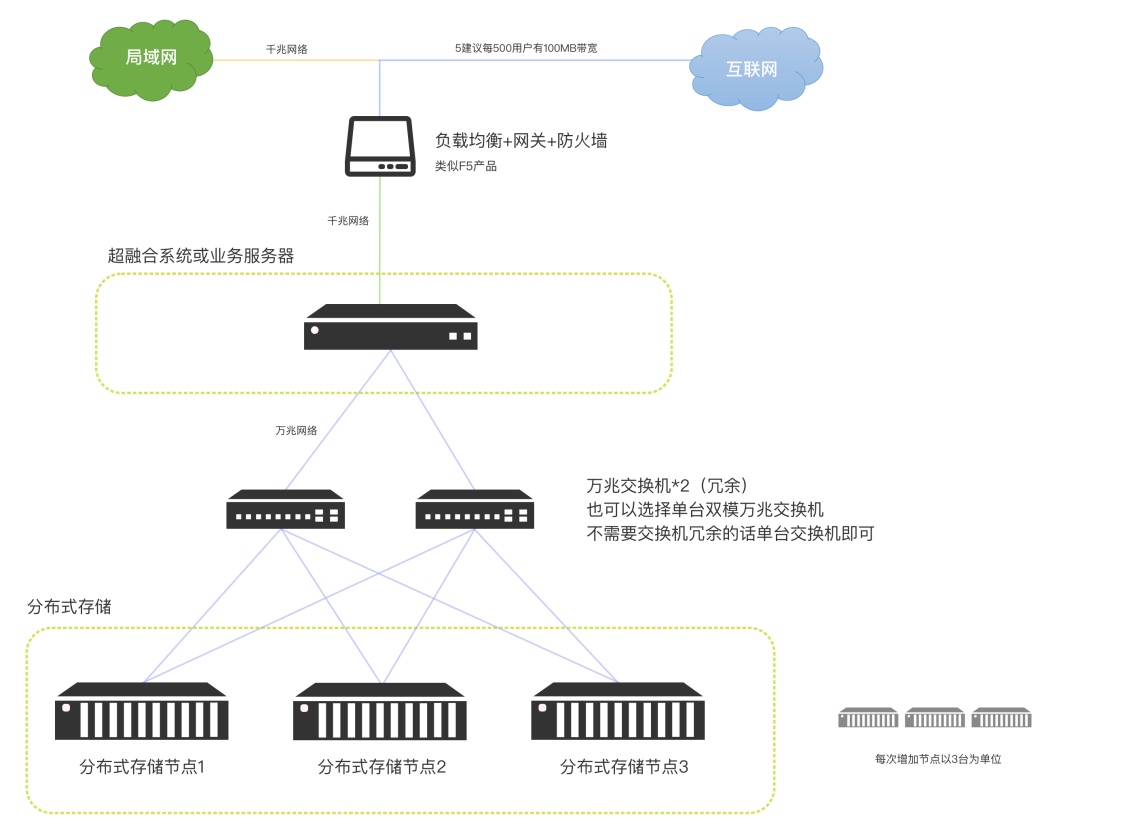
We also support building a distributed object storage system composed of multiple servers.
The minimum requirement for a distributed storage system is 2+1, which means three storage servers need to be prepared. The performance requirements are consistent with those of a single object storage.
*The currently recommended minimum unit for physical distributed storage is 3 storage servers. The 2+1 error correction code means that every time two storage nodes are expanded, one server needs to be added as an error correction server. In this way, 4+1 means that adding 4 storage servers requires adding an error correction server. So the disk utilization of 4+1 is higher than that of 2+1. The first construction using the 4+1 solution requires 5 storage servers. The minimum unit added for each expansion is the same as the minimum server unit required for the first construction.
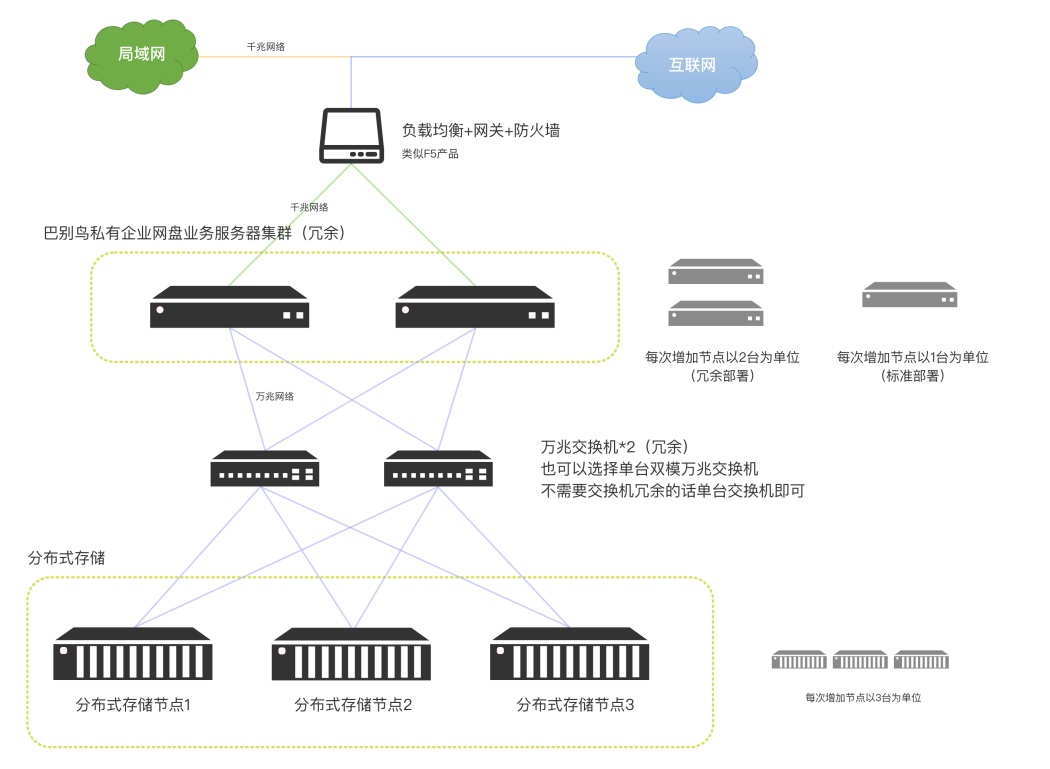
You can add a new storage server or a set of storage servers for real-time backup. If there is a problem with the primary storage server, quickly switch to the backup server and it can be used normally.
Distributed high availability and high redundancy deployment:
Because financial institutions, hospitals, energy, and very large enterprises have hard targets for uninterrupted business, they need systems that can achieve high availability and high redundancy. Services will not be interrupted due to a single point failure of the server, and hot switching and hot repair can be performed. In extreme cases, even network equipment such as switches need to be separated from active and backup, which requires the use of distributed high-availability and high-redundancy deployment.
Babel supports a variety of high availability and high redundancy solutions and can be deployed in traditional distributed systems to achieve high availability and high redundancy.
We can also build a distributed system suitable for Babel for customers. (Customers need to purchase hardware by themselves as required)
Babel distributed deployment can ensure that any single point of failure will not affect the normal use of the system.
The recommended distributed and easy-to-deploy solution uses active-active-active backup for the business server and distributed storage for the storage system.
If there is a need for management and control of confidential and non-confidential areas, please see the "Data Ferry Chapter" for details.
Babel High Availability System Network Topology
Off-site disaster recovery deployment
For users who have higher requirements for data preservation, BabelBird also supports off-site disaster recovery solutions. It means backing up important database and file storage contents to an off-site backup system. If there is a problem in the local computer room, as long as the backup data is there, the system can be rebuilt anywhere and restored to normal use.
BabelBird can build off-site disaster recovery servers for customers, but it does not support advanced backup methods such as hot and cold data separation. If the amount of data is very large (above 1PB) and considering cost-effectiveness, it is recommended to use a professional backup system (such as NBU, Yunqi).
BabelBird has a backup API that supports the NBU standard and can be called.
Off-site disaster recovery deployment has higher requirements on the network environment. It is best to have dedicated lines or stable VPN connections between computer rooms in different locations. Using the backup system can only restore and reconstruct data through backup after a problem occurs. Direct switching to backup data is not supported. Generally, the data reconstruction cycle will take a long time.
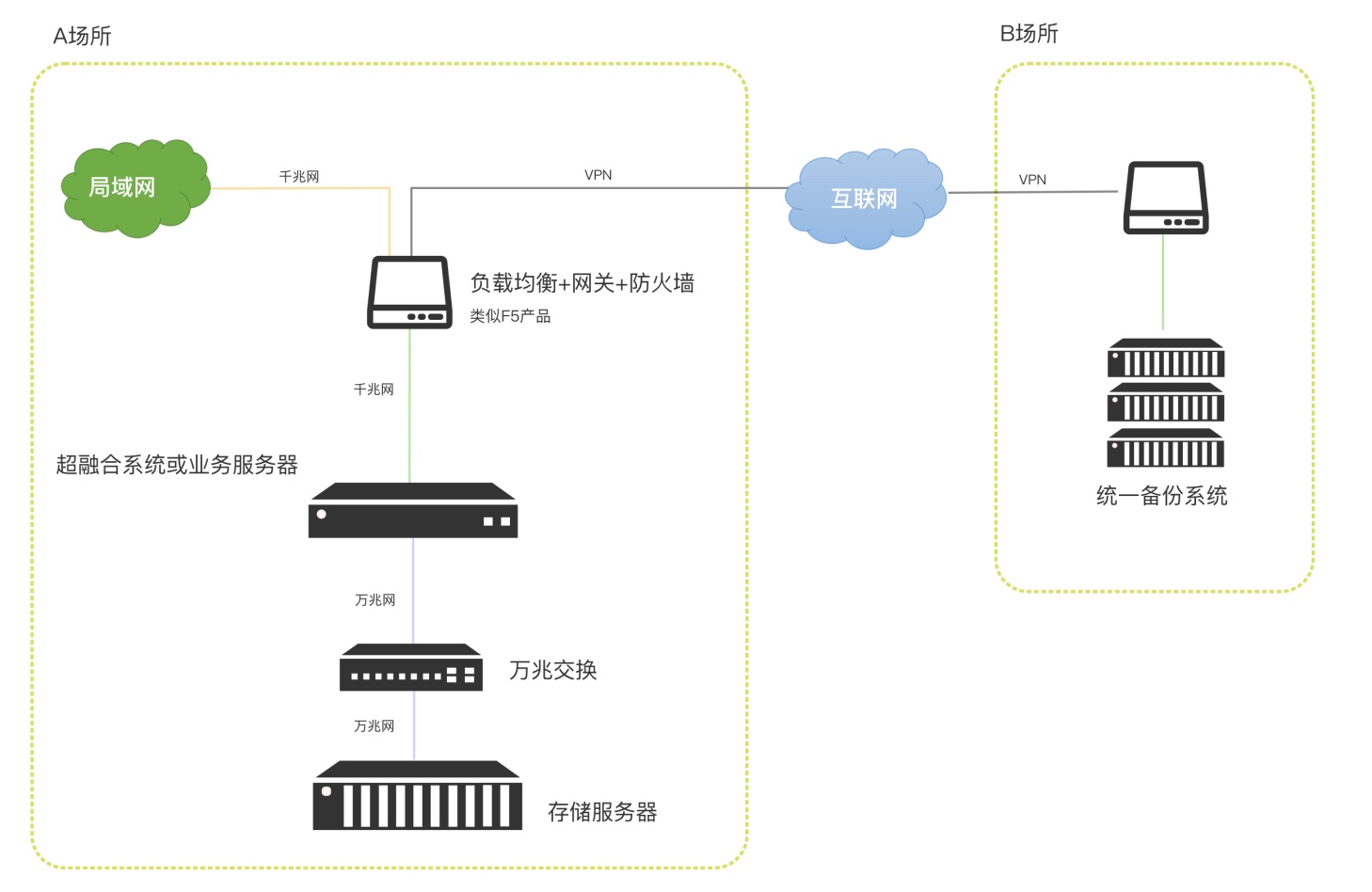
If hot and cold data do not need to be classified and saved, BabelBird can also use the off-site disaster recovery function of object storage to complete off-site disaster recovery deployment for customers.
Use object storage for remote disaster recovery. When the main system has a problem, you can quickly switch to the disaster recovery server.
Self-built object storage server
Babel object storage is an object storage system developed on the open source MinIO system. It inherits MinIO's advantages of high performance, scalability, and data security, and is more suitable for the application scenarios of BabelBird Enterprise Drive.
As an advanced object storage system, Babel object storage system has unparalleled advantages over traditional storage systems in terms of speed, security, stability, high availability, and horizontal expansion.
Advantages of Babel object storage system
Performance
MinIO is claimed to be the fastest object storage server in the world. Published GET/PUT results of over 325 GiB/sec and 165 GiB/sec on 32 NVMe drive nodes and 100Gbe network, a clear advantage compared to Amazon S3 and far superior to traditional HDFS.
High availability: MinIO ensures high reliability and availability through multiple copies of data, failover and automatic recovery, thereby ensuring that data is not lost and business is not interrupted.
Low redundancy and high tolerance for disk damage: the standard and highest data redundancy coefficient is 2 (that is, storing a 1 M data object actually takes up 2 MB of disk space). However, data can still be read even if any n/2 disks are damaged (n is the number of disks in an erasure coding set). And this damage recovery is based on a single object, not based on the entire storage volume.
Security:
MinIO delivers more functionality with the highest levels of encryption and extensive optimizations that virtually eliminate the overhead typically associated with storage encryption operations.
Data is stored in blocks and on each hard disk, and data cannot be restored even if you obtain read and write permissions from the hard disk or server.
Extremely high scalability: MinIO supports distributed deployment and can be expanded horizontally. When more storage space or higher performance is needed, MinIO can be easily expanded by adding new nodes.
At least it supports the deployment of object storage systems on a single machine, instead of the traditional requirement of three independent servers.
Object storage system and erasure coding
About erasure coding Babel Object Storage System (MinIO) uses erasure coding and checksums to protect data from hardware failures and silent data corruption. Even if half (N/2) of the hard drives are lost in the highest redundancy state, you can still recover data.
Erasure coding is a mathematical algorithm for recovering lost and damaged data. MinIO uses Reed-Solomon code to split objects into N/2 data and N/2 parity blocks. This means that if there are 12 disks, an object will be divided into 6 data blocks and 6 parity blocks. Any 6 disks can be lost (regardless of whether they store data blocks or parity blocks) and can still be recovered from the data in the remaining disks. We call the data storage D and the erasure code (parity) P.
By default, the drive is sliced in N/2 data and N/2 parity blocks (customizable to support higher space utilization)
Erasure coding is different from traditional multi-copy technology. It has higher disk utilization and higher data recovery efficiency. (However, many storage manufacturers promote erasure coding as multiple copies and refer to the P number as the number of copies. This is inaccurate and will cause a lot of misunderstandings.)
Multiple copies in the context of Babel refers to adding backup servers to fully synchronize and store data.
Characteristics of erasure coding and differences from raid technology
Erasure coding protects data from multiple drive failures
RAID6 tolerates two drive failures while MinIO erasure coding allows the loss of half the drives
RAID is a volume-level erasure code, while MinIO erasure code is an object-based erasure code (without downtime).
Effective space calculation (space utilization)
Assuming you need 100TB of storage space, how many hard drives you need to buy depends on the redundancy standard you choose. For example: using the 3+1 redundancy method, 100TB of available space requires the purchase of 12 12TB hard drives, 4 hard drives forming 3 groups, 9 data disks and 3 parity disks, the available space is 9*12, a total of 108TB available. If 2+1 redundancy is adopted, 15 10TB hard drives, 10 data disks, and 5 parity disks are required.
In the 3+1 plan, only 3 of the 12 hard disks can fail without affecting system usage and data restoration. However, if you use the 2+1 plan, although you need to purchase more hard disks, any 5 of the 15 hard disks can fail without affecting the system usage.
After replacing the damaged hard drive, the system can automatically repair the data.
Please refer to the table below for space utilization. If the space requirement is large (more than 150TB) and continues to grow, considering storage density and cost performance, it is recommended that a server be equipped with 16 hard disks at a time. Different numbers of disks and space utilization can be calculated by clicking the link below
https://min.io/product/erasure-code-calculator?ref=docs
Hardware preparation
Required hardware configuration.
Babel supports a single server to build an object storage system (single node), using hard disk groups as redundant objects. Up to half of the hard drive can be damaged without affecting the normal use of the system.
The Babel object storage system requires customers to prepare hardware servers in advance for deployment as required. The minimum configuration requires 2 Xhiqiang CPUs, 64GB memory and 400G solid-state drives (system disks), and then the mechanical hard drives required to increase the corresponding storage capacity.
To calculate the storage space required and the number of hard drives to purchase, click the link below to calculate it.
https://min.io/product/erasure-code-calculator?ref=docs
The recommended hardware configuration is as follows:
| Server type | Configuration requirements | Operating system | Server purpose | Notes |
|---|---|---|---|---|
| Storage server | If storage density and future expansion investment are considered, a 12T hard drive can be used. | Linux | Object Storage Server | It is recommended to add a server with the same disk capacity for future expansion. |
Babel object storage uses software-defined storage technology, so the hard disk does not require RAID. Considering that some servers require RAID to support multiple disks, in this case, each hard disk can be set to RAID0 pass-through mode.
Each expansion in single server mode requires adding a server with the same configuration. Uninterrupted service is possible during capacity expansion.
Single-server deployment also supports adding a server with the same configuration to establish active-standby mode for real-time synchronization. If the hardware of a server is damaged, it can be quickly switched to the backup server.
The effective disk space capacity is related to the selected redundancy method. For example: use 8 10T hard drives to build an object storage system, and adopt a 3+1 redundancy scheme, which is equivalent to a group of 4 hard drives, divided into 2 groups, with an effective available space of 60TB. At the same time, if any two of the 8 hard drives are damaged, the data and system usage will not be affected. The damaged hard drive can be automatically rebuilt. If a 7+1 redundancy scheme is adopted, the effective available space is 70TB. Any damage to one of the eight hard drives will not affect data and system usage.
Multi-server deployment (distributed).
Babel object storage system supports multi-server deployment. If the server is used as a redundant unit, at least 3 servers are required, that is, 2+1 mode. However, considering the space utilization, it is recommended to adopt the 3+1 solution (that is, 4 servers).
The configuration requirements for each node (server) are consistent with the single-server deployment above.
It is recommended that the node configuration be consistent (same operating system, same number of disks and same network connection)
The number of drives provided by each node must be the same
The time difference between nodes cannot be greater than 15 minutes (it is recommended to use NTP to ensure time consistency)
The space utilization calculation is the same as for a single server.
Privatization requirements and service procedures
In order to ensure the experience and quality of using the BabelBird system, all privatized deployment work of BabelBird is deployed remotely or on-site and certificates are issued by the BabelBird team. Deployment by an agent team or self-deployment by customers is not currently supported. At the same time, the maintenance work of the system is also carried out by the Babel operation and maintenance team on a regular basis remotely. Customers only need to prepare the hardware and access resources as required, and leave the rest to the Babel team.
Things that need to be prepared in the early stage of privatized deployment: Calculate the approximate number of users, concurrency, storage space and space growth rate and let the Babel account manager evaluate the required configuration.
The customer evaluates the remaining resources (if any) of the existing server and selects a deployment method based on the actual situation.
Babel issued a privatization deployment plan.
Customers prepare corresponding servers and access resources according to the plan, allocate servers, and install operating systems.
Ensure that the server can be accessed via external remote desktop (you can also use Sunflower) and ssh, and open the corresponding port (our deployment technicians will put forward specific port requirements)
It is best for the user to provide a domain name. If there is no domain name, a fixed IP address is required. The solution using IP address to access needs to ensure that the IP address will not change during use.
If you need to access your email to retrieve your password or send a verification code to your mobile phone number, you need to prepare the corresponding email access or SMS gateway.
| Number | Project | Requirements | Remarks |
|---|---|---|---|
| 1 | Domain name | An independent primary domain name or secondary domain name is required | A secondary domain name can be set based on the company's original domain name. Such as yun.company.com |
| 2 | An email address that can send notification emails is required | An email address that supports SMTP is sufficient ########## Email push related ########## MailUser=xxxx@mail.com MailPassword=password MailHost=Mail server address MailPort=Port number | |
| 3 | Remote access | Remote access to the server for configuration | Support remote access and control of the server |
| 4 | SSl certificate | https needs to apply for an SSL certificate | Apply like a digital certificate authority CA. Recommended Application OV Wildcard |
| 5 | SMS interface | If you need a mobile invitation, please register with your mobile phone. You need to activate the SMS interface service (optional) | Cloud service providers such as Alibaba Cloud and Tencent Cloud also provide SMS service interfaces, which can be activated by applying |
implementation stage
Notify us after the preparation work is completed, and we will give users a specific implementation time schedule. Please maintain smooth access to the external network during the implementation time period.
Implementation generally takes 2-3 working days. On the first day, Babel is deployed and installed remotely, on the second day it is tested and accepted, and on the third day, problems encountered are corrected.
Once the implementation is complete we will notify the user and then start the initialization phase
Initialize service
Babel provides initialization services to all private cloud customers, including: Maintenance personnel training (remote or on-site)
Help users with data migration, user import, permission assignment, etc. (remotely or on-site)
User training (remote or on-site)
Access third-party services
As an office platform centered on corporate documents, the privatized BabelBird Enterprise Drive can easily integrate various third-party services into BabelBird to meet different needs by accessing third-party APIs. These services include but are not limited to: electronic signature, advanced CAD preview, office, text recognition, image recognition... and other third-party services to solve your needs.
Conditions for accessing third-party services
In theory, third-party applications or service modules that support the BS architecture can be accessed.
Third-party services must provide open APIs so that BabelBird Enterprise Drive can be integrated with them
If it is an Internet service, the server needs to be able to access the external network.
Enterprises need to authorize themselves or entrust us to purchase third-party services for access.
Recommended accessible services
File anti-leakage system: ipguard
Online office editing: onlyoffice (self-contained), office365, WPS Online, Yongzhong office
Advanced CAD preview: Haochen Cloud Atlas, Dream CAD
CAD online editing: Dream CAD
Online signature: Sign on
Text recognition and image recognition: Baidu Qianfan (Smart Cloud)
AI related: Zhichao AI (self-owned), ChatGPT, Zhipu AI
Open API (unified storage platform)
The private version of BabelBird provides an open API. Using the BabelBird API, you can use almost all capabilities of BabelBird in your system. And build custom applications and integrations in the cloud without having to build and maintain your own content management service.
Unified storage platform
Unified management of unstructured data:
The core value of BabelBird Enterprise Drive's open API is that it can be used as a unified storage platform to integrate and manage unstructured data from various enterprise platforms. This includes but is not limited to OA (office automation), CRM (customer relationship management), ERP (enterprise resource planning) and other applications, so that all unstructured data of an enterprise can be managed uniformly on one platform, improving security and saving storage resources.
Enterprise-grade object storage:
BabelBird Enterprise Drive can also open its own object storage interface as a unified storage management platform for enterprises. This means that enterprises can store data from different sources, including documents, media, reports, etc., in BabelBird Enterprise Drive, and access and manage these data through APIs.
Documentation and support
Detailed documentation: BabelBird Enterprise Drive provides detailed API documentation, including sample code and use cases, to help developers quickly integrate APIs.
Attachment 2: Babel API document https://www.babel.cc/p/api-integration.do
Development support:
We provide development support services, and technical staff will participate in joint debugging to solve one-on-one problems and challenges that may be encountered during the API integration process.
Single sign-on SSO
The BabelBird privatization system supports docking with the SSO single sign-on platform or third-party platforms such as Enterprise WeChat, DingTalk, Feishu, OA, ADFS, and ERP to achieve single sign-on.
For more information about single sign-on, please refer to the security chapter above: Single Sign-On (SSO) integration
Data ferry
BabelBird can use the "department security policy" method to isolate a certain department's data to implement functions such as security and outbound approval of confidential departments. However, when it comes to file transfer between confidential and non-confidential areas isolated by the network, data ferrying is required to ensure safe and controllable exchange of files between confidential and non-confidential areas. Here, the BabelBird data ferry function needs to be deployed. In BabelBird, this functional module is named "Transfer File" to make it easier for ordinary users to understand.
Implementation method
Deploy one set of Babel birds in each of the secret area (R&D area) and the non-confidential area (office area), and transfer files between the two sets of Babel birds:
Need to install the Babel data ferry module
Transmission ports need to be configured between the two sets of servers
Transfers are encrypted using SSL
Support file transfer between multiple sets of BabelBirds
Super administrator can set specific document recipients and reviewers
Can be configured to transfer files from non-confidential area to confidential area without approval
All transfers are recorded and logged
Multiple sets of Babel birds transmit files across multiple networks:
Simplified file transfer method for single set of BabelBird*:
The core requirement of some customers is to transfer files quickly and easily from the non-confidential area to the confidential area. They only want to deploy a set of BabelBirds in the confidential area and have no need to use a network disk in the non-confidential area. In this case, a simplified data ferrying method can be used.
For security reasons, this method only supports transferring files from non-confidential areas to encrypted areas, but does not support transferring files from encrypted areas to unencrypted areas.
In addition to deploying a complete Babel system in the secret area, a file transfer service also needs to be deployed in the non-confidential area.
Transferring files from non-confidential areas to confidential areas does not require approval.
Usage steps
After deploying the data ferry module, Babel will add a "Transfer File Configuration" module to the enterprise console. If you can see the module entry in the enterprise console, it means that the data ferry module has been deployed successfully. Create a new receiving port and sending port in the "Transfer File Configuration" of the enterprise console. The receiving end and sending end of the data ferry have been determined.
If one set of Babel birds is only configured with an interface port and no sending port, then it can only receive files but cannot send files. For example: the secret area can only receive files but cannot send files.
When a new receiving end is created, a token will be automatically generated, and the sending end must fill in the token to achieve encrypted transmission.
A Babel bird can establish multiple receivers, and each receiver can choose different members. For example: the receiving ends of the R&D department and the technology department are separated.
After passing the review, the recipient can find the transferred files in the "Transfer Files" column of his or her Babel account.
Users can directly right-click "Send File" in the BabelBird Enterprise Drive and select the receiving end to send the file (send). And check the files that have been sent and passed the review under the "Send Files" column.
To ensure security, files are transferred in file units (important files are entrained in multi-layer folders to cheat the review). Folder selection is not supported for transfer, but multiple file selection is supported for transfer.
Administrators or department managers with approval authority can review received and sent files under the "Transfer Files" column. Only files that pass the review can be transferred.