
Common deployment methods
Introduction to common deployment methods of BabelBird
BabelBird can support multiple deployment methods on demand. Here we introduce the commonly used deployment methods of BabelBird.
Deployed on public platforms such as Alibaba Cloud, Tencent Cloud, Huawei Cloud, etc.:
Babel supports deployment on virtual machines (ECS) and object storage (OSS, OBS...) of public cloud service providers such as Alibaba Cloud, Tencent Cloud, Baidu Cloud, Huawei Cloud, and Tianyi Cloud, and provides services to users on the Internet.
The difference compared with purely private deployment is as follows:
| Advantages and Disadvantages/Deployment Method | Image Service | Video Service | Public Network Access | Stability | Hardware Cost |
|---|---|---|---|---|---|
| Using Alibaba Cloud storage and Alibaba Cloud servers | You can use the picture service provided by Alibaba Cloud | You can use Alibaba Cloud's video transcoding service, but it requires an additional fee (expensive) | It can be accessed on the public network. The speed of user access depends on the user's own bandwidth and the purchased Alibaba Cloud bandwidth. | The system is very stable, simple to deploy and easy to manage. | You need to pay Alibaba Cloud's storage and server fees, which can be paid monthly or annually. Users can be responsible for the maintenance of the server themselves, or they can entrust us to perform maintenance and upgrades. |
| Storage and servers are built on your own intranet | Use self-built image processing services (requires customers to provide high-performance servers) | Use self-built transcoding services (requires customers to provide high-performance servers). If the user does not have this requirement, you can ignore it. | If there is no external network exit, users cannot access the external network. But intranet access is very fast. | Stable, customized development for modules such as storage systems. The security of data is the responsibility of the user. | Requires independent host and storage systems. The server can be purchased by the user or by us. Server maintenance is the responsibility of the user, and we can provide corresponding software upgrade services. |
Public cloud deployment (1000+ users) requirements:
| Number | Server type | Configuration requirements | Operating system | Server purpose |
|---|---|---|---|---|
| 1 | ECS | 16-core CPU 32G memory 500G SSD system disk | CentOS8 or openeuler22 | Main business server |
| 2 | ECS | 8-core CPU 16G memory 500G SSD system disk | CentOS8 or openeuler22 | Database server |
| 3 | ECS | 8-core CPU 16G memory 500G SSD system disk | CentOS8 or openeuler22 | Search server |
| 4 | Storage | Object storage system. Such as Alibaba Cloud OSS, Huawei Cloud OBS | Object Storage System. Such as Alibaba Cloud OSS, Huawei Cloud OBS | Object Storage System. Such as Alibaba Cloud OSS, Huawei Cloud OBS |
The main advantages of deploying on a public cloud platform are that it does not require dedicated maintenance, top-level disaster recovery can be achieved without purchasing hardware, access to the Internet is fast, and servers and data are managed by oneself.
The main disadvantages of deploying on a public cloud platform are: data is not localized, and annual server rental fees and corresponding bandwidth storage costs need to be paid.
Self-purchased servers (2 physical machines) for deployment:
If you want to deploy a purely private BabelBird in your own computer room and do not have spare virtual machine resources, you need to purchase hardware deployment. The requirements are as follows:
| Physical server brand recommendation: It is recommended to use 2 DELL T440 servers to complete the system setup. And purchase DELL 3-year gold service. The server's system disk can optionally use raid to enhance redundancy. If you use the raid1 solution, the number of hard disks required needs to be increased by 2 times. (2TB SSD becomes 2TB SSD*2) | Physical server brand recommendation: It is recommended to use 2 DELL T440 servers to complete the system construction. And purchase DELL 3-year gold service. The server's system disk can optionally use raid to enhance redundancy. If you use the raid1 solution, the number of hard disks required needs to be increased by 2 times. (2TB SSD becomes 2TB SSD*2) | Physical server brand recommendation: It is recommended to use 2 DELL T440 servers to complete the system construction. And purchase DELL 3-year gold service. The server's system disk can optionally use raid to enhance redundancy. If you use the raid1 solution, the number of hard disks required needs to be increased by 2 times. (2TB SSD becomes 2TB SSD*2) | Physical server brand recommendation: It is recommended to use 2 DELL T440 servers to complete the system construction. And purchase DELL 3-year gold service. The server's system disk can optionally use raid to enhance redundancy. If you use the raid1 solution, the number of hard disks required needs to be increased by 2 times. (2TB SSD becomes 2TB SSD*2) | Physical server brand recommendation: It is recommended to use 2 DELL T440 servers to complete the system construction. And purchase DELL 3-year gold service. The server's system disk can optionally use raid to enhance redundancy. If you use the raid1 solution, the number of hard disks required needs to be increased by 2 times. (2TB SSD becomes 2TB SSD*2) | Physical server brand recommendation: It is recommended to use 2 DELL T440 servers to complete the system construction. And purchase DELL 3-year gold service. The server's system disk can optionally use raid to enhance redundancy. If you use the raid1 solution, the number of hard disks required needs to be increased by 2 times. (2TB SSD becomes 2TB SSD*2) |
|---|---|---|---|---|---|
| Two server plan business + storage | Two server plan business + storage | Two server plan business + storage | Two server plan business + storage | Two server plan business + storage | Two server plan business + storage |
| Number | Server type | Configuration requirements | Operating system | Server purpose | Remarks |
| 1 | Server | Zhiqiang Silver 4410 *2 16-core CPU, 64G memory, 2TB SSD hard drive | open Euler, Ubuntu, CentOS | Main business server | It is recommended to install VM |
| 2 | Storage | 4410 *2 16-core CPU, 64G memory, 500G SSD hard disk + required hard disk space (no raid or raid0 required) | open Euler, Ubuntu, CentOS | Storage server | Hard disk capacity is configured according to storage space requirements |
The above configuration can support 1000+ users and about 150TB of storage space.
Babel storage server uses an object storage system and supports distributed deployment (multiple storage servers) with a minimum requirement of one physical server. Supports the use of hard disk groups for verification, and supports multiple verification types such as 2+1, 3+1, 4+1... etc. See the self-built object storage chapter for details.
If you need to expand the storage space, just add a single storage server.
You can also add a storage server as a backup server to synchronize the backup in real time. If there is a problem with the main storage server, switch to the backup server and it can be used normally.
Single server (1 physical machine) deployment:
Some customers who do not have a computer room but need to deploy BabelBird privately and have small storage space requirements (less than 10TB) can choose to deploy BabelBird on a single server. Just purchase a tower server that meets the requirements and place it in your company to meet the needs of using BabelBird.
| Physical server brand recommendations: If there is no computer room, it is recommended to use tower servers for deployment. It is recommended that the server storage hard disk is raid1 or raid5+1. The system disk of the server can optionally use raid to enhance redundancy. If you use the raid1 solution, the number of hard disks required needs to be increased by 2 times. (2TB SSD becomes 2TB SSD*2) | Physical server brand recommendations: If there is no computer room, it is recommended to use tower servers for deployment. It is recommended that the server storage hard disk is raid1 or raid5+1. The system disk of the server can optionally use raid to enhance redundancy. If you use the raid1 solution, the number of hard disks required needs to be increased by 2 times. (2TB SSD becomes 2TB SSD*2) | Physical server brand recommendations: If there is no computer room, it is recommended to use tower servers for deployment. It is recommended that the server storage hard disk is raid1 or raid5+1. The system disk of the server can optionally use raid to enhance redundancy. If you use the raid1 solution, the number of hard disks required needs to be increased by 2 times. (2TB SSD becomes 2TB SSD*2) | Physical server brand recommendations: If there is no computer room, it is recommended to use tower servers for deployment. It is recommended that the server storage hard disk is raid1 or raid5+1. The system disk of the server can optionally use raid to enhance redundancy. If you use the raid1 solution, the number of hard disks required needs to be increased by 2 times. (2TB SSD becomes 2TB SSD*2) | Physical server brand recommendations: If there is no computer room, it is recommended to use tower servers for deployment. It is recommended that the server storage hard disk is raid1 or raid5+1. The system disk of the server can optionally use raid to enhance redundancy. If you use the raid1 solution, the number of hard disks required needs to be increased by 2 times. (2TB SSD becomes 2TB SSD*2) | Physical server brand recommendations: If there is no computer room, it is recommended to use tower servers for deployment. It is recommended that the server storage hard disk is raid1 or raid5+1. The system disk of the server can optionally use raid to enhance redundancy. If you use the raid1 solution, the number of hard disks required needs to be increased by 2 times. (2TB SSD becomes 2TB SSD*2) |
|---|---|---|---|---|---|
| One server (all-in-one solution) | One server (all-in-one solution) | One server (all-in-one solution) | One server (all-in-one solution) | One server (all-in-one solution) | One server (all-in-one solution) |
| serial number | Server type | Configuration requirements | operating system | Server purpose | Remark |
| 1 | server | Zhiqiang Silver 4410*2 16-core CPU 64G memory 2TB SSD hard drive + hard drive that requires storage capacity*2 (hard drives can also be added in the future) | openEuler, Ubuntu, CentOS 8.5 and above | All-in-one machine | It is recommended to install VM with 2 CPU authorization. |
The entire BabelBird system deployed on a single server does not support object storage and uses read-only hard disks or NFS for storage. It is recommended to use raid1 to improve system reliability.
A backup server can be added for data synchronization and backup. If there is a problem with the main server, you can use the backup server to reconstruct the data.
Deploy on existing virtual machine (hyperconverged) system:
This is currently the most commonly used deployment method. It is deployed under the existing servers and hardware of the enterprise without purchasing new equipment.
Deployment is completed in the customer's existing VM or virtual machine allocated by the hyper-converged platform, which is suitable for users who already have certain IT construction and management. It is deployed in a small cluster, and the virtual machine platform is responsible for the unified management of the server.
Supports most virtualized systems.
It is recommended to deploy four virtual machines with storage space mounted.
| Number | Server type | Configuration requirements | Operating system | Server purpose |
|---|---|---|---|---|
| 1 | Virtual machine | 8-core CPU 32G memory 500G SSD system disk | CentOS8 or openeuler22 | Main business server |
| 2 | Virtual machine | 8-core CPU 16G memory 500G SSD system disk | CentOS8 or openeuler22 | Database server |
| 3 | Virtual machine | 8-core CPU 16G memory 500G SSD system disk | CentOS8 or openeuler22 | Search server |
| 4 | Virtual machine | 8-core CPU 16G memory 200G SSD system disk | windows 2012 R2 | transcoding server |
| 5 | Storage | Support NFS or S3 interface storage system or virtual machine mounting disk as storage disk | Support NFS or S3 interface storage system or virtual machine mounting disk as storage disk | Support NFS or S3 interface storage system or virtual machine mounting disk as storage disk |
If there is a need for system redundancy, you can prepare 6 virtual machines to complete database backup and system redundancy.
| Number | Server type | Configuration requirements | Operating system | Server purpose |
|---|---|---|---|---|
| 1 | Virtual machine | 8-core CPU 32G memory 500G SSD system disk | CentOS8 or openeuler22 | Main business server |
| 2 | Virtual machine | 8-core CPU 32G memory 500G SSD system disk | CentOS8 or openeuler22 | From business server |
| 3 | Virtual machine | 8-core CPU 16G memory 500G SSD system disk | CentOS8 or openeuler22 | Main database server |
| 4 | Virtual machine | 8-core CPU 16G memory 500G SSD system disk | CentOS8 or openeuler22 | From database server |
| 5 | Virtual machine | 8-core CPU 16G memory 500G SSD system disk | CentOS8 or openeuler22 | Database server |
| 6 | Virtual machine | 8-core CPU 16G memory 200G SSD system disk | windows 2012 R2 | transcoding server |
| 7 | Storage | Distributed Object Storage | Distributed Object Storage | Distributed Object Storage |
Supports virtual machine mounting disks to use the mounted disk as storage space.
It can also be connected to third-party storage systems such as san storage or object storage systems.
BabelBird also provides customers with self-built object storage services.
Self-built object storage server and virtual machine deployment:
Babel supports customers to build object storage on general-purpose servers. Because of the advantages of object storage software-defined storage (high availability, easy horizontal expansion), it is recommended that users without object storage can purchase a new server and deploy the Babel object storage system to use it with the Babel business system running on a virtual machine (hyper-convergence).
The business server requirements are the same as those in the previous section "Deployment on Existing Virtual Machine (Hyper-Converged) System".
For a detailed introduction to Babel object storage, please see the "Self-Built Object Storage Server" chapter.
Most of our customers end up choosing object storage servers for storage.
At least a single server is supported to build an object storage system (space requirement is less than 150TB).
| Server type | Configuration requirements | Operating system | Server purpose | Notes |
|---|---|---|---|---|
| Storage server | If storage density and future expansion investment are considered, a 12T hard drive can be used. | Linux | Object Storage Server | It is recommended to add a server with the same disk capacity for future expansion. |
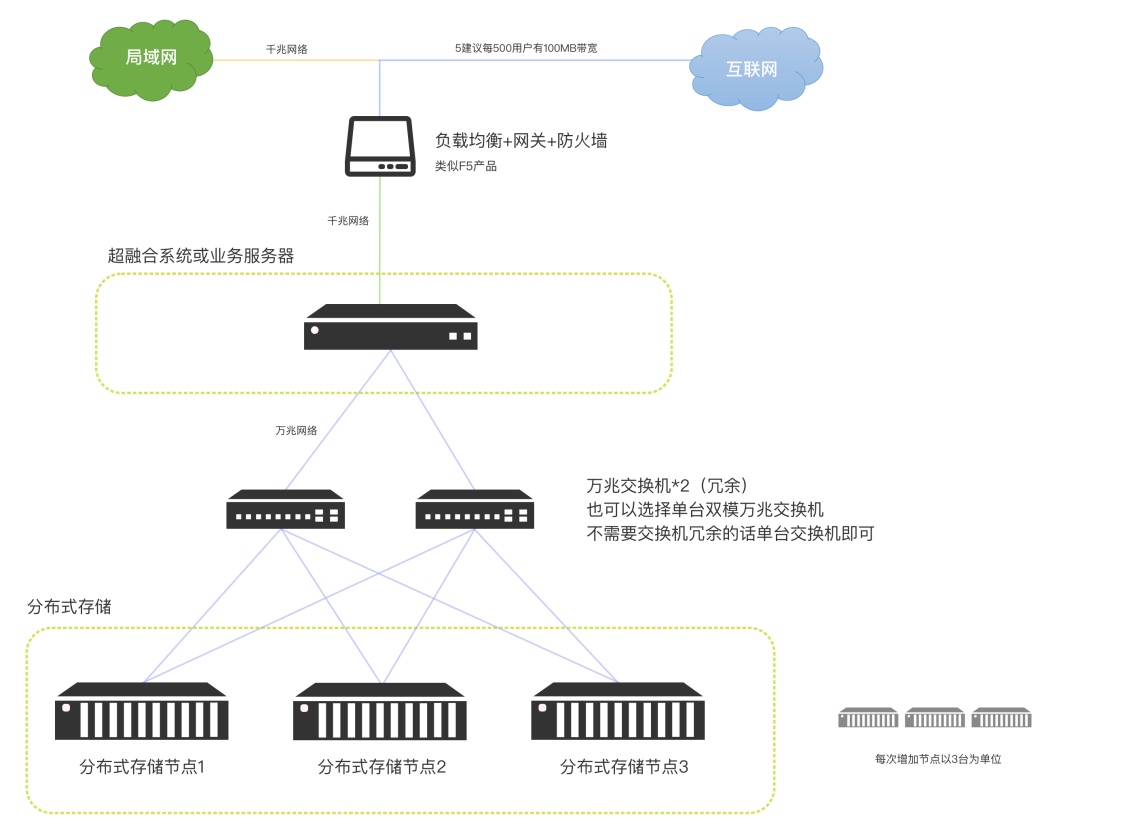
We also support building a distributed object storage system composed of multiple servers.
The minimum requirement for a distributed storage system is 2+1, which means three storage servers need to be prepared. The performance requirements are consistent with those of a single object storage. *The currently recommended minimum unit for physical distributed storage is 3 storage servers. The 2+1 error correction code means that every time two storage nodes are expanded, one server needs to be added as an error correction server. In this way, 4+1 means that adding 4 storage servers requires adding an error correction server. So the disk utilization of 4+1 is higher than that of 2+1. The first construction using the 4+1 solution requires 5 storage servers. The minimum unit added for each expansion is the same as the minimum server unit required for the first construction.
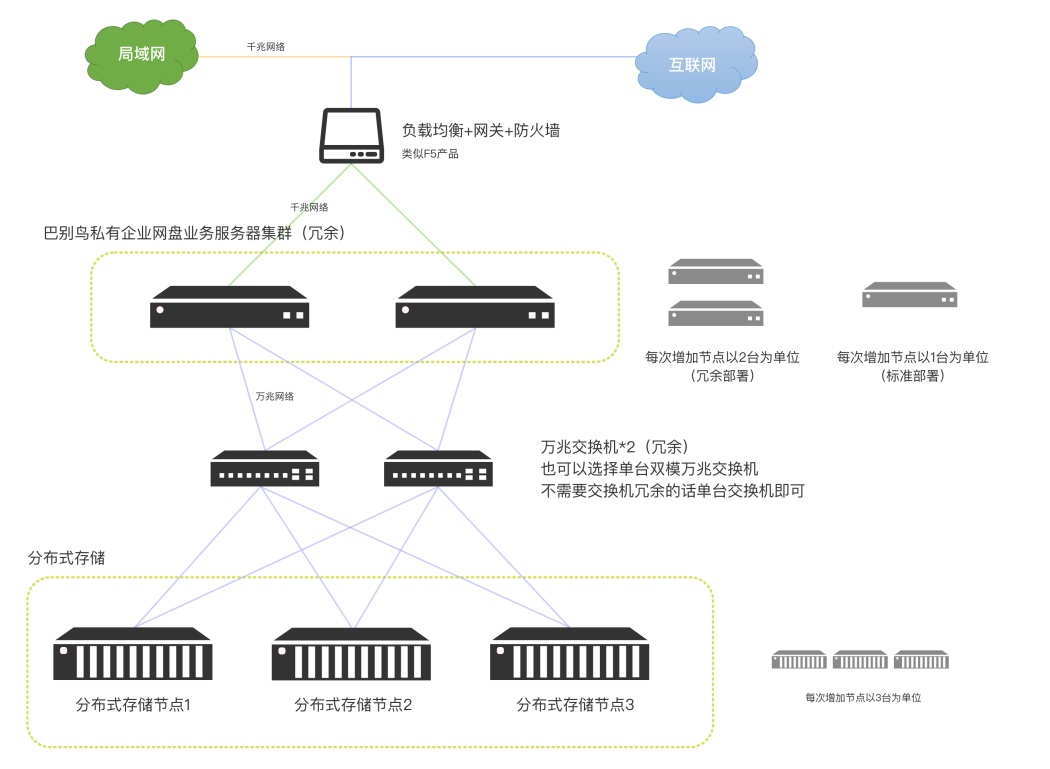
You can add a new storage server or a set of storage servers for real-time backup. If there is a problem with the primary storage server, quickly switch to the backup server and it can be used normally.
Distributed high availability and high redundancy deployment:
Because financial institutions, hospitals, energy, and very large enterprises have hard targets for uninterrupted business, they need systems that can achieve high availability and high redundancy. Services will not be interrupted due to a single point failure of the server, and hot switching and hot repair can be performed. In extreme cases, even network equipment such as switches need to be separated from active and backup, which requires the use of distributed high-availability and high-redundancy deployment.
Babel supports a variety of high availability and high redundancy solutions and can be deployed in traditional distributed systems to achieve high availability and high redundancy.
We can also build a distributed system suitable for Babel for customers. (Customers need to purchase hardware by themselves as required)
Babel distributed deployment can ensure that any single point of failure will not affect the normal use of the system.
The recommended distributed and easy-to-deploy solution uses active-active-active backup for the business server and distributed storage for the storage system.
If there is a need for management and control of confidential and non-confidential areas, please see the "Data Ferry Chapter" for details.
Babel High Availability System Network Topology
High availability planning covers application nodes, database, search, transcoding, object storage, K8S, backup and launch drills. For full guidance, see High Availability Deployment.
Off-site disaster recovery deployment
For users who have higher requirements for data preservation, BabelBird also supports off-site disaster recovery solutions. It means backing up important database and file storage contents to an off-site backup system. If there is a problem in the local computer room, as long as the backup data is there, the system can be rebuilt anywhere and restored to normal use.
BabelBird can build off-site disaster recovery servers for customers, but it does not support advanced backup methods such as hot and cold data separation. If the amount of data is very large (above 1PB) and considering cost-effectiveness, it is recommended to use a professional backup system (such as NBU, Yunqi).
BabelBird has a backup API that supports the NBU standard and can be called.
Off-site disaster recovery deployment has higher requirements on the network environment. It is best to have dedicated lines or stable VPN connections between computer rooms in different locations.
Using the backup system can only restore and reconstruct data through backup after a problem occurs. Direct switching to backup data is not supported. Generally, the data reconstruction cycle will take a long time.
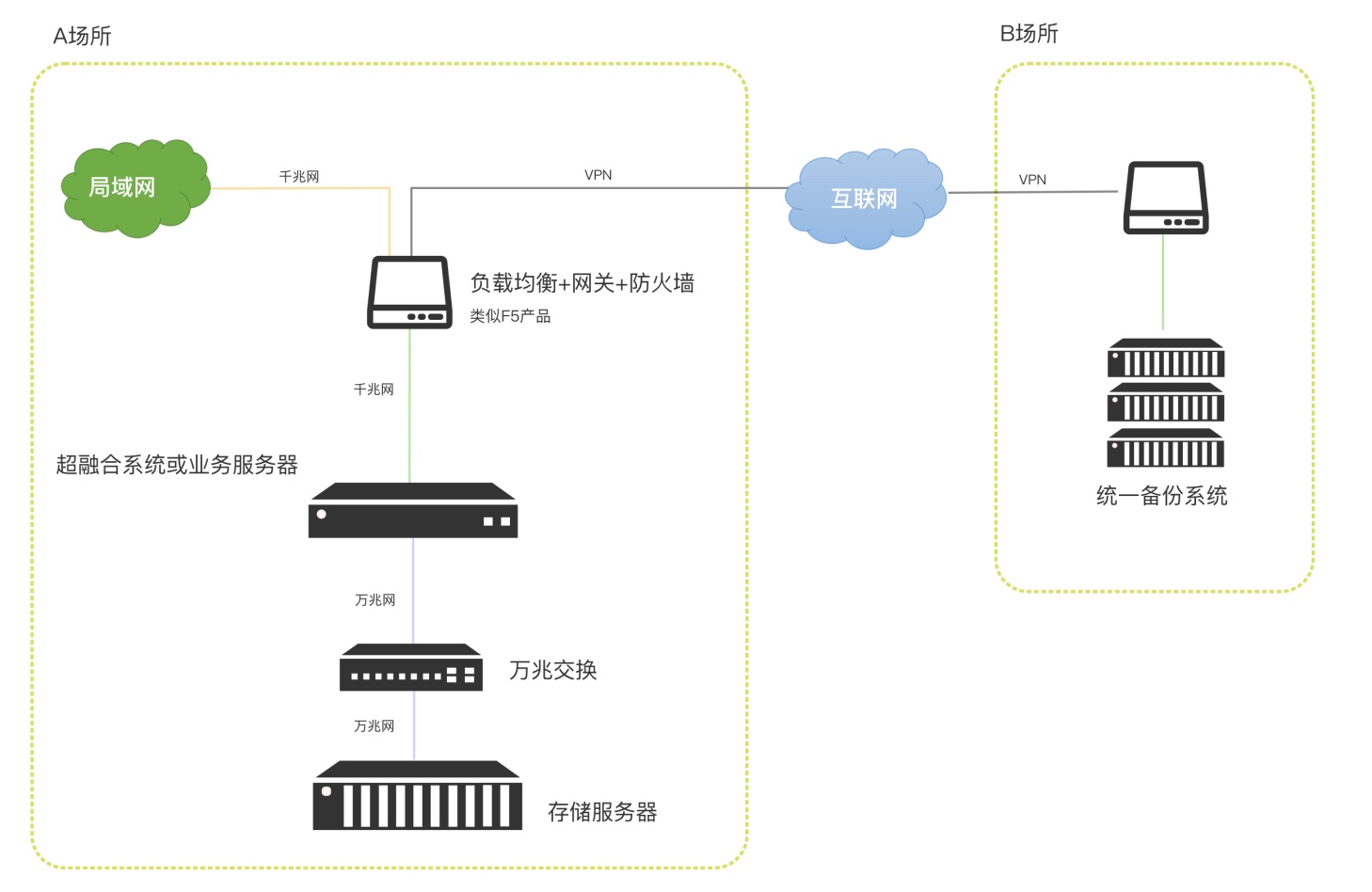
If hot and cold data do not need to be classified and saved, BabelBird can also use the off-site disaster recovery function of object storage to complete off-site disaster recovery deployment for customers.
Use object storage for remote disaster recovery. When the main system has a problem, you can quickly switch to the disaster recovery server.